Lightroom degrading images before my eyes

NorthernNikon

Suspended / Banned
Messages
2,032
Name
Barney
Edit My Images
Yes
Has anyone else come across this phenomenon?

When I click on an image in the Lightroom (v 1.3) filmstrip to bring it up in the loupe, all looks well as Lightroom displays "loading form Previews", but as soon as dialogue box changes to "Rendering Higher quality" I sometimes see a huge increase in chroma noise and/or what looks like over exposure.

This phenomenon occurs with D3 files as well as my D300 ones.

Is there likely to be some sort of default processing going on which is altering the files causing this?
 
the initial preview is an embedded jpg the render is the raw file which doesn't have any of the nikon presets applied to it therefore it looks cack, also in lightroom your raws aren't going to be as sharp as in the nx software which suck arse tbh

lightroom is tres useful but it's a pity it's not fully compatible :(
 
Has anyone else come across this phenomenon?

When I click on an image in the Lightroom (v 1.3) filmstrip to bring it up in the loupe, all looks well as Lightroom displays "loading form Previews", but as soon as dialogue box changes to "Rendering Higher quality" I sometimes see a huge increase in chroma noise and/or what looks like over exposure.

This phenomenon occurs with D3 files as well as my D300 ones.

Is there likely to be some sort of default processing going on which is altering the files causing this?

Is Lightroom applying a preset (by accident or design) as it renders the RAW images?

Anthony.
 
Is Lightroom applying a preset (by accident or design) as it renders the RAW images?

Anthony.

That's a good point - check that your import settings don't have any presets applied to them which could be adversely affecting the image.

If they don't then it might be an idea to setup a standard "Nikon shapening"-type preset so that it adjusts the settings to mirror those applied to the embeded jpeg preview. You can then tweak things from there.
 
If you can afford it upgrade to 2.3. This newer version, will apply camera styles to your images if you want. This will give similar results to what the initial jpeg is showing you.The initial preview from my canon is a lot better since these styles were made available

OK if you don't want to pay the extra, firstly check there is no preset being applied. If there is still a problem it may be the way lightroom is evaluating the RAW image to give you the preview and large image. In which case drop into the develop module and adjust a typical image using the controls there. Then save this as a preset. You can then get LR to apply this on import to all the images.Don't forget these adjustments are totally non destructive so if you don't like them you can simply delete the preset, or hit the reset button
 
Chappers got it - LR 2.3 has new camera profiles which let you use the exact same settings as in camera. That colour/tone jump used to really tick me off.

The good news is, you can download the new profiles and even a custom profile creator from Adobe. Grab it here. Google for a guide on it, as it's not intuitive. Hope that helps!

Ross
 
Because when you shoot in Raw a medium size JPEG preview image is embedded into the Raw file, the JPEG preview is composed using the settings that your camera was set at when you took the image.
 
Because when you shoot in Raw a medium size JPEG preview image is embedded into the Raw file, the JPEG preview is composed using the settings that your camera was set at when you took the image.

YOU LIE!!!!!! :razz:

No seriously? is that true?
Seems a lot of goings on for a preview.. I still think its the preset.. :suspect:
 
I need to havea look at mine actually, as i have the same thing. The initial preview as its loading seems alright, then it looks like it applies a certain preset and send everything off whack.
 
YOU LIE!!!!!! :razz:

No seriously? is that true?
Seems a lot of goings on for a preview.. I still think its the preset.. :suspect:
It's the embedded JPEG preview that is used for displaying the image on your cameras LCD display, etc.
 
YOU LIE!!!!!! :razz:

No seriously? is that true?
Seems a lot of goings on for a preview.. I still think its the preset.. :suspect:

He's telling the truth! The wiki article mentions the thumbnail and embeded jpeg image.

So what you see when you load a raw file into Lightroom is the thumbnail or embeded jpeg which, like any jpeg from your camera, has been processed, sharpened, white-balanced etc so that it looks good.
When people move to raw they often complain that their images aren't as good as they used to be because they're not applying the processing that the camera used to do automatically.

As Lightroom loads the main file it replaces what you see with the raw version and applies any import presets you've asked it to. This is the stage that you might think that the image is degrading - you can either now apply your processing options manually or setup a preset that mimics the generic settings your camera would have applied (like saturation and sharpening) which is run when you import.

Remember that Lightroom is non-destructive so any presets or changes you make can be undone or amended to suit your preferences.


With the comments posted above it's probably not a preset being applied (they don't by default so it's only there if you've set it up) but just the loading of the unprocessed raw file. If you shoot raw you've got to be prepared to spend time processing.
 
Tis true,
also if you have a mac you can use filejuicer to extract the jpeg (not sure if there is a pc equivalent?)
Makes shooting RAW+jpeg pretty pointless, for an amateur at least,as what you potentially end up with is RAW+2jpeg lol.
 
He's telling the truth! The wiki article mentions the thumbnail and embeded jpeg image.

So what you see when you load a raw file into Lightroom is the thumbnail or embeded jpeg which, like any jpeg from your camera, has been processed, sharpened, white-balanced etc so that it looks good.
When people move to raw they often complain that their images aren't as good as they used to be because they're not applying the processing that the camera used to do automatically.

As Lightroom loads the main file it replaces what you see with the raw version and applies any import presets you've asked it to. This is the stage that you might think that the image is degrading - you can either now apply your processing options manually or setup a preset that mimics the generic settings your camera would have applied (like saturation and sharpening) which is run when you import.

Remember that Lightroom is non-destructive so any presets or changes you make can be undone or amended to suit your preferences.


With the comments posted above it's probably not a preset being applied (they don't by default so it's only there if you've set it up) but just the loading of the unprocessed raw file. If you shoot raw you've got to be prepared to spend time processing.

nice post :thumbs:
I did believe him... honest :baby:
It does all make sense, I wonder if there is a file thingy for the pc as in the mac so you can preview the images without lightroom :thinking:
 
nice post :thumbs:
I did believe him... honest :baby:
It does all make sense, I wonder if there is a file thingy for the pc as in the mac so you can preview the images without lightroom :thinking:

Thanks Trev :)

I've heard about this one but not tired it myself.

I use this plugin to allow Windows to preview the embeded jpegs from the raw files as if they were any other image format.
 
Thanks all for your replies. I see what people are suggesting i.e. it's the jpeg previewing before the unprocessed RAW file comes through, but the chroma noise which suddenly appears seems far too great for it to be that, plus I never had this issue using Raw Essentials :thinking:
 
nice post :thumbs:
I did believe him... honest :baby:
It does all make sense, I wonder if there is a file thingy for the pc as in the mac so you can preview the images without lightroom :thinking:
Have a look at FastStone MaxView, it's a fast image viewer that can view most files including Raw, which it uses the embedded preview for displaying. It's also free for personal and educational use.
 
YOU LIE!!!!!! :razz:

No seriously? is that true?
Seems a lot of goings on for a preview.. I still think its the preset.. :suspect:

Theres a program called instant jpeg from raw that extracts the built-in jpeg, handy for quick conversions. It works on Canon/Nikon haven't tried it on anything else. Wayne
 
Thanks all for your replies. I see what people are suggesting i.e. it's the jpeg previewing before the unprocessed RAW file comes through, but the chroma noise which suddenly appears seems far too great for it to be that, plus I never had this issue using Raw Essentials :thinking:

Does the noise disappear when you switch to the dev. module or when you zoom to 100%?

I see this effect sometimes on high iso shots but it's before LR has finished rendering a higher resolution preview.
 
Does the noise disappear when you switch to the dev. module or when you zoom to 100%?

I see this effect sometimes on high iso shots but it's before LR has finished rendering a higher resolution preview.

I've just tried and no, the noise is still present in the Develop module and when zoomed at 100% (in fact the noised is zoomed by the same factor)
 
As Lightroom loads the main file it replaces what you see with the raw version and applies any import presets you've asked it to. This is the stage that you might think that the image is degrading - you can either now apply your processing options manually or setup a preset that mimics the generic settings your camera would have applied (like saturation and sharpening) which is run when you import.

This preset that mimics the generic camera settings, how do you go about doing this and finding out what settings your camera uses?

I use this plugin to allow Windows to preview the embeded jpegs from the raw files as if they were any other image format.

I'll be using that thank you very much :D :D :D
 
This preset that mimics the generic camera settings, how do you go about doing this and finding out what settings your camera uses?

I was thinking along the lines of taking a raw image and applying a series of processing changes until it looks more like you'd expect from your camera - you'd probably apply sharpening, the auto tone control and some increased saturation... they're the basic ones that a camera auto mode would run. Maybe include auto WB but I'm never that happy with it.

Then save those settings as a custom preset by going to the Develop menu and choosing New Preset and select the settings that you want to apply - deselect the ones you want to retain from the initial raw image.

It might be an idea to create a couple to correspond to different picture styles.

Then when you import the pictures you can choose to apply a default preset to take your settings halfway to where you'd normally want them.
Alternatively you can set Lightroom to apply a default preset for everything by using the Set Default Settings menu selection.


You can always adjust things more afterwards to tweak to your exact preferences.
 
I've just tried and no, the noise is still present in the Develop module and when zoomed at 100% (in fact the noised is zoomed by the same factor)

A screen shot could be useful...
 
This preset that mimics the generic camera settings, how do you go about doing this and finding out what settings your camera uses?
I don't know what options there are for Nikon or other manufacturers, but for Canon users Lightroom has a series of camera profiles that are designed to mimic the "Picture Styles" that Canon offers. There is also a small selection of Adobe profiles to choose....

20090514_104358_0007_LR.jpg


The different presets have a marked effect on colour reproduction, contrast, and perhaps levels too. After much experimentation I have chosen to stick with "Adobe Standard" as my preferred camera profile, even though I use the "Standard" ("Camera Standard") Picture Style when processing in DPP.

Once you have a basic setup that you are happy with you can then update Adobe's defaults for import with your new settings. Within the Develop module, hold down the ALT key and you will see the button at the bottom right of the screen says "Set Default". Press that and confirm. You can easily reset back to the original defaults with the same button.
 
A screen shot could be useful...

or a copy of an image file that exhibits the problem so that we can check it out on our own machines and eliminate any messed up settings as possible causes of the problem.
 
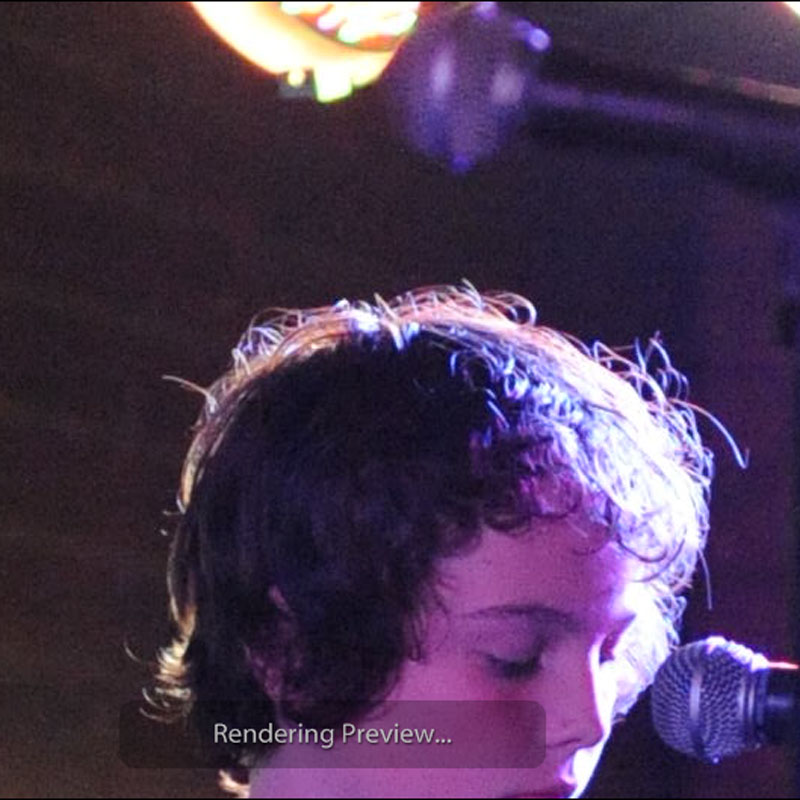
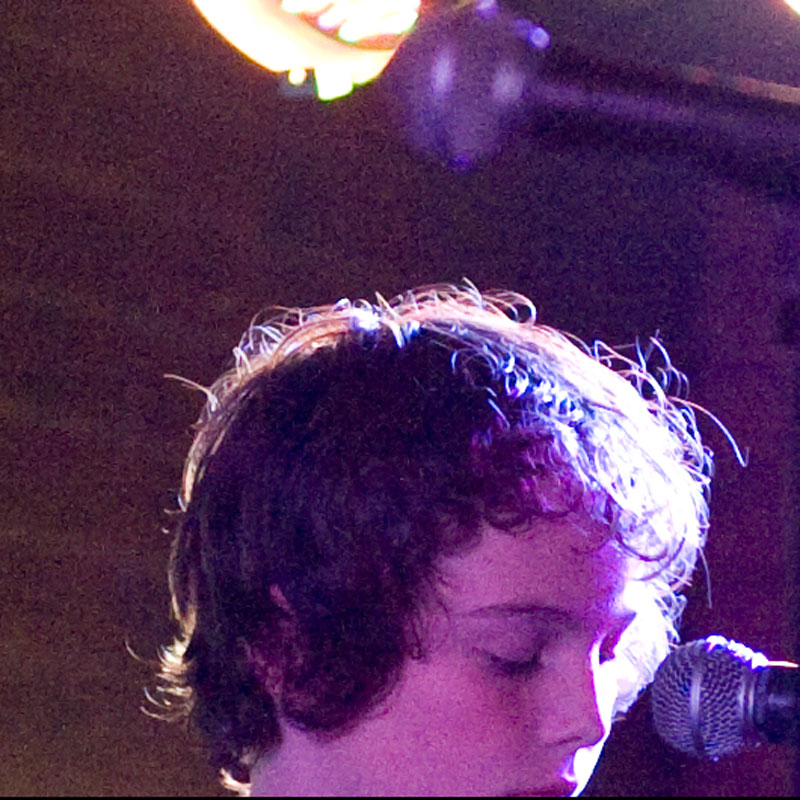
Okay, I've finally managed to get sometime on my desktop and find a file which I hadn't created a preview for. See the below before and after shots to see what I mean. These are crops at 100% of part of the image

Preview being rendered ...

3556697273_a3abd0ac2b_o.jpg


Image after finishing rendering ...

3557508438_1867c18bf9_o.jpg


Nikon D3, Nikkor 24-70 AF-S f:2.8, ISO6400, 1/200 f:2.8

Does this help?
 
I think you had your answer in post #2. Look at the detail/sharpness in individual strands of hair sticking out and compare between the images. Ditto the microphone. I'm sure that all you are seeing is a low resolution preview JPEG, upsized for viewing at 100%, that has consequently blurred all detail, including noise, vs a properly rendered image where the noise is represented accurately.

That said, in my experience ACR/Lightroom always seems to need a couple of goes at getting these things right when each new body is released. I shoot Canon but I remember the noise handling of 40D files to be poor when Lightroom first handled the files and that magically improved some time later with a later Lightroom release. It was exactly the same thing with the 50D. I don't have a 5D2 but people said the same thing about that camera as well. Adobe just doesn't seem to get it right from the off. If you are using Lightroom 1.3 then I don't think you're up to date for Lightroom Version 1, never mnd Version 2. I think LR got to V1.4.1 before the move to V2.x. At the very least I suggest you upgrade your copy of LR to the latest V1.x version.

1.4.1 download page - http://www.adobe.com/support/downloads/detail.jsp?ftpID=3892
 
Thanks Tim, I've upgraded to version 1.4.1 and I'll see if that helps at all. Maybe I just need to be more proficient with Lightroom.
 
Back
Top