noticed recently that my default camera import which is set as camera standard produces an over saturated image and any auto adjustments to white balance push it into the 6700-7000+ range.
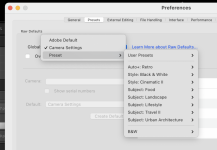
I noticed there were some other options as below - how do I set these as default:
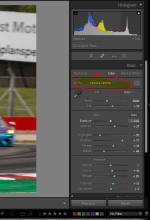
Create a preset with the settings you want at import and apply that preset at import, or if you have the latest version of LR you can set this in the preferences.
Open any image in the develop module.
Set the colour profile you want to use for each image.
Click the + next to Presets on the right and choose Create Preset
Name your preset and uncheck everything except for Treatment & Profile (although I normally leave the Lens Corrections checked too)
Now go to your preferences->Presets
In the Global drop down choose Presets->User Presets->Your new preset
If you have multiple cameras which you want to apply different profiles to then you can create more presets for each camera, then tick the "Override global setting for specific cameras" box then choose a preset below for each camera.
This site uses cookies to help personalise content, tailor your experience and to keep you logged in if you register.
By continuing to use this site, you are consenting to our use of cookies.