

Alkins
Suspended / Banned
- Messages
- 50
- Name
- Alan
- Edit My Images
- Yes
Why are the colour profiles in Adobe so off sometimes. Even the profiles for your camera available in lightroom aren't always quite right. to combat this I created my own profiles using the ColorChecker passport and the Adobe DNG profile editor. I use Adobes rather than X-rite as you can tweak the profiles in the DNG profile editor and the X-rite profiles always appear way way off and obscure. before you say anything yes my monitor is calibrated using the datacolor Spyder4.
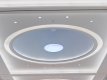
Any I have pretty much happy with the tweaked dual illuminant profile for my Olympus E-M1. the colour from the SOOC jpegs are usually quite good under ideal lighting but the dual illuminant tends to be better over a wider range of lighting senrios. so yes I was blissfully happy until I took the photo of ceiling in the Eldon Square mall in Newcastle. The roof was white and the light shade in the middle should be turquoise. in camera this was exactly as it was. but when I uploaded it to light room the turquoise was completely washed out and there appears there isn't much I can do to fix it. The generic camera profiles in lightroom do display it better than the dual illuminant but still no where as good as the jpeg.
has any one had this type of issue or advise what could be the problem?
see below the first image is straight out of camera and the second is using the dual illuminant profile. the light shade in the middle is almost white and clipping

Any I have pretty much happy with the tweaked dual illuminant profile for my Olympus E-M1. the colour from the SOOC jpegs are usually quite good under ideal lighting but the dual illuminant tends to be better over a wider range of lighting senrios. so yes I was blissfully happy until I took the photo of ceiling in the Eldon Square mall in Newcastle. The roof was white and the light shade in the middle should be turquoise. in camera this was exactly as it was. but when I uploaded it to light room the turquoise was completely washed out and there appears there isn't much I can do to fix it. The generic camera profiles in lightroom do display it better than the dual illuminant but still no where as good as the jpeg.
has any one had this type of issue or advise what could be the problem?
see below the first image is straight out of camera and the second is using the dual illuminant profile. the light shade in the middle is almost white and clipping
