lightroom colour problems

onefunkypenguin

Suspended / Banned
Messages
1,587
Name
dave
Edit My Images
Yes
hello, not sure if this is lightroom problem or not but here goes...

iv set up my user defined settings on my 5d and the colours are the way i like them, saturated and bright.

when i upload my pictures into lightroom in the catalogue they look bright but when i click on them you see the colour draining before your eyes and they go back to having a 'normal' look about them.

how do i get them to stay the way i took them?

i shoot RAW if this helps...
 
Import them into LR with the drop down for 'develop settings' set to 'none'.

That should do it. ;)

20090720-p7heskaepquc2y7mtnp7yyb6pa.jpg
 
just deleted the pictures and uploaded again and the develop settings are already set to none... :bang:
 
^^ i dont think it is that. I think the preview image that you see on the camera screen and also as thumbnail is a jpeg the camera or lightroom creates. when u open the file to develop, your just getting the raw file with little or none of the in-camera processing applied. it maybe a limitation of adobe camera raw as i know for example, in the nikon world, if you use capture nx it can process your picture/jpeg settings that you set in camera so your raw's will come out looking the same as what you see on camera screen.
 
Hmmmm, sorry, I thought that was it. I remember seeing this posted elsehwere and tried it myself as I often experienced the same issue.

Apologies... can't help I'm afraid.
 
damns, thats typical!

if i shoot in jpeg i can use them im guessing? but takes away all the benefits of raw...
 
Use Canon's DPP and the camera settings will be remembered - any other raw app applies it's own defaults and won't read the camera data. LR does have some presets that emulate some of the picture styles such as landscape, etc. which can be found in the calibration part of the develop panel.

The other thing you could do is create a preset in LR that emulates the settings you want and have it applied on import.
 
Hmmmm pxl8, that's what I thought importing a preset of 'none' did... i.e. applied no settings on import from LR but brought the image in as is from camera leaving the RAW settings from there!

Alas not...

Might have to ask over on LR net about this myself as it seems a bit of a negative step if one cannot import the RAW settings that were applied in camera.
 
The in-camera settings you've chosen are only applied to the jpegs and the embedded preview jpeg that's captured when you shoot raw. If you shoot raw then you NEED to apply some alterations on the computer like saturation and sharpening which are no longer being applied in-camera.

It seems strange at first but you get used to it and you will really start to appreciate the control you have over your final image (and start to develop your processing style too) that you can't get if you allow your camera to do all the work.

The same thing was discussed on this thread recently.


EDIT: meant to add that the initial image shown in Lightroom is taken from the embedded jpeg which is why it starts off looking good and then gets duller and less sharp.
 
Hmmmm pxl8, that's what I thought importing a preset of 'none' did... i.e. applied no settings on import from LR but brought the image in as is from camera leaving the RAW settings from there!

I think what pxl8 was suggesting was to setup a preset yourself that applies your most commonly used adjustments automatically as you import so that you end up with images that are closer to what you are expecting. Lightroom makes it very easy to do this.
The preset of 'none' you mention doesn't apply anything.
 
I think what pxl8 was suggesting was to setup a preset yourself that applies your most commonly used adjustments automatically as you import so that you end up with images that are closer to what you are expecting. Lightroom makes it very easy to do this.
The preset of 'none' you mention doesn't apply anything.
Yep, I gotcha...:thumbs:
 
Under the camera calibration on Lightroom there should be the option to use the profile that you have selected on the camera, you can also then make other adjustments to get the pictures looking as you want, save them as a preset and then apply them when you import them, is this what you mean?
 
Yes, didn't I make it very clear?
 
Under the camera calibration on Lightroom there should be the option to use the profile that you have selected on the camera, you can also then make other adjustments to get the pictures looking as you want, save them as a preset and then apply them when you import them, is this what you mean?
Can you explain for me please what you mean by 'profile you have selected on the camera'...? All I see in that drop down is ACR4.4, ACR4.3 and Adobe.
 
where's the camera calibration option?

how do you make your own presets?

Camera calibration is the bottom panel on the RHS. Click on the little triangle, and you will get some sliders. Just above them, it says "profile : adobe standard "(eg) click on the profile and you will get a drop down list to select from.

I'm not sure if they are the same profiles that you get on the camera though. How would lightroom know?
 
Make sure you have the latest version of camera raw along with lightroom.
The different profiles will show up, depending on whether the files are cr2 or nef.

The best way to use LR is to create a preset that include the camera profile and a few basic adjustments that you like, then to use this as a starting point by adding to your pics on import.

People tend to forget that there is no such thing as NONE or NO settings when creating a preview from a raw file. If it really was none, you wouldnt see an image at all.
 
Use Canon's DPP and the camera settings will be remembered - any other raw app applies it's own defaults and won't read the camera data. LR does have some presets that emulate some of the picture styles such as landscape, etc. which can be found in the calibration part of the develop panel.

The other thing you could do is create a preset in LR that emulates the settings you want and have it applied on import.

Pxl8 has it smack on.
LR can't read the camera control data (as yet) so the camera profiles downloadable from Adobe Labs are the closest presets available if you not opening your raw files with the proprietary software (DPP, NX2).

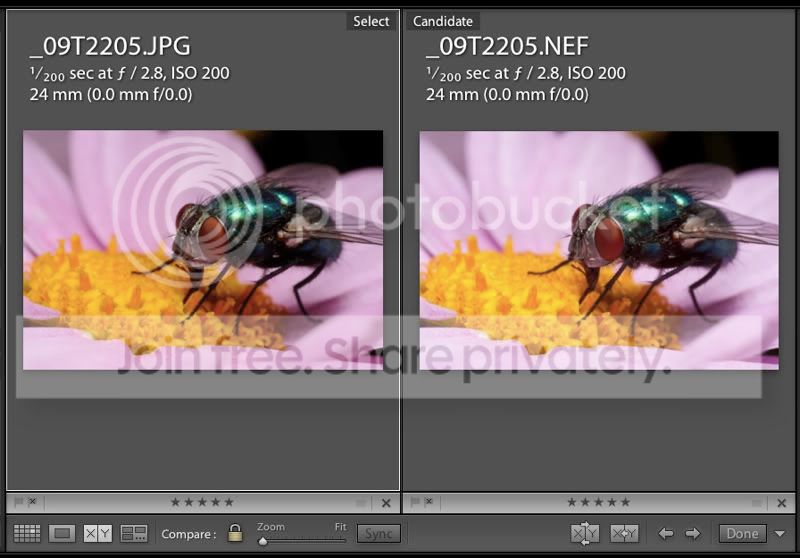
One thing I have started doing is shooting in jpeg and raw simultaneously (make sure to check the 'open jpeg alongside raw' box in Lightroom preferences before importing).

Picture3-2.jpg


This is a great anchor point or frame of reference for matching your camera control data during post.

I'm hoping that one day in the not too distant future, Lightroom will read this camera data.
 
I'm hoping that one day in the not too distant future, Lightroom will read this camera data.

I can't see it will happen - Adobe never even managed to get LR importing settings from RawShooter and they had access to all the specs, etc. for that.

The way LR handles the data is just too different - just look at the difference in blues between LR and DPP, even using the "profiles" in LR.
 
I can't see it will happen - Adobe never even managed to get LR importing settings from RawShooter and they had access to all the specs, etc. for that.

Your quite likely to be on the money there too mate.
I still hope they sort something out though, it's my single gripe with LR.

The way LR handles the data is just too different - just look at the difference in blues between LR and DPP, even using the "profiles" in LR.

Yeah, that's why I began to shoot jpeg as well as raw, to compare just how different they are.

Still my workflow is much better with LR and PS, I have tried to use NX2 but it slows me down far too much despite being more colour efficient.
 
Back
Top