Lightroom Classic 14.2 painfully slow doing gradients and masks

TG.

Suspended / Banned
Messages
6,905
Name
Tel
Edit My Images
No
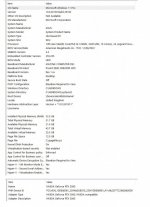
I'm really tearing my hair out with lightroom classic, it's unbelievably slow, I've been trying to do some radial gradients and masking, and it's just so sluggish, the gradients and brush's seem to take an age to load up, and when your trying to lighten/darken the gradients again, it takes ages to respond, I have tried everything I can think of, like making file sizes smaller, as in editing smart previews, which really can't be that big now, I have purged the cache, increased the cache settings to 80gb, so I am at odds now what to do, I'm fairly sure it isn't my PC as it's quite a high spec, and I have put up a screen grab, so you can see, and help me with advice. I've watched some YouTube videos of people doing this sort of thing, and everything is instant in a micro second, so it makes you wonder .
 

Attachments

  • MY SYSTEM INFORMATION copy.jpg
    MY SYSTEM INFORMATION copy.jpg
    100.1 KB · Views: 28
Graphics card drivers? That's the obvious thing to check. Is your processor maxed out, and how much memory is available? I assume you've nothing running in the background (like a browser) and you've just re-started the machine before beginning to work (all help Lr performance).
 
It has been some years since I had LR in use.....

However, I do recall a similar oft reported lament and IIRC it was recommended to stick with a set of curated preferences that avoided allocating too much memory to LR.

Also, at one time it was am issue in regard to 'memory leaks' consuming & not freeing up memory once a process was completed to allow it's usage for the next process.

So, my first thought is to check your Preference Settings in regard to memory usage?
 
Slowing down clearly(?) is a persistent issue.....

Maybe these offer some added insights


Graphics card drivers? That's the obvious thing to check. Is your processor maxed out, and how much memory is available? I assume you've nothing running in the background (like a browser) and you've just re-started the machine before beginning to work (all help Lr performance).

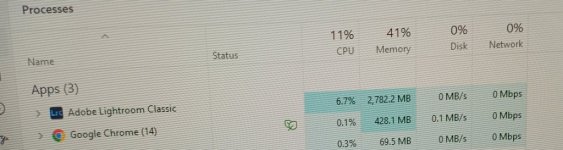
I can't see anything that's affecting the graphics card, these are the average stats whilst using lightroom, and the percentage is low.
 

Attachments

  • 20250223_135924.jpg
    20250223_135924.jpg
    65.5 KB · Views: 6
Slowing down clearly(?) is a persistent issue.....

Maybe these offer some added insights


I tried turning off the antivirus, but it made little to no difference, I didn't want to uninstall it, as I didn't want to take that risk.
 
I tried turning off the antivirus, but it made little to no difference, I didn't want to uninstall it, as I didn't want to take that risk.
AFAIK in all(most?) Anti virus programs you can selectively remove from AV monitoring i.e. the folders containing the image files and LR itself?

Have you looked at your LR preference settings in regard to memory allocation i.e. not too much ram allocated?
 
I had a ten year old PC i7 processor with ten year old graphics card and 16Gb RAM which did become painfully slow. In fact it took 50 mins to boot up every morning. I recently replaced this with a new PC, i9 processor new Graphics card( NVIDIA GeForce RTX 4060 (8Gb)), 32Gb Ram and and SSD for the OS disk and a large conventional disk for data. It now boots up in less than 40 seconds and LR runs fast. Even Topaz Denoise etc. runs in seconds rather than minutes. I have several other applications running as well. Check the performance settings in LR Edit>preferences>performance I have mine set to use the Graphics card and it recognises my specific Graphics card (full graphic acceleration enabled). I have my Raw cache setting at 5Gb Max. I also have W11 and run Anti-virus software.

Dave
 
I had a ten year old PC i7 processor with ten year old graphics card and 16Gb RAM which did become painfully slow. In fact it took 50 mins to boot up every morning. I recently replaced this with a new PC, i9 processor new Graphics card( NVIDIA GeForce RTX 4060 (8Gb)), 32Gb Ram and and SSD for the OS disk and a large conventional disk for data. It now boots up in less than 40 seconds and LR runs fast. Even Topaz Denoise etc. runs in seconds rather than minutes. I have several other applications running as well. Check the performance settings in LR Edit>preferences>performance I have mine set to use the Graphics card and it recognises my specific Graphics card (full graphic acceleration enabled). I have my Raw cache setting at 5Gb Max. I also have W11 and run Anti-virus software.

Dave

If you look at the spec of mine above, it is similar to yours, with the exception of the graphics card, mine is the 3060 12gb, could you tell me where your lightroom catalogues are stored i.e. on an internal or external drive, also have you tried radial masking and linear masking, as these are the tools that slow it down.
 
I had a ten year old PC i7 processor with ten year old graphics card and 16Gb RAM which did become painfully slow. In fact it took 50 mins to boot up every morning. I recently replaced this with a new PC, i9 processor new Graphics card( NVIDIA GeForce RTX 4060 (8Gb)), 32Gb Ram and and SSD for the OS disk and a large conventional disk for data. It now boots up in less than 40 seconds and LR runs fast. Even Topaz Denoise etc. runs in seconds rather than minutes. I have several other applications running as well. Check the performance settings in LR Edit>preferences>performance I have mine set to use the Graphics card and it recognises my specific Graphics card (full graphic acceleration enabled). I have my Raw cache setting at 5Gb Max. I also have W11 and run Anti-virus software.

Dave
My home built PC which is now over 3 years old take lest than 20sec to boot up, it has an AMD processor and a 3060 Vcard, 32Gb ram and pcie ssd disk..
Adobe is not known for processor effiecient code and less so for graphics card processing.
 
If you look at the spec of mine above, it is similar to yours, with the exception of the graphics card, mine is the 3060 12gb, could you tell me where your lightroom catalogues are stored i.e. on an internal or external drive, also have you tried radial masking and linear masking, as these are the tools that slow it down.

Radial and linear masking seem OK on mine, but when trying to work with a 5 shot pano earlier then eraser was very slow. I use radial and linear a lot, and they both seem fine, catalogue is on the fast NVME system drive.
 
Radial and linear masking seem OK on mine, but when trying to work with a 5 shot pano earlier then eraser was very slow. I use radial and linear a lot, and they both seem fine, catalogue is on the fast NVME system drive.
I just moved my catalogue to the external SSD drive, where my main photo library is to see if it will make any difference, but I'm not holding my breath, it's ridiculous really, I paid over 2k to have my PC built and this program is useless, yet you watch YouTube video tutorials, and everything works instantly, I'm just not getting it !
 
I just moved my catalogue to the external SSD drive, where my main photo library is to see if it will make any difference, but I'm not holding my breath, it's ridiculous really, I paid over 2k to have my PC built and this program is useless, yet you watch YouTube video tutorials, and everything works instantly, I'm just not getting it !
I feel you must have something wrongly configured. It is certainly not LR that is the cause. I am puzzled as to why you do not have the catalogue on the OS system drive. The catalogue contains the previews of which I set to standard in Import. This gives instantly available views of images and allows immediate editing. If you need more detail then the image is pulled from wherever you store your images which ideally should be another internal drive. I use another 8Tb disk for this. For back up I use an external NAS and back up automatically when I import images from my camera card. Both Linear and radial masking are fine on my system. Your cache setting of 80 Gb seems very wrong to me; mine is 5Gb max. If you needed to use such a large cache, you would be working from disk all the time which is very slow. Best wishes sorting this.

Dave
 
I feel you must have something wrongly configured. It is certainly not LR that is the cause. I am puzzled as to why you do not have the catalogue on the OS system drive. The catalogue contains the previews of which I set to standard in Import. This gives instantly available views of images and allows immediate editing. If you need more detail then the image is pulled from wherever you store your images which ideally should be another internal drive. I use another 8Tb disk for this. For back up I use an external NAS and back up automatically when I import images from my camera card. Both Linear and radial masking are fine on my system. Your cache setting of 80 Gb seems very wrong to me; mine is 5Gb max. If you needed to use such a large cache, you would be working from disk all the time which is very slow. Best wishes sorting this.

Dave

Everything I have read seems to say, put your catalogue on an external drive, so I have my photos and catalogue on an external 4tb SSD drive, I have just moved the catalogue today, to the external drive, and nothing has changed. What part of your OS is your catalogue on ? As regards the 80gb setting, I read its normally between 20 and 50gb so I figured the higher the better, having it smaller didn't seem to make sense, can you explain the reasoning behind only using 5gb ? Many thanks
 
Everything I have read seems to say, put your catalogue on an external drive, so I have my photos and catalogue on an external 4tb SSD drive, I have just moved the catalogue today, to the external drive, and nothing has changed. What part of your OS is your catalogue on ? As regards the 80gb setting, I read its normally between 20 and 50gb so I figured the higher the better, having it smaller didn't seem to make sense, can you explain the reasoning behind only using 5gb ? Many thanks
If the 80GB being referred to is a cache setting on LR that could well be the source of your issue.

As I mentioned in my initial post, IIRC setting memory usage too high in LR back in the days of LR 6 or was a commonly reported reason for performance issues as in 'more is not always better'.

One ref to read
 
Last edited:
Everything I have read seems to say, put your catalogue on an external drive, so I have my photos and catalogue on an external 4tb SSD drive, I have just moved the catalogue today, to the external drive, and nothing has changed. What part of your OS is your catalogue on ? As regards the 80gb setting, I read its normally between 20 and 50gb so I figured the higher the better, having it smaller didn't seem to make sense, can you explain the reasoning behind only using 5gb ? Many thanks
Everything you have read is wrong then. You want the catalogue which contains all you need for initially reviewing and editing images to be as close as possible. Also clearly a cache of 80GB is not possible with the 32Gb of Ram you have so it has to use disk. The constant access to disk will slow things down and an external disk even more. Remember LR does not actually edit the images but records the editing changes in the catalogue and temporary applies them to the preview (also stored in the catalogue) for display purposes. If you open the Raw file in PS in 16 bit TIFF (which I use) the editing changes are fully applied before opening the file in PS. This is why the export to PS takes longer as it works with the full sized file.

Dave
 
Everything you have read is wrong then. You want the catalogue which contains all you need for initially reviewing and editing images to be as close as possible. Also clearly a cache of 80GB is not possible with the 32Gb of Ram you have so it has to use disk. The constant access to disk will slow things down and an external disk even more. Remember LR does not actually edit the images but records the editing changes in the catalogue and temporary applies them to the preview (also stored in the catalogue) for display purposes. If you open the Raw file in PS in 16 bit TIFF (which I use) the editing changes are fully applied before opening the file in PS. This is why the export to PS takes longer as it works with the full sized file.

Dave
Ok thanks for your input, I have reduced the 80gb to 5 and I'm just in the process of moving the catalogue onto the main C drive (photos) and then I will copy the catalogue onto a USB drive just for backup, so I shall see how it goes, I will update later, hopefully with good news.
 
Disk access time is a big thing for LR. Have a dedicated m.2 for such data items as the catalogue files.
 
Everything you have read is wrong then. You want the catalogue which contains all you need for initially reviewing and editing images to be as close as possible. Also clearly a cache of 80GB is not possible with the 32Gb of Ram you have so it has to use disk. The constant access to disk will slow things down and an external disk even more. Remember LR does not actually edit the images but records the editing changes in the catalogue and temporary applies them to the preview (also stored in the catalogue) for display purposes. If you open the Raw file in PS in 16 bit TIFF (which I use) the editing changes are fully applied before opening the file in PS. This is why the export to PS takes longer as it works with the full sized file.

Dave

Well having moved the catalogue to an internal C drive, and changed the cache back to 5gb nothing much has changed, still painfully slow a very slight change, but I can't really work with it, it's just to slow, and now I seem to be getting coloured overlays on my photo, god knows how that has happened, as I never changed any settings, I think I may have a look at ON1 software, as I believe you can do radial and linear overlays on this with less hassle from what I've heard, LR is just so bloody frustrating !
 
Disk access time is a big thing for LR. Have a dedicated m.2 for such data items as the catalogue files.

The catalogue is on an M.2 SSD
 
I think I may have a look at ON1 software

It's available as a free download for trial. I've got the 2025 version and could replace LrC with it. Some things Adobe do better, some On1. It's also available on a permanent licence basis if that matters to you.
 
Well having moved the catalogue to an internal C drive, and changed the cache back to 5gb nothing much has changed, still painfully slow a very slight change, but I can't really work with it, it's just to slow, and now I seem to be getting coloured overlays on my photo, god knows how that has happened, as I never changed any settings, I think I may have a look at ON1 software, as I believe you can do radial and linear overlays on this with less hassle from what I've heard, LR is just so bloody frustrating !
Have you tried disabling GPU acceleration?
 
My system is very similar and I have no speed issues at all even after adding 15 different adjustments, except 14.2 update made crop tool snail slow IF proofing is on, and only then. Clearly a bug that wasn't there prior to update

Hopefully they fix their bugs soon instead of dumping more gen AI garbage on us.
 
Well having moved the catalogue to an internal C drive, and changed the cache back to 5gb nothing much has changed, still painfully slow a very slight change, but I can't really work with it, it's just to slow, and now I seem to be getting coloured overlays on my photo, god knows how that has happened, as I never changed any settings, I think I may have a look at ON1 software, as I believe you can do radial and linear overlays on this with less hassle from what I've heard, LR is just so bloody frustrating !
Perhaps a silly question as I cannot recall but do settings preference changes require a reboot of the computer for it/them to take effect?
 
No not tried that, surely that would make it run slower

Adobe has been notoriously bad at implementing graphics acceleration.

Perhaps a silly question as I cannot recall but do settings preference changes require a reboot of the computer for it/them to take effect?

I am assuming that you have done a full reboot - possibly multiple reboots - by this stage.
 
Adobe has been notoriously bad at implementing graphics acceleration.

This. It definitely worth a try.

When I ran my Intel based Mac with a GeForce graphics card I always had GPU acceleration off. It was slow with it on and I sometimes got the weird red overlay you mentioned.

It may also be worth checking that you have the latest drivers for your card.
 
Last edited:
  • Like
Reactions: TG.
This. It definitely worth a try.

When I ran my Intel based Mac with a GeForce graphics card I always had GPU acceleration off. It was slow with it on and I sometimes got the weird red overlay you mentioned.

It may also be worth checking that you have the latest drivers for your card.
I will give it a go tomorrow, cheers
 
Just out of curiosity. Have you tried doing the same in acr and ps, just to determine if it is LR or your pc?
 
Having read through this thread, it's not clear if this slow running has just started or has always been the case.

In other words, what has changed?

What version of LR classic are you using?

The latest release 14.2 has made some significant speed improvements in masking.
This video gives a summary.
Lightroom
 
Just out of curiosity. Have you tried doing the same in acr and ps, just to determine if it is LR or your pc?
No not tried in PS/acr I wasn't aware you could do radial/linear gradients in there, the same as LRC
 
Having read through this thread, it's not clear if this slow running has just started or has always been the case.

Lightroom
Not really used gradients in LR before, just something I wanted to experiment with, normal editing is normally ok, I'm using the very latest updated LRC
 
No not tried in PS/acr I wasn't aware you could do radial/linear gradients in there, the same as LRC
Yep, you can do both (in both). But I find it easier in PS *just personal preference*.
If you have a play about, at least you'll know either way.
 
Yep, you can do both (in both). But I find it easier in PS *just personal preference*.
If you have a play about, at least you'll know either way.

Yes I tried earlier in PS and everything worked as it should all quick and snappy, which is odd considering LR is ACR as well.
 
Well I have been trying to get this working properly, but to no avail, it would appear that the latest windows 11 update 242H is causing some incompatibility problems with LR v14.2 so reading online, I'm not the only one having problems with it, having said that, their are others with this windows update, and LR is working as it should, I tried updating what they called a repaired update of 242H but it wouldn't update, so the only thing I think I can do for now, is do my edits in PS until I can get this resolved, It's just a right bloody pain !
 
Well I have been trying to get this working properly, but to no avail, it would appear that the latest windows 11 update 242H is causing some incompatibility problems with LR v14.2 so reading online, I'm not the only one having problems with it, having said that, their are others with this windows update, and LR is working as it should, I tried updating what they called a repaired update of 242H but it wouldn't update, so the only thing I think I can do for now, is do my edits in PS until I can get this resolved, It's just a right bloody pain !
Well now you know it's not your pc (just windows). Tbh they have been pretty good at ironing out the early bugs. Fingers crossed it won't be too long before the fix.
 
  • Like
Reactions: TG.
Well now you know it's not your pc (just windows). Tbh they have been pretty good at ironing out the early bugs. Fingers crossed it won't be too long before the fix.
Yes well at least I know the PC is ok, I think this windows update came around October last year, which is why I hadn't really noticed, as I hadn't done any LR editing for ages, until a few weeks ago, I just hope theirs a fix soon.
 
Updates aren't the same for all because hardware differs lots and requires different drivers etc, never mind software ...
 
It does seem tough given I have the latest W11 and LR Classic but do not have the problems that you are having. Hope it gets resolved soon.

Dave
 
Back
Top