

gothgirl
Suspended / Banned
- Messages
- 1,589
- Edit My Images
- Yes
Right , I have NO settings set to auto in Lightroom , I.e exposure, tone etc . So nothing should happen automatically , it should just import the raw (CR2) file as is .
But when I go into develop mode and click a photo , it shows me the image for around 10 seconds and it looks ok , but then it finishes doing whatever it was doing (autotoning or auto NR ?) the timer disappears and Lightroom has changed the image , and I can never get that first preview back .
This is a really REALLY crap photo that I would just throw away , but you can see the difference, the image as it first appears in the first 10 seconds with the loading symbol , and then the image after . This all happens without me doing anything , lightroom just does it itself
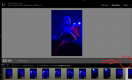
Here you can see the timer when you first preview the file
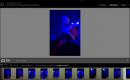
Here you can see the timer has disappeared, and the image has been changed
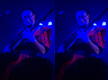
Side by side, you can see the way lightroom has changed it , without being told to
But when I go into develop mode and click a photo , it shows me the image for around 10 seconds and it looks ok , but then it finishes doing whatever it was doing (autotoning or auto NR ?) the timer disappears and Lightroom has changed the image , and I can never get that first preview back .
This is a really REALLY crap photo that I would just throw away , but you can see the difference, the image as it first appears in the first 10 seconds with the loading symbol , and then the image after . This all happens without me doing anything , lightroom just does it itself
Here you can see the timer when you first preview the file
Here you can see the timer has disappeared, and the image has been changed
Side by side, you can see the way lightroom has changed it , without being told to
Last edited:
