Lightroom and importing RAW & JPG Files?

cambsno

Suspended / Banned
Messages
20,999
Name
Simon
Edit My Images
Yes
This is bound to be a silly question but here goes!

I normally shoot in RAW but wanted to see what the processing was like for JPG in my D300. Set the camera to RAW + JPG Fine.

Imported to lightroom and only RAW files appear to be visable? Missing something here - can someone help? Where are the JPG files?
 
Lightroom can only work with RAW files, I'd assume your jpg files will be in the same directory you copied them but too or else still on the card. Oce you have have edited your RAW's in LR though you can then export them as jpg', tiff's (or PSDI think)

Tommy.
 
Lightroom does work with JPEGs.

Are the files in the directory you imported to with Lightroom?
 
In library I hover over each file and it says raw + jpg but there is no way I can see to work on both. However when I delete and then check trash there is a jpg and raw.

So there is both formats but in LR I can only see one?
 
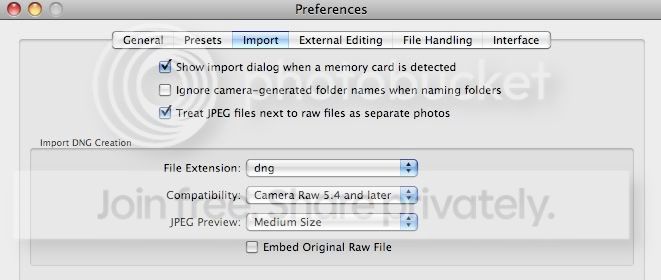
There's a setting somewhere in LR which treats RAW and its JPEG as the same file when importing them. On the mac it's under preferences > import >Treat JPEG next to raw files as separate photos.

The default setting is off, so I think this is your problem.
 
Edit > Preferences > Import > Treat JPEG files next to RAW files as seperate photos

Indeed! This was covered yesterday in this thread too:

http://www.talkphotography.co.uk/forums/showthread.php?t=159427&page=2


You may find that interesting so give it a read :thumbs:

You need to change a preference in Lightroom to have the JPEG treated as a separate file upon import:
LRJPEGPREF.jpg


Tick the box - 'Treat jpeg files next to raw files as separate photo's.

In the library module you will now have the jpeg sitting next to the raw, you'll clearly be able to see the difference between the two.
 
Back
Top