Lightroom 3.3 memory leak...

RobertP

TPer Emeritus
Suspended / Banned
Messages
11,726
Name
Robert
Edit My Images
Yes
Since upgrading to Lightroom 3 I've had a few problems.

Sometimes it just seems to get slower and slower. By the time I've had enough it can be 2 seconds before I see the results of an adjustment which makes editing a really slow business - and I bought V3 to speed things up.

It can also just stop working when it gets to the slow down stage and windows 7 closes the program saying it has stopped working and will look for a solution....very likely! fortunately even though the program restarts on whatever it was on the previous time it was started it does not lose any editing up to the point where it crashed. Just means I have to find my way back to the picture I was working on.

Then there's the failed to export 5 or 6 pictures out of a batch of 200. Not enough memory is the reason given.

All these problems are related to using the adjustment brush etc. It seems there is a memory leak when using these tools and I have been selectively sharpening and sometimes using the gradient filter tool. If I stay away from those tools then everything works fine. Working through a lot of indoor shots with bounce flash with a bright top that corrects very nicely with the gradient tool and sharpening eyes etc is all proving a bit too much for LR3.

I found a thread on the Adobe forums with the same problem and a fix seems to be being worked on. Hope it is sooner rather than later.

The memory is not freed up until a reboot so just exiting LR and restarting doesn't help. The thread linked above has a memory manager program linked in it. kaspersky said it was 'dangerous' but I might install it anyway..
 
The ajustment brush does use a lot of memory, I tend to go into photoshop for selective sharpening with PK sharpener (my favorite sharpener) I tend to use LR for the capture or output sharpen.
I haven't noticed any issues with the gradient, which I often use, and I'm usually working on maybe a 1000+ images most of the time.
Wayne
 
I used to have a right nightmare with the adjustments brush.

I have a SSD just for my OS and lightroom, it was nearly full and the brush was unusable.
But as soon as i cleared a few gb off the drive it works perfectly fine.
 
I have a folder with 4500 5d2 images from my Australia trip. I can edit my way through landscapes which have only slider type adjustments no problem apart from being a touch slow. As soon as I work on pictures that benefit from brush adjustments things start to grind to a halt and eventually go wrong.

The program starts to swap to the hard drive as soon as the available memory is used so I guess a SSD is going to help.

Seems the problem is seen on mac and PC from what i've read and even 16Gb of ram doesn't stop it running out of memory.

My tactic is to edit until it slows down, export what I've just done, export those that failed to export if any (they always work second time around) and then reboot while I go for a coffee.

I really like the lens distortion fix in LR3 (which is another source of memory problems I read somewhere) so I'm staying with V3 but LR3 is proving a pain to use sometimes.

My system is a Q6600 quad core with 4Gb running W7 32 bit and 1gb gaming graphics. Not the fastest but not slow either. Before I found out about the memory leak in LR3 I was wondering if my system wasn't up to it.
 
Why are you not using 64bit windows? 32bit does not use all of your 4GB of ram..
 
If I had 64bit and 16Gb of ram the problem would still be there - but I might get a few more edits done before it slows down. It's the program holding onto memory it is no longer using and then running out, not how much memory you have available.
 
I find that LR slows down a lot if my hard drive starts to fill up (I use a laptop) so I put very few pictures on the laptop itself and use an external hard drive this helps. The 5DMII does not help either - I find it much faster editing from the 50D and can do more before a reboot is required - same with photoshop
 
I'm using LR3.3 on a four year old C2D laptop running Windows 7 x64 with 4GB of RAM (only 3.2GB accessible) and I don't notice the problems you've been seeing, Robert, apart from with the brush tool, which can sometimes dawdle a bit. Certainly I don't get crashes and the sliders all work without fuss, even on 7D and 5D2 raw files.
 
Can I borrow your laptop?

;)
 
No. :)

Bit of a long shot, but have you checked out your video drivers? Are they as up to date as poss? It's been a while, but some time back I read that flakey Lightroom performance might be down to video drivers/settings. If you have aero glass enabled try turning it off. Here are my system basics....

20110205_092829_.JPG
 
interesting screen that one...

Graphics card drivers were updated 2 days ago. made no difference.

I've just got that info screen up on my LR. I have a picture displayed in edit as that was where I last left it. The used by lightroom memory figures are changing as I watch. incrementing by about 1Mb per second. After 3 or 4 minutes they levelled out.

Lightroom version: 3.3 [711369]

Physical processor count: 4
Processor speed: 2.4 GHz
Built-in memory: 3327.1 MB
Real memory available to Lightroom: 716.8 MB
Real memory used by Lightroom: 640.3 MB (89.3%)
Virtual memory used by Lightroom: 675.6 MB
Memory cache size: 63.9 MB
System DPI setting: 96 DPI
Desktop composition enabled: Yes
Displays: 1) 1920x1200, 2) 1680x1050

Then I use the adjustment brush tool and scribble some random sharpening across the image -

Physical processor count: 4
Processor speed: 2.4 GHz
Built-in memory: 3327.1 MB
Real memory available to Lightroom: 716.8 MB
Real memory used by Lightroom: 1193.1 MB (166.4%)
Virtual memory used by Lightroom: 1230.8 MB
Memory cache size: 0.0 MB
System DPI setting: 96 DPI
Desktop composition enabled: Yes
Displays: 1) 1920x1200, 2) 1680x1050

Now what I'm wondering is why LR doesn't have real memory available to it according to that info screen.

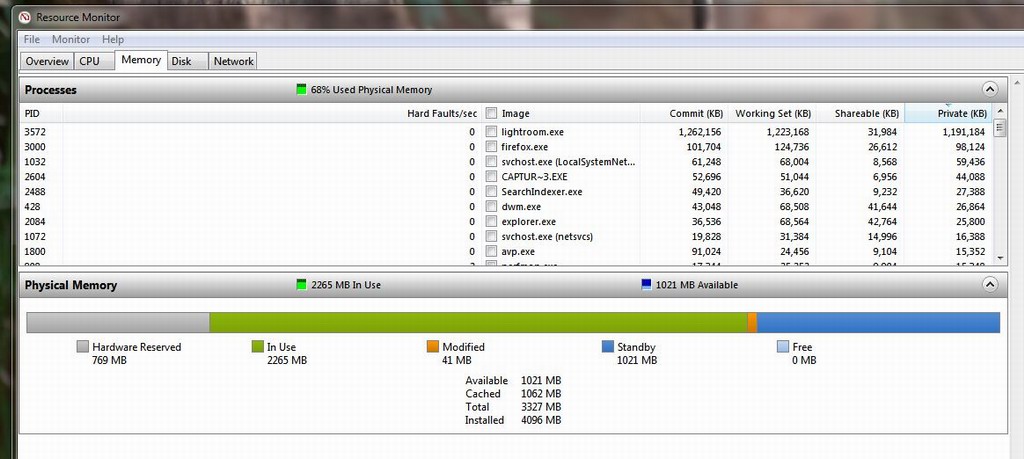
Resource monitor in windows shows it using real memory... I think

resmon.JPG
 
Desktop composition enabled: Yes means you have aero enabled, which is obvious from your screen print. I think (I'm not certain) the issue with the memory allocation is that you are running 32 bit Windows. Seriously, why are you running 32 bit on your quad core system? Unless you have some peculiar peripheral for which there are no 64 bit drivers then I would think that 64 bit is a slam dunk.
 
I looked up 32bit allocation and it is a provisional figure in LR and not what it actually uses.

I was thinking of upgrading soon so I can change the OS then. From what I've read 64 bit systems (and macs) have the same problem with LR 3.3 so it's not just me :)

Maybe I'll try loading smaller batches into library. I have 4500 5d2 displayed as thumbnails at present.
 
I'm not sure what sort of upgrading you are talking about, presumably the whole machine, but my machine was supplied with Windows MCE, upgraded by me to Vista 32 bit and 64 bit and since then to Windows 7 x64. In terms of hardware upgrades I doubled the RAM and swapped out the 120GB 7,200rpm drive for a 320GB 7,200rpm replacement.

With a machine of your spec, which is well above mine in horsepower terms, you could just replace your OS. I've done it on loads of machines over the years. AIUI a 32 bit licence should be freely swappable with the equivalent 64 bit licence. You just need to get your hands on a 64 bit disc - unless you have an OEM install by the manufacturer and there's something funny preventing you getting your hands on an x64 version of the OS for your machine.
 
SSD at the least combined with a fresh install should make things snappier. I've already checked and going 64bit will not cost me.
 
Now what I'm wondering is why LR doesn't have real memory available to it according to that info screen.

Resource monitor in windows shows it using real memory... I think
If you google "real memory lightroom 716.8" you will see a host of people who have exactly the same number. They are all running 32bit OS's.

The question is, does that actually indicate how much is available or is it just an anomaly of lightroom on a 32bit OS. The way to find out is have resource monitor running and do some activity in LR. Check the hard faults/sec column. If that is churning over, then you are swapping pages in from disk and this is the reason it is slowing down. I'm not sure if hard faults/sec shows swapping out of memory, so you might need to monitor the disk activity too...

I'd definitely reinstall a 64bit OS. Here's what my system info says after a random brushstroke in LR (notice that it can see and use all of my 16G of memory, but even a simple edit already uses over 1GB which is the same as yours):

Lightroom version: 3.3 [711369]
Operating system: Windows 7 Business Edition
Version: 6.1 [7600]
Application architecture: x64
System architecture: x64
Physical processor count: 8
Processor speed: 3.4 GHz
Built-in memory: 16364.1 MB
Real memory available to Lightroom: 16364.1 MB
Real memory used by Lightroom: 1205.7 MB (7.3%)
Virtual memory used by Lightroom: 1352.0 MB
Memory cache size: 1474.5 MB
System DPI setting: 96 DPI
Desktop composition enabled: Yes
Displays: 1) 1920x1200, 2) 1920x1200
 
I've got the same issues in LR3 and run 64 bit Windows 7 and have 8gb of RAM. From what I've read on the Adobe forums LR3 will not make use of the any more than 4GB of RAM, nomatter what is available to it. The only application I've seen so far using more than 4gb is CS5...
 
Nice to know I'm not the only one on TP with the problem.

I am planning on changing to SSD and adding another 4Gb plus going to 64bit but not with any real hope of fixing the current version of LR.

I'm limiting my editing to 100 pictures by which time LR is getting very slow, then exiting and rebooting. Coming back to the PC I export what I had edited then move on to another 100 batch. Fortunately I'm down to the last 500 odd of 4500 so the end is in sight.
 
I've certainly heard of, and observed, the same effect in LR, and I'm running 64bit. My understanding from the Adobe forums is that it's been confirmed by Adobe that there is a memory leak affecting the brush tool, and that it will be patched. Whether there is another, 32bit only, problem is a different matter.
 
Funnily enough I have had similar problems as well...... I don't use adjustment brush very much but after i've done a batch of editing, or even forwarded quickly through a long series of images, it tends to slow down and has even come to a halt........

(Windows 7 32 bit)
 
I ran into what may be this problem, too. It's a bug, and seems to be related to the use of "limit file size" when exporting photos. Just deselect that option and the problem goes away.
 
I ran into what may be this problem, too. It's a bug, and seems to be related to the use of "limit file size" when exporting photos. Just deselect that option and the problem goes away.

That sounds like a totally different bug. Have you reported it to Adobe? The one I know of creates a memory leak every time you use the brush tool. Nothing to do with exporting photos.
 
Back
Top