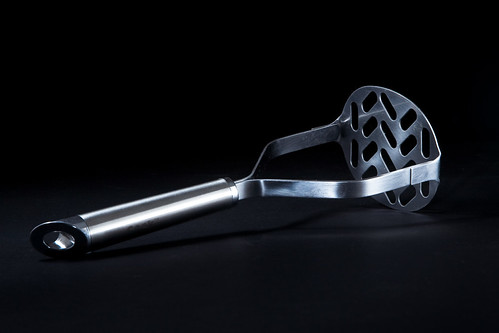
Lighting help for capturing images of hairdressing scissors

the_scissorman

Suspended / Banned
Messages
6
Name
James
Edit My Images
No
Hello, I am a little confused and seem to be getting mixed views with regards to the folowing question.

I want to take good quality pictures of hairdressing scissors to upload to my website. I am using A new Nikon D60 with the standard issue lens on a good quality stand. I have 1 x daylight lamp (5100k) and a pop up light tent but when I shine the lamp through the light tent it has little or no impact on the scissor. I have tried to point the light source directly at the scissor which seems to take a better shot but then I have the issue of shadows, the scissor look really dark in areas. I am pretty efficient with Photoshop but to be honest I would rather know how to take a top shot with minimum adjustment afterward sin PS but at present I am taking the shot then spending time attempting to make it better.

I am adding a link for you to take a look at the scissors on my site for your comments but I am not happy with the image quality - Help!

http://www.itsahairthing.co.uk/product_info.php?cPath=30_45&products_id=295

I would greatly appreciate someones expert help in advising of the correct camera settings and what light source,I should use, if any?. This is my business and my living so I am happy to invest in some Kit but I would not know where to start and I would not want to waste my money without knowing truely what to buy.

Your comments will be greatly greatly appreciated.

Kind Regard

James Curd
managing Director
It's a hair thing
 
It's just one of those things...
People buy light tents because they think that they want soft, gentle lighting without shadows but then find, as you have, that whatever they do with the lighting makes little difference - why is that?
Because the light is heavily diffused, that's what light tents do and are supposed to do

Scissors aren't a particuarly easy shape for a beginner because the shapes are more complex than they look. The handles certainly are a complex shape and light reflected from them will go in all sorts of different but predictable directions, so the handles will always look OK if the light on them isn't too soft (if it is too soft they will just look dull and boring)
The blades are different, almost a mirror surface, and so either photograph as white or black, depending on the placement of the light and on any surface that the pick up reflections from. I don't think that is something that you should be worrying about too much, after all your potential customers know what scissors look like in real life, but you do need to control the appearance to some extent - so position the scissors where they need to be, position the camera where it needs to be and then just experiment with moving the light around until it looks reasonably OK on the blades and good on the handle detail.
Now introduce bits of odd things nearby to reflect into the scissor blades and add a bit of interest - black card, silver foil, maybe a 50p piece standing on end - all out of shot of course but reflected in the bright metal of the blades.

You mention shadows - what's wrong with having shadows? They create a feeling of depth and reality to everyday objects, and actually help as long as the shadows aren't so strong that they take over.
 
Photos of curved, shiny, metal - you like to make life difficult for yourself!

Basically you need to think of the angles between the light source and the camera lens. I try to think of it like balls on a snooker table - if you trace back from the camera position you can work out what will be reflected. Luckily, because it is so reflective, you should be able to do this with your eye (i.e. get you eye into the position where your camera will be - or just look down the viewfinder I suppose!).

Ideally, I'd suggest that you want the main blades lit - so you want to move the positioning of the scissors so that you can 'see' your light source (be it tent / reflector / umbrella) from the camera. You'll see from the shot with the open scissors that only one of the blades are lit - this is because when they are open, the blades are at a different angle. If you want to light them both then you will need to either try and position your light source so that it reflects in both blades, or move to scissors to achieve the same effect. Failing that you might need to add another light source (could be a fill card or another light through a piece of paper) to get that 'specular highlight'. Then repeat this for all the bits you want lit.

If you want to take things a bit more seriously then you might be better off with some off camera flashes - you can exert a bit more control that way. For more reading (and a better explanation) check our Strobist Lighting 102 particularly the Cooking Light assignment:

http://strobist.blogspot.com/2007/07/lighting-102-assignment-cooking-light.html

There's plenty of good material there to help you on your way.

FWIW - I was trying this out with a similarly shiny, metal, curved object at the weekend. It took 3 separate light sources to shoot this:

4375573299_5b30fd310c.jpg
 
Hi people and thank you for your time and input to my question.

I am going into my stock room to have a go at taking shots with various angles of light, I also do have white and black card so I am going to experiment, I'll upload some shots later so I would appreciate some feedback.

With regards camera settings, as I mentioned I am using a Nikon D60 and wondered if you could advise on the optimum camera settings for taking such shots?

Current settings are

ISO - 200
Aperture size - F8
Shutter speed - normal
Taken in RAW format

Have you any suggestions for best settings?
 
f/8 or f/11 at the lowest available ISO will give you the best image quality - but the lighting will make far more difference to your shots than the camera settings
 
I have taken the following image with a direct light source and a piece of matt white card to the front of the shot to hopefully reflect the light back onto the scissor. I also cut out the background in PS, What do you think?

matakki-slicer-c.jpg

matakki-slicer-b.jpg
 
Back
Top