

You are using an out of date browser. It may not display this or other websites correctly.
You should upgrade or use an alternative browser.
You should upgrade or use an alternative browser.
Light Room Export options?! Where have they gone!?
- Thread starter mrk123
- Start date

Musicman
Suspended / Banned
- Messages
- 9,866
- Name
- Rob Telford
- Edit My Images
- No
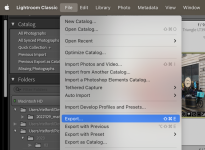
On my Mac, at least, it's still where it's always been in the menus
File > Export...
You need a photo selected, otherwise it will be greyed out.
I usually use Lightroom Classic, but it's the same in CC
I'm somewhat confused as I don't ever recall seeing a Save As... command in Lightroom. Are you quite sure you actually have Lightroom open (sorry if it's a dumb question)?
File > Export...
You need a photo selected, otherwise it will be greyed out.
I usually use Lightroom Classic, but it's the same in CC
I'm somewhat confused as I don't ever recall seeing a Save As... command in Lightroom. Are you quite sure you actually have Lightroom open (sorry if it's a dumb question)?
Attachments
Last edited:

Box Brownie
Suspended / Banned
- Messages
- 17,645
- Edit My Images
- No
I no longer use LR but to inform those that could help it might help if you said which variant of LR you are using:-Just got LR. I was using older software. I can't find those export options, or any export, only "save as"...
What's going on?!
LR classic i.e. files stored on your PC or Mac
or
LR CC i.e. AFAIK where all files arr stored in the 'cloud'.

snerkler
Suspended / Banned
- Messages
- 26,078
- Name
- Toby
- Edit My Images
- No
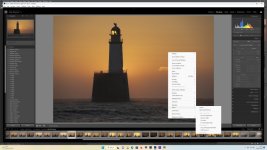
CMD+Shift+E for MacIn windows CTRL+Shift+E brings up export/save or CTRL+E for open in another program e.g. Photoshop.
As mentioned you need a photo open.


Yep, always pressed CMD SHFT E and now it just "BEEP" me,,,
Uusually in 'file menu' but not there...??
It might be my software, I DL'd it to see if it was worth me buying it. Honest.
This vrsion won't even let me 'EDIT IN PHOTOSHOP' with multiple selections.
The only option I have is "SAVE TO" and it sucks. Zero control.
Uusually in 'file menu' but not there...??
It might be my software, I DL'd it to see if it was worth me buying it. Honest.
This vrsion won't even let me 'EDIT IN PHOTOSHOP' with multiple selections.
The only option I have is "SAVE TO" and it sucks. Zero control.
Last edited:

Craikeybaby
Suspended / Banned
- Messages
- 7,590
- Name
- Lewis
- Edit My Images
- Yes
It sounds to me like you are using Lightroom CC (the cut down "cloud" version) rather than Lightroom Classic, the original one.
snerkler
Suspended / Banned
- Messages
- 26,078
- Name
- Toby
- Edit My Images
- No
I thought they were all CC these days and you have LR classic and LR mobile, or have they changed the naming recently?It sounds to me like you are using Lightroom CC (the cut down "cloud" version) rather than Lightroom Classic, the original one.
I didn’t realise you can’t export on some versions


4wd
Suspended / Banned
- Messages
- 3,224
- Name
- North York Moors
- Edit My Images
- Yes
What's the point of it if you can't save your changes.I thought they were all CC these days and you have LR classic and LR mobile, or have they changed the naming recently?
I didn’t realise you can’t export on some versions
That doesn't sound right
Musicman
Suspended / Banned
- Messages
- 9,866
- Name
- Rob Telford
- Edit My Images
- No
ah yes it's CC... I can't export on cc? Damn...
I ned classic then?
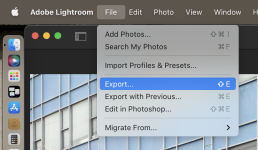
The second screenshot that I posted was taken in Lightroom CC for Mac (simply AKA 'Adobe Lightroom' these days) and it has an export option
Musicman
Suspended / Banned
- Messages
- 9,866
- Name
- Rob Telford
- Edit My Images
- No
I DL'd it to see if it was worth me buying it. Honest.
This vrsion won't even let me 'EDIT IN PHOTOSHOP' with multiple selections.
I suspect that is the source of your problem. It's a trial copy that has expired.
You get 7 days of full functionality to trial Lightroom CC, but after that you are locked out.
Among the locked out features is export.
From Adobe's FAQs about the trial version
https://www.adobe.com/uk/products/photoshop-lightroom/free-trial-download.html
How long does the Lightroom free trial last?
Your free trial of Lightroom lasts for seven days and starts when you check out. Your Lightroom trial will automatically convert to a paid Creative Cloud membership after seven days, unless you cancel before then.
N.B. as I highlighted above, the 7 days starts from when you check out, not when you first launch it. Perhaps you put off trying it for a few days, or had previously downloaded a trial version in recent months that you never got around to using. My speculation would be that you would locked out until the next major version is released once a trial is expired.
Last edited:
D
Deleted member 95743
Guest
You CAN export from the CLOUD based version of Lightroom.ah yes it's CC... I can't export on cc? Damn...
I ned classic then?

If you subscribe to Adobe Cc you get Lightroom Classic AND the cloud storage version.thought they were all CC these days and you have LR classic and LR mobile, or have they changed the naming recently
most togs I know continue to use Classic. This has the look, feel, and functionality of the version of Lightroom we all know.

Phil V
Suspended / Banned
- Messages
- 26,303
- Name
- Phil
- Edit My Images
- No
This is clearly the answer.I suspect that is the source of your problem. It's a trial copy that has expired.
You get 7 days of full functionality to trial Lightroom CC, but after that you are locked out.
Among the locked out features is export.
From Adobe's FAQs about the trial version
https://www.adobe.com/uk/products/photoshop-lightroom/free-trial-download.html
N.B. as I highlighted above, the 7 days starts from when you check out, not when you first launch it. Perhaps you put off trying it for a few days, or had previously downloaded a trial version in recent months that you never got around to using. My speculation would be that you would locked out until the next major version is released once a trial is expired.