
and please use their services
You are using an out of date browser. It may not display this or other websites correctly.
You should upgrade or use an alternative browser.
You should upgrade or use an alternative browser.
Latest LR doesn't allow camera profiles
- Thread starter Peter123
- Start date

Dave Canon
Suspended / Banned
- Messages
- 1,980
- Name
- David
- Edit My Images
- No
I use my own bespoke profiles for each camera and they are still there. Before I had bespoke profiles, I did choose Canon Standard for my 5D4 rather than Adobe standard; this was as recommended by Canon.
Dave
Dave


OP

Peter123
Suspended / Banned
- Messages
- 6,705
- Name
- Peter
- Edit My Images
- Yes
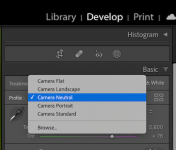
Well I've now found them by clicking on browse. In the past they used to be grouped with the adobe ones. Now by default they show only adobe and you have to go and find them.
Thanks for all the quick replies.
I still think Nikon camera standard beats all the adobe profiles.
Thanks for all the quick replies.
I still think Nikon camera standard beats all the adobe profiles.


sk66
Suspended / Banned
- Messages
- 9,557
- Name
- Steven
- Edit My Images
- Yes
If you favorite them they will show up w/o browsing... you can also unfavorite the adobe profiles so only the Nikon profiles show.Well I've now found them by clicking on browse. In the past they used to be grouped with the adobe ones. Now by default they show only adobe and you have to go and find them.
Thanks for all the quick replies.
I still think Nikon camera standard beats all the adobe profiles.
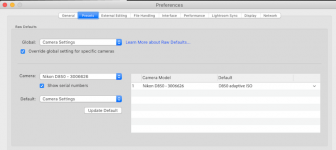
And you can set your preferences so that LR automatically applies whichever profile was set in the camera.

- Messages
- 18,695
- Name
- LongLensPhotography
- Edit My Images
- No
Adobe standard is great. Very neutral. And appears to be camera specific.