
Large Print Size Problem (36x24in)

dankellys

Suspended / Banned
Messages
221
Name
Dan
Edit My Images
Yes
I have an image, which is 6582x3907px (its a landscape, with bottom cropped off). I want have it printed as a poster. Was thinking something like 36x24in. However, if I create a blank canvas in PS which is 36x24in then I copy my photo onto the canvas, it is tiny in comparison (see screen dump below)
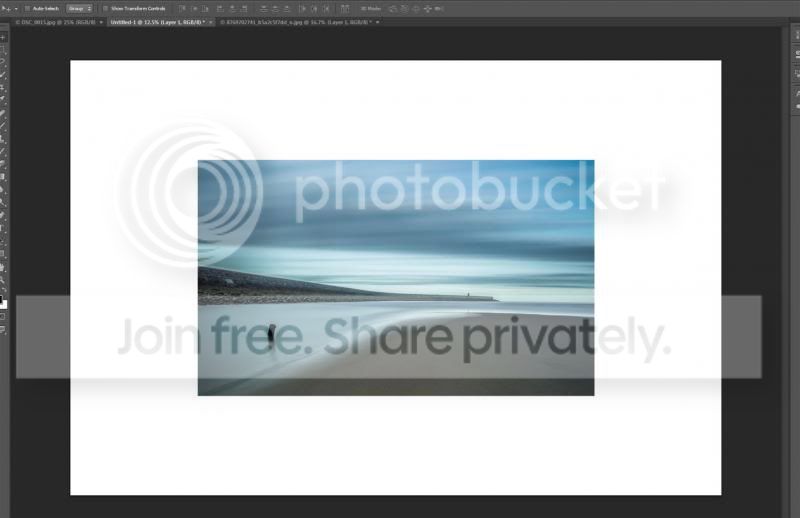


Am I doing something wrong, or is my image just not big enough for that sized print? if its not big enough, why not? Is it something I am doing wrong in camera, or when converting from RAW to JPG? Or is it just a limitation of my camera? :help:

(A bit more info: Carmera: D3200, Lens: 18-55mm Kit Lens, Software used to Convert: Lightroom)
 
6582x3907 is ~22" x 13" at 300dpi.

I suspect your canvas is sized at 300 dpi.
 
Why complicate things for yourself? Just make sure the proportions are right, the resolution is at 300 dpi and you're good to go.

However if this is how you'd like to sort it then here goes. It may be that your dpi settings of the image you are copying and pasting dont fit the canvas hence it is pasting across as a smaller image. If your canvas is set at 36x24 then your image must be the same to fill the canvas.
 
Why complicate things for yourself? Just make sure the proportions are right, the resolution is at 300 dpi and you're good to go.

Basically, I want to add a white border to the image (about an inch all the way around, 1.5 inches at bottom) with text in the bottom of the border (something like "Image Name | Dan Kelly")

However if this is how you'd like to sort it then here goes. It may be that your dpi settings of the image you are copying and pasting dont fit the canvas hence it is pasting across as a smaller image. If your canvas is set at 36x24 then your image must be the same to fill the canvas.
Both the new blank canvas and the image I am copying are set to 300dpi. When I view the image in PS, the size is 21x13in. Any way I can 'blow it up' without pixilating it? Why is it so small. Thought the D3200 would produce larger images than that...
 
Both the new blank canvas and the image I am copying are set to 300dpi. When I view the image in PS, the size is 21x13in.
Which is exactly what I said above ;)
6582x3907 is ~22" x 13" at 300dpi.

I suspect your canvas is sized at 300 dpi.

Any way I can 'blow it up' without pixilating it?
Just resize in PS. It does a good job if you choose the right resizing algorithm (it suggests which is best for upscaling).

Why is it so small. Thought the D3200 would produce larger images than that...
Because you have it set to 300ppi... ;)
 
Just resize in PS. It does a good job if you choose the right resizing algorithm (it suggests which is best for upscaling).

Thank you :), just resized it using the 'Bicubic Smoother' option and it appears fine on screen, no sign of any pixilation anywhere. I assume it will look fine in print too?
 
Easiest way is to resize image to a size below the paper size. So if your print is going to be 36x24 and you want half inch white all round make your image 35 x 23 at the required resolution.

Then use photoshops Image > Canvas Size to add half an inch all round. Job done
 
Easiest way is to resize image to a size below the paper size. So if your print is going to be 36x24 and you want half inch white all round make your image 35 x 23 at the required resolution.

Then use photoshops Image > Canvas Size to add half an inch all round. Job done

Did it slightly different. Added a 1 inch grid to the canvas, then resized the image to the grid. Left an inch all they way around, except the bottom, where I left 2 inches.
 
Back
Top