Large Canvas Prints

CiaranMc

Suspended / Banned
Messages
27
Name
Ciaran
Edit My Images
No
Ive never really printed anything very large. I shoot an Xt1 (16.3MP) and the biggest I've gone is 24x16, slightly bigger than max resolution, but it was fine.

The question I have is this: Can I go much larger on a medium like canvas that might be more forgiving to lower resolution? I'd love to try 36x24 or something similar. Also, on the other han, for a landscape with alot of colour like a sunset or sunrise is Canvas too forgiving- will it kill fine detail?
 
I've done a 36x24 canvas from a 12MP D3S and wouldn't consider it a problem at all, especially as you naturally stand back a bit with something larger :)
 
I've a print over 50" wide hanging in the office. One of my first shots from a few years ago. Shot it with a Nikon D5100, I.e. 16mp.

Looks great. Canvas is quite a forgiving medium I think.
 
I've got a 40x30 from a 12mp camera, looks great. As the two posters above have said, canvas is a more forgiving surface than paper and as canvases are more for wall decor rather than an exhibition where people are more likely to get closer to large prints, any loss of subjective image quality isn't really noticed, well to a certain point anyway. Hang it behind your settee and no one can physically get close enough if you're going stupidly big!
 
You should have no problem. I too have printed 45inches on the long side from a 12mp camera. At my local photo processing shop, he prints at 200 dpi.
 
I've had a large canvas done of several night photos and they show detail quite well. I have them on display in an area I like to pretentiously call my stairs gallery where the walls are plain white. The window is north facing so there's no direct sunlight and the canvas prints look good against the white background.

There's a difference in quality in the various suppliers so it could be quite costly to try them all out. I used Picanova who have regular offers and are doing an 800 x 600mm canvas for £19 at the moment, P&P is extra. Their quality is OK and I'm very happy with what I got for the price other than one of the prints had been slightly damaged in transit. The best print I've seen I was told cost about £90 for the same size but was better finished using a nicer canvas and had a thicker frame but you'd need to move the couch from in front the photo to appreciate the difference.
 
I've had a large canvas done of several night photos and they show detail quite well. I have them on display in an area I like to pretentiously call my stairs gallery where the walls are plain white. The window is north facing so there's no direct sunlight and the canvas prints look good against the white background.

There's a difference in quality in the various suppliers so it could be quite costly to try them all out. I used Picanova who have regular offers and are doing an 800 x 600mm canvas for £19 at the moment, P&P is extra. Their quality is OK and I'm very happy with what I got for the price other than one of the prints had been slightly damaged in transit. The best print I've seen I was told cost about £90 for the same size but was better finished using a nicer canvas and had a thicker frame but you'd need to move the couch from in front the photo to appreciate the difference.

I'd be using a printer with a great rep near where I work, so I'd be able to choose the canvas he used anyway.

Thanks for the help everyone!
 
I work at a printing firm. We use rubbish jpegs from customers up to high res tiffs all day long.
Even the rubbish jpegs at 72 dpi, yes 72 dpi look okay printed up to 2x2 metres.
We have even printed 140dpi at 5 metres x 12 metres and it looked okay.

We print up to 5 metres wide by 60 metres long and have also welded these together to cover football pitches & the sides of buildings.

Basically if your software can up size to the size you want at 300dpi it will be fine.
However, anything above 240dpi for up to 60" wide by any length would be more than acceptable.

Remember the viewing distance increases with bigger images and so the dpi can be lower.
 
Even the rubbish jpegs at 72 dpi, yes 72 dpi look okay printed up to 2x2 metres.
Hang on a sec. A 2x2 metres print at 72 dpi would be a bit over 32 megapixels. How us that a "rubbish" file?
 
I see the confusion Stuart, I'll try and be clearer, the original file we would receive is very likely to be only A4 at 72 PPI. We then resize this to the new size which of course drops in PPI but as put still looks okay
 
I see the confusion Stuart, I'll try and be clearer, the original file we would receive is very likely to be only A4 at 72 PPI. We then resize this to the new size which of course drops in PPI but as put still looks okay
Blimey my tablet is jumping ahead of me!
So to continue after resizing this would clearly be far less than 72 PPI. We use a resize programme (not photoshop) to keep to the 72 PPI, which as I said still looks okay at 2x2,metres. Hope that is clearer, but I understand me saying rubbish and not qualifying the original file size made it appear odd.
Anyhoo are you following me around to pick further holes?
 
Blimey my tablet is jumping ahead of me!
So to continue after resizing this would clearly be far less than 72 PPI. We use a resize programme (not photoshop) to keep to the 72 PPI, which as I said still looks okay at 2x2,metres. Hope that is clearer, but I understand me saying rubbish and not qualifying the original file size made it appear odd.
Anyhoo are you following me around to pick further holes?
What are you using that can resize an A4 at 72ppi to 2m squared? Magic??
 
A bespoke piece of software within the large format printing company given to us by Hewlett Packard as the printers we use print up to 5 metres wide and upto 100 metres long and at times we weld these together to cover football pitches and complete sides of buildings and also we have printed the material covering a blimp but we didn't weld that as it needed to be ait tight and so another company did.
 
If anyone would like to visit the factory I work at you're welcome to visit. It's based in Gosport Hampshire and I have shown other people around so know the boss is okay with it.
Let me know you might want to bring a camera as there are some things you wouldn't normally get access to.
 
But seriously how can anything resize to that extent and keep any kind of quality?
 
Not sure what experience you have with large format and "RIP" software but the way this works is programmed specifically for large format and the fact the viewing distance is expected to be as it should be for such large banners.
Together with the type of media being PVC and or canvas which is dimpled which has quite a significant effect on the way it turns out, ie the finished print.
Please don't feel awkward in any way that you sound disbelieving as I have this from time to time when I talk to someone with a background of photography as I did indeed some years ago when I became the companies photographer.
 
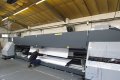
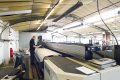
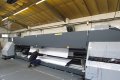
Here are some photos of where I work, the first one is of Sam loading the machine, this needs two people to load the rolls which weigh up to 170kgs each.
The 1st photo here is Sam aligning the media to be straight.
Sam1.jpg

Next is Sam standing on the platform which is needed to view the print head as it goes left to right and check the print for head touches and banding.
Sam2..jpg

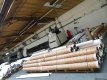
Here are a stack of PVC media rolls with the 5 mtr at the bottom next the 2.5 mtr and on top the 3.2 mtr rolls.
Sam3.jpg
 

Attachments

  • Sam.jpg
    Sam.jpg
    273.1 KB · Views: 8
This PVC media in particular comes in at 450gsm and goes up to 750gsm which is used for double sided banners.
These banners are hemmed and eyeleted so the can be hung up.
We also now print to cloth which then has to go through a baking oven to fix the ink.
This baking oven can go up to over 1000 degrees celsius and up to 3.2 metres wide by 100 metres long.
This we stitch a hem along if needed or a silicone edge which allows it to be attached to aluminium frames which we also make.

If you read the short bit via the link about the RIP software hopefully it may have given some insight to this world and the what to me and others was an improbable
ability to take a rubbish 72ppi file and print it at 72ppi but much larger.
There are limits of course.
We mainly use Wasatch and Onyx.
 
Sorry, I misunderstood. I thought you meant that you could print a high quality photographic canvas at 300 DPI from that file.
 
To divert slightly.. I don't like 'canvas' papers or effects, they often look a bit mushy (aka forgiving).

All that said, I'm fairly happy with 36x24 inch prints (on non-canvas papers) from my 16mp OM-D E-M5. Some of the images had a fair bit of processing which won't have helped. I use Perfect Resize to upsample; it works very well. I wouldn't go bigger than that, though.

edited for clarity
 
Last edited:
As for fine detail.. I compared a fair few paper types and a number of print labs. It depends in part on the viewing environment but semi-Matt C-Types won in 80% of cases, and The Print Space, Ilford & Metro held the joint #1 spot.
 
I have seen some very good results from Perfect Resize and have read it has a better output than Photoshop, do you find this to be the case?
Unfortunately it has limits in how big it will go and thus of limited use for us.
I have toyed with the idea of getting it for myself but haven't felt the need given the printers I have available via work. The 60 inch wide Canon imagePROGRAF 9000's we use are for us small format versus the HP Scitex.
My own personal home printer is a Canon Pro100s which at 13 X 19 inches isn't really classed as large format.
I did read somewhere though that it can print up to A2 equivalent in length! I will have to investigate as it certainly has no roll to roll capability.
Re your divert and mushy aka forgiving I would have to agree 100%.
 
Juggler you're talking fine detail which is an area I would love to work in but as can be assessed from my posts large format isn't fine in any which way.
And even the Canon imagePROGRAF 9000's which are 12 ink true photo printers with the canvas we use it is as you say mushy, soft due to the canvas effect. We could put good proper photo paper through it but our customers aren't in that market.
So because we don't have a need for photo paper at work was the reason I needed a decent printer at home, well I feel the Canon Pro100s is decent.
 
To divert slightly.. I don't like 'canvas' papers or effects, they often look a bit mushy (aka forgiving). That said, I'm fairly happy with 36x24 inch prints from my 16mp OM-D E-M5. Some of the images had a fair bit of processing which won't have helped. I use Perfect Resize to upsample; it works very well. I wouldn't go bigger than that, though.
Have you seen the canvases from Oxford Imaging? They're stellar quality.
 
No I haven't, what size & material?
The weave makes a hell of a difference to the softness and at up to 60" wide it matters not the length as it becomes more like a Bayeux Tapestry.
Meaning just because it's long you still stand quite close as it's only! 60" high.
I'll go take a look, cheers.
 
Dean do you just purchase the canvas or get them framed or some & some?
What size do you usually get or I suppose it depends & are they for you or customers?
I'm asking as I have been asked for prints from my own customers & so far have used what we have at work but am looking to up the game.
Cheers.
 
Juggler you're talking fine detail which is an area I would love to work in but as can be assessed from my posts large format isn't fine in any which way.
And even the Canon imagePROGRAF 9000's which are 12 ink true photo printers with the canvas we use it is as you say mushy, soft due to the canvas effect. We could put good proper photo paper through it but our customers aren't in that market.
So because we don't have a need for photo paper at work was the reason I needed a decent printer at home, well I feel the Canon Pro100s is decent.

Understood - I was going back to the OP's original question.

As for Perfect Resize - yes, it's definitely better than PS at upscaling in most cases, especially if you're doing more than 2x enlargements (i.e. 4x the number of pixels) but it takes a little work to get the best out of it. It does a great job with with edges and detail. PR can introduce artefacts in areas little blurred backgrounds unless you're careful with the sliders, but it seems to manage areas which are nearly completely blank very well. I tend not to use its sharpening tools but that's because I've a much better understanding of how Nik's output sharpener works - so I stick with that.

In summary, Perfect Resize is great if you want to produce large prints which may be viewed from close range but not worth the extra cost and work otherwise. It also has some handy tools for creating canvases which wrap around a frame.
 
Simon I watch a video on PR and the wrap caused the top of a sky scrapper to be upside down on the upper edge and cars to drive into each other down the side edge, most funny.
 
Back
Top