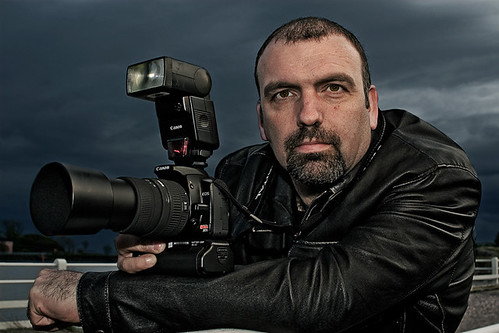
Just can't seem to figure this out.....

kmadd2004

Suspended / Banned
Messages
28
Name
Krista
Edit My Images
Yes
I have been following different photographers to get an idea of what clients are looking for in my area and have come across a very similar pattern. Visual effects. One in particular is the sky in this photo. Does anyone happen to know how this can be done... if it is post processing or a camera setting?

index.cfm


*been having trouble uploading lately...hope this one works :|

28td2d.jpg
 
Hi, this can be achieved in one of two ways - a full frame camera (which in this instance looks likely due to the distortion of the people) and by replacing the sky using layers in PHotoshop or similar software.

If you'd like to know how to do this let me know.
 
I would guess PP.
Heres a shot I have made fairlly similar.
Select your sky area (use your favorite selection tools) add some feather now use filter/render/ lighting effects (choose omni) and ajust size and brightness of "hotspot" finally with the selection still active add new layer fill with blue and change blend mode to colour and ajust opacity to suit. Wayne
3709890548_34a8126a8a_o.jpg
 
I would guess PP.
Heres a shot I have made fairlly similar.
Select your sky area (use your favorite selection tools) add some feather now use filter/render/ lighting effects (choose omni) and ajust size and brightness of "hotspot" finally with the selection still active add new layer fill with blue and change blend mode to colour and ajust opacity to suit. Wayne
3709890548_34a8126a8a_o.jpg

i am not even sure its that technical, looks like the sun behind some broken light cloud with a shutter speed fast enough to pick up cloud detail, with the subjects lit by flash from the camera right.
 
It may well have been done differently, I'm just suggesting a way of getting a similar effect. The halo around the boys suggests PP.
 
The halo suggests flash and daylight mix with a longish exposure compared to flash duration to me ;)
 
two ways you can do this in camera one way you can do this in post

In camera
you can meter the camera for the sky and use the flash to fill the shadows in the subject
no example sorry
you can use a nd grad to darken the sky and thus balance out the extremes.
s


Post processing you can dodge and burn the sky to selectively put in shadow and highlights, done properly this effect can produce some stunning photos.
s
 
I have seen a clip on YouTube (still trying to figure it out completely) but basically the sky looked very similar to the first post. Which was HDRd then had a gradient (mask?) added which changed the colour completely. You could then mask out the people and leave the sky HDR and edit the people seperately.

See the sky in this pic, ignore the rest :)
3707465059_cc9c0f87b9_o.jpg
 
Yv has this spot on.

The sky is slightly underexposed to ensure the preservation of highlights, although they didn't quite succeed in the example photo.

The subjects have been lit with flash, the output of the flash is balanced with the underexposure of the sky in order to get the overall exposure correct and the desired effect acheived.

I will add, that during post processing, there has been some excessive sharpening, whether high pass, smart sharpen or USM, it's been over done and not finished off correctly, producing halo's and loss of detail.

Although there are plenty of shooters that utilize this approach, off the bat, a much more refined example of this very well known 'look' can be seen in the 'creative portraits' section from Canadian photographer Martin Prihoda.

Here's an old example from me too:
2597687598_657d0c8e5b.jpg
 
Back
Top