iTunes library mystery

Serendipitous Sid

Suspended / Banned
Messages
2,993
Name
Dan
Edit My Images
No
When I display my iTunes library on the puter by artist, in many cases songs listed are split into several albums, even though when I check the "info", there's only song title and artist. Why is that? And is there a way of combining all songs by the same artist into one listing for that artist?
 
You may have view by album or album art switched on. I prefer it that way hence I no when for some reason I loose that view ;)

I think it is apple G to toggle it but aren't 100%.
 
Cheers dejongi - I'd never noticed the option to view album by artist, and now that's switched on there's one less mystery in my life :)
 
iTunes really likes to separate stuff that should really belong together. It's like Apple don't understand music :)
I don't understand that. If you display with Album art on then surely it is logical that you group it by album art? You have a choice on how you want it displayed at the press of a simple short cut.

The other often problematic one is albums with various artists. This is based on the metadata tag for album artists not being filled out. Just pop various artists in there and the album gets grouped properly as it should. And your data quality is ok.
 
I was mostly referring to the various artists issue. If I rip a CD to iTunes I'd expect it to understand the album structure but too often compilations fox it. I think I've even had this with an album bought from their store. It got sliced up in an odd way. The edit metedata function usually fixes it but IIRC they changed the fix you had to make in various versions.
 
Yes I agree, it is definitely the album artist field that is linked to that. Unfortunately too few sources fill this properly. Anyone as anal like me about getting their library complete can simply sort this, just don't forget to write it back to MP3 format.

Looking at the files I get of some friends, it seems to suggest that most don't care about metadata as it is rarely complete.

I guess I am weird as I can't stand incomplete data :)
 
Hell, most of the time my IpOD's set to random so it makes no difference and other than that, I listen to an album at a time. Must get around to playing with playlists so I don't keep getting episodes of H2G2 and having to skip them. (I suppose I should also get around to editing the album names for all those series [which the BBC seem to have messed up with!])
 
There's a setting somewhere that stops it playing podcasts when you are in shuffle mode ;)
 
My H2G2 episodes are ripped from the CD boxed set. Easy enough to set up playlists but that means remembering to do it then remembering to stick the IpOD back in the car. Easier to hit the skip button when required!
 
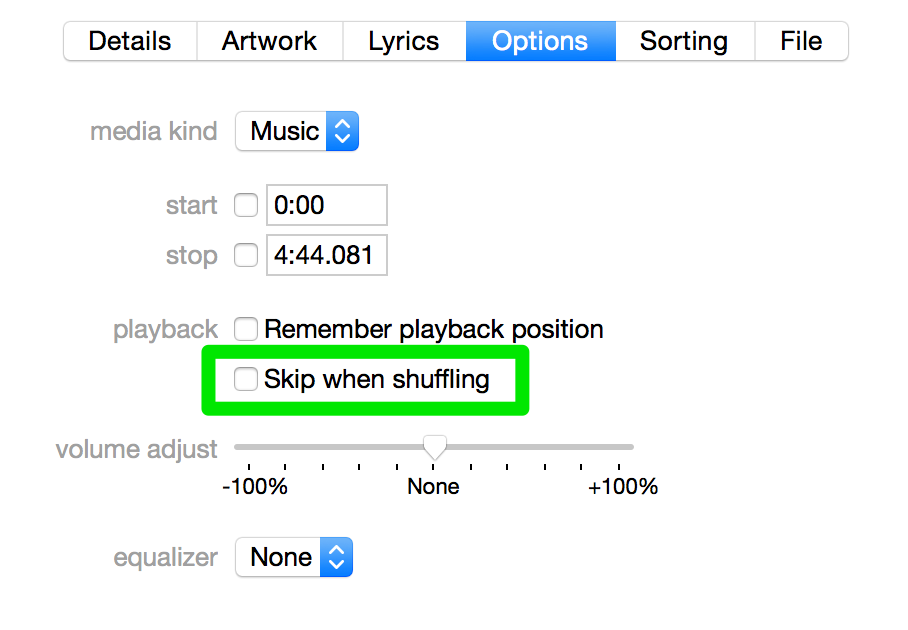
Select all the tracks you don't want want when you shuffle. Get info, go to the options tab, and check "skip when shuffling"

II9QRof2Oo-3000x3000.png
 
Back
Top