ISO questions

SEPkent

Suspended / Banned
Messages
1,167
Name
Jon
Edit My Images
Yes
Hi. I see alot of reviews and people posting data under images saying "photo shot at 800ISO" photo shot at 1500 ISO...

Whenever I shoot at these levels I get lot's of grain. Is this because I am shooting at too low a shutter speed? I'll try and dig out a sample...

Many thanks
 
Assuming you are using the Nikon D7100 as mentioned in your profile info then i would have thought you would be able to get perfectly acceptable shots at 800/1600 ISO.

Do you have any example shots that would give us a better idea of just how much grain you are referring to?

Are you shooting Jpeg or Raw?

If Raw you may be under exposing your shots then adjusting exposure in post which will accentuate any grain in the image.
 
Last edited by a moderator:
I regularly shoot at high ISO photographing birds.

I use a Nikon D7200 and find 3 things help, a shallow dof, correct exposure on the subject and a good noise reduction program for the bg, Nik Dfine if editing a jpeg.

If working a raw file, I work the two layers separately in ACR, one for the subject with very little noise reduction, one for the bg where I'll reduce the noise by +80, create a layer mask and brush the subject in with a soft edge brush.

Here's an example that hasn't cleaned up too bad, shot in poor light @ 1/400th, ISO8000

Long-eared Owlet Siblings by Phil D, on Flickr
 
If you're shooting at high iso's with a d7100, you should get fairly clean images, unless you underexposed a lot and then pull them up in post.
 
D7100, and lightroom... That's what I have....
 
I have a problem whereby I'm more sensitive to noise/grain then others.
I have a 1Dx mk2 and really don't like anything above iso 800, yet I'm told it's good to 6400.
I use noise reduction software but it always results in loss of definition.
 
Am I best to shoot raw, or Jpeg.... I only have lightroom for processing and use Gimp sometimes too... Both of which I am a novice...
 
I have a problem whereby I'm more sensitive to noise/grain then others.
I have a 1Dx mk2 and really don't like anything above iso 800, yet I'm told it's good to 6400.
I use noise reduction software but it always results in loss of definition.

I would say you are over critical of the nose/grain.
The reason i say that is that resident TP member @KIPAX uses a 1DX mk2 and in this thread below captured the boxing shoot at ISO51200 and it still looks more thsn acceptable.
https://www.talkphotography.co.uk/threads/thank-goodness-for-canon-1dx-mkii.662362/#post-7968239
 
Am I best to shoot raw, or Jpeg.... I only have lightroom for processing and use Gimp sometimes too... Both of which I am a novice...

If you shoot Jpeg the camera will attempt to clean the image up as part of image saving but will never fully remove noise.

If you shoot Raw then the onus is on you to tidy the image up in post.

Before we talk about post processing though it would be handy to see an example of what you refer to in your opening post.

As noted by myself and @Phil V you could be underexposing your shot when you take it. This is something that can be remedied before you even take the shot.
 
Last edited by a moderator:
If you shoot Jpeg the camera will attempt to clean the image up as part of image saving.

Also jpg is compressed so it will naturally hide some noise :)


A RAW picture will always look ten times worse than a JPG
 
I would say you are over critical of the nose/grain.
The reason i say that is that resident TP member @KIPAX uses a 1DX mk2 and in this thread below captured the boxing shoot at ISO51200 and it still looks more thsn acceptable.
https://www.talkphotography.co.uk/threads/thank-goodness-for-canon-1dx-mkii.662362/#post-7968239

I can produce images of similar standard but my point is I just don't like them.
It's probably because my framing is not great and need room for cropping most of the time.
 
Thanks... Not at home at the moment... Will upload then... Thanks... I always shoot in Jpeg.. Just touch up a little in lightroom... Nik def2 never heard of until now.... Can I use that in lightroom....
 
Thanks... Not at home at the moment... Will upload then... Thanks... I always shoot in Jpeg.. Just touch up a little in lightroom... Nik def2 never heard of until now.... Can I use that in lightroom....
yes the Nik-efex program is free to download and use and it runs as a plug in to Lightroom and photoshop ,BUT by the sound of it you may need to read up on your basic editing skills and how to use them
 
Thanks... Not at home at the moment... Will upload then... Thanks... I always shoot in Jpeg.. Just touch up a little in lightroom... Nik def2 never heard of until now.... Can I use that in lightroom....

This will probably start a 'debate', but ... shoot RAW. Always. It's the difference between having the negatives and being able to do what you want with them, and having the 6x4s the Saturday kid has slapped through a machine at Boots.
 
This will probably start a 'debate', but ... shoot RAW. Always..

Its not a debate.. its simmilar to everything on your camera.. every option on your camera is an option.. Unless you know something canon, nikon and all the other experts who make jpg available don't know then there is always a reason not to shoot raw same as theres always a reason to shoot raw..


the only thing wrong is people like you saying you should always do the one and not the other..
 
Its not a debate.. its simmilar to everything on your camera.. every option on your camera is an option.. Unless you know something canon, nikon and all the other experts who make jpg available don't know then there is always a reason not to shoot raw same as theres always a reason to shoot raw..


the only thing wrong is people like you saying you should always do the one and not the other..

But in this context the OP would be much better off shooting RAW if he is having issues with noisy photos, so lets not get drawn into that discussion.
 
But in this context the OP would be much better off shooting RAW if he is having issues with noisy photos, so lets not get drawn into that discussion.

Not necessarily - if he underexposes even in RAW the pull back in post will just accentuate the noise.
 
Not necessarily - if he underexposes even in RAW the pull back in post will just accentuate the noise.

:agree: This is really valuable in shooting High ISO (or indeed any images), get the exposure right, use the histogram, and you can get good recovery. But photographing the proverbial black cat in a coal hole at night will always generate a noisy image!!!!
 
Also jpg is compressed so it will naturally hide some noise :)

A RAW picture will always look ten times worse than a JPG

All images, from whatever camera, start out as Raws off the sensor. JPEGs are just processed Raws. Process it the same, in-camera or PC, and it'll look exactly the same.
 
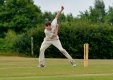
Anyone live near Pembury, Kent and fancy giving me a lesson or two.... I'll buy the beers
 
photo
 

Attachments

  • Josh Cricket 1.jpg
    Josh Cricket 1.jpg
    124.8 KB · Views: 63
It might be because im on the phone but on that photo i am struggling to see issues with grain/noise.
 
Anyone live near Pembury, Kent and fancy giving me a lesson or two.... I'll buy the beers
How fars that from North Wales :pint:
 
Looks OK. Are you pixel peeping? Most do, but you don't view a picture that way.
 
Stick with jpeg,looks fine,plus unless you really want to learn PP it will give you more time down the pub
 
Last edited:
I have a 50d (canon) and the noise control is not great. Above iso 800 it becomes quite noticeable, mainly in the shadow areas. It is a learning curve to know how to control noise and what your expectations are. Zooming in over 50% you really are going to start seeing noise that's hardly noticeable at normal viewing size. I've also found when images are printed, noise is not as bigger problem (unless it's really bad).
Getting the exposure right in the first place is a big step in the right direction and it definitely helps to over expose when using high iso. The trouble with fixing noise in the computer is, go too far and your image starts to look soft, so you add a bit of sharpening, but that brings back a noisy looking image. In lightroom (with a RAW file), I've found it best to reduce noise (to an acceptable level), then sharpen (let's say for example 35-40%), then holding the alt key (on a pc) move the sharpening mask slider to around 85-95%. This will then only sharpen the detail edges in your photo. These are only ball park percentages, you'll have to see what works best for each individual image. I hope this makes sense, I'm not best at putting things into words.
 
Last edited:
I have a 50d (canon) and the noise control is not great. Above iso 800 it becomes quite noticeable, mainly in the shadow areas. It is a learning curve to know how to control noise and what your expectations are. Zooming in over 50% you really are going to start seeing noise that hardly noticeable at normal viewing size. I've also found when images are printed, noise is not as bigger problem (unless it's really bad).
Getting the exposure right in the first place is a big step in the right direction and it definitely helps to over expose when using high iso. The trouble with fixing noise in the computer is, go too far and your image starts to look soft, so . I hope this makes sense, I'm not best at putting things into words.
Not bad for somebody over 500 years old lol
Edit,sorry thought your name was Nostrodamus
 
Not necessarily - if he underexposes even in RAW the pull back in post will just accentuate the noise.
Yep I did that yesterday evening. I had rushed around trying to follow two stags that looked like they were going to fight and got there just as they did. Unfortunately forgot to change the exposure compensation as it was set to -0.7 having been shooting backlit prior to rushing over. It's come out ok, a little noise than it should have been but only photographers notice noise.

Thanks... Not at home at the moment... Will upload then... Thanks... I always shoot in Jpeg.. Just touch up a little in lightroom... Nik def2 never heard of until now.... Can I use that in lightroom....
The D7100 can shoot JPEG and RAW at the same time so why not shoot both. Give you a chance to try RAW and still have your normal JPEG.

For learning Lightroom these free videos on Lightroom 4 were great for me. It is LR4 but majority of it still applies to LR5 and LR6.

https://en.elephorm.com/tuto-lightroom-4-complete-training/lightroom-4-introduction.html?html5

I can't see anything wrong with that. I used to have a D7100, ISO up to 1600 was fine with me. I even pushed it further if needed. The truth is the only people who notice and obsess about noise are photographers, show the image to a non photographer and it wouldn't even cross their mind.
 
I can't see anything wrong with that. I used to have a D7100, ISO up to 1600 was fine with me. I even pushed it further if needed. The truth is the only people who notice and obsess about noise are photographers, show the image to a non photographer and it wouldn't even cross their mind.
:agree:
 
Back
Top