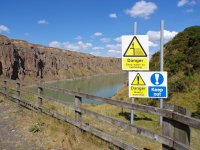
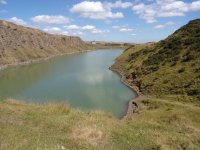
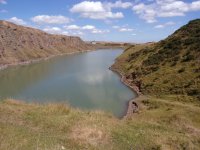
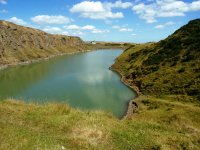
Is there a Colour cast with these images ?

BADGER.BRAD

Suspended / Banned
Messages
4,252
Edit My Images
Yes
Hello all,

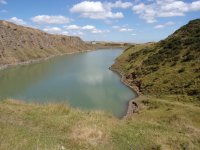
I've been using a Kodak AZ401 Bridge camera that I have had for sometime but never really used very much but to my eye the colours seem slightly off , What do you think ? I've checked the white balance setting which seems to be correct ( any others look awful) and there is no options for altering the colours in camera so any alterations will need to be done in post. It may just be I've got so use to the colours on my Sony that these just look different !

1.JPG

The pool below is green but to my eye the grass looks out
2.JPG

3.JPG
 
Last edited:
Difficult to say really. Green grass is a bit unusual these days.

Looks okay on my phone anyway. But I think it is the case that different sensors will give you a different colour palette. Some are warmer than others.
 
Look OK on my Imac but the Kodak uses a CCD sensor so yes I would expect it to look difffernet to a Sony colour pallette.

Grass coulour looks OK for this time of year and most of it is now almost brown.
 
I had no idea how to do this ( I do only very minor editing ) so looked on Youtube which was Photoshop orientated then found the same settings on Gimp ( I use Linux) from my point of view I think I've sorted it ( I backed the green off slightly) Of coarse for anyone looking at the photos it is difficult to tell unless you were there when the image was taken , To my eye everything looked a little too green. The other thing I realised is I've just changed my monitor so thought I had better look back at some old images just in case it was the monitor but they all looked fine.

The difference is fairly subtle but the first one is from camera and the second my altered image. The sky now looks a better color ( more blue) , the water looks nearer to how it was and the grass is that little bit less lush !

2.JPG
6.JPG
 
Firstly, I'm very colour blind, but I do sometimes see things from a different angle/colour scape. To me the second shot has a slight pinkish tinge around the water and far left cliffs.
As for the first shot, there is something weird about the colour but I can't make it out.
Hope that helps?
 
I think colours are sometimes a bit subjective, maybe off colours will show up more with people pictures? Just a thought.

I do think all these are nice pictures and I can't really say if the colours are necessarily off in any significant way as sometimes the light can be different from second to second.

So, nothing definite but no great worries for me :D
 
I had no idea how to do this ( I do only very minor editing ) so looked on Youtube which was Photoshop orientated then found the same settings on Gimp ( I use Linux) from my point of view I think I've sorted it ( I backed the green off slightly) Of coarse for anyone looking at the photos it is difficult to tell unless you were there when the image was taken , To my eye everything looked a little too green. The other thing I realised is I've just changed my monitor so thought I had better look back at some old images just in case it was the monitor but they all looked fine.

The difference is fairly subtle but the first one is from camera and the second my altered image. The sky now looks a better color ( more blue) , the water looks nearer to how it was and the grass is that little bit less lush !

View attachment 363208
View attachment 363209
I wouldn’t say there’s a cast per se, but each camera portrays colours slightly differently. Another big culprit is white balance and the two examples above look like a case in point. The top image is slightly too ‘green’ and the bottom slightly too magenta giving the soil and rocks too much of a magenta colour. Somewhere in between would be where I’d have it. YMMV
 
I wouldn’t say there’s a cast per se, but each camera portrays colours slightly differently. Another big culprit is white balance and the two examples above look like a case in point. The top image is slightly too ‘green’ and the bottom slightly too magenta giving the soil and rocks too much of a magenta colour. Somewhere in between would be where I’d have it. YMMV

^ I would agree this this pretty much.

Different subject, but with my night sky images where WB can be difficult at times, I push the saturation up to 100% and then strike an even balance with yellow, blue, green and magenta. That might work similar if you have white clouds as in the image above. I don't know for sure, I've never tried it, but it might be worth a try.
 
Interesting thread it’s actually something I’ve always struggled with, getting the colour balance right and still get it wrong sometimes, I’ve only just gone through some shots again to get the colour balance right
 
I would not say that there is a colour cast but the image looks a little flat and lacking in contrast mostly due to the lighting.
I have tweaked the images to add some contrast and a tiny bit of saturation but not necessarily more accurately. but mostly to the highlights and shadows but left the middle tones mostly alone. But made the lighter stones on the shore neutral.

In all these things what the camera produces is the starting point. how we interpret it is down to us, and is very personal, not better.

2copyalt.jpg
 
I would not say that there is a colour cast but the image looks a little flat and lacking in contrast mostly due to the lighting.
I have tweaked the images to add some contrast and a tiny bit of saturation but not necessarily more accurately. but mostly to the highlights and shadows but left the middle tones mostly alone. But made the lighter stones on the shore neutral.

In all these things what the camera produces is the starting point. how we interpret it is down to us, and is very personal, not better.

View attachment 364414
Yep very true indeed. I actually prefer the original to your edit if I'm being perfectly honest, but we all see things differently (y)
 
Back
Top