
and please use their services
You are using an out of date browser. It may not display this or other websites correctly.
You should upgrade or use an alternative browser.
You should upgrade or use an alternative browser.
is it poss
- Thread starter debrito
- Start date


This thread is useless without an image
Or just take the shot in the dark LOL
lol oh sorry im nearly asleep


scottthehat
Suspended / Banned
- Messages
- 6,290
- Name
- scott
- Edit My Images
- Yes
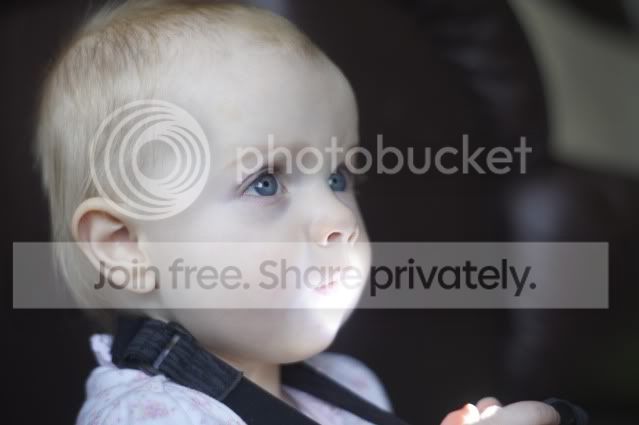
the hardest thing is the mouth. heres a quick o with burn tool and clone.
it could be done better if you spend more time.

it could be done better if you spend more time.
the hardest thing is the mouth. heres a quick o with burn tool and clone.
it could be done better if you spend more time.
thank you all for efforts
will have to do a re shoot but thank you again for trying
Do you only have it as a JPEG? It might be recoverable from an original RAW file.
no sorry only jpeg keep say im going to start shooting in raw but i always forget:bang:

Howi
Suspended / Banned
- Messages
- 115
- Name
- Howard
- Edit My Images
- Yes
no sorry only jpeg keep say im going to start shooting in raw but i always forget:bang:
There have been a LOT of threads on RAW v JPG on tp just lately, this is a classic example of where a RAW (might) just save the day.
The light around the mouth does seem VERY bright, but restricted to a small area, do you know what caused this? It would have helped to use something to prevent that light spot, blocking the light source, moving child etc.
Always difficult with this extreme of ev.
Not saying RAW would have been totally recoverable, in this case - we will never know

scottthehat
Suspended / Banned
- Messages
- 6,290
- Name
- scott
- Edit My Images
- Yes
the tourch in his hand.There have been a LOT of threads on RAW v JPG on tp just lately, this is a classic example of where a RAW (might) just save the day.
The light around the mouth does seem VERY bright, but restricted to a small area, do you know what caused this? It would have helped to use something to prevent that light spot, blocking the light source, moving child etc.
Always difficult with this extreme of ev.
Not saying RAW would have been totally recoverable, in this case - we will never know

Howi
Suspended / Banned
- Messages
- 115
- Name
- Howard
- Edit My Images
- Yes
 nice one - didn't see that.........

Kerioak
Suspended / Banned
- Messages
- 7,245
- Name
- Christine
- Edit My Images
- Yes
I think it would be possible given time and patience - I just had a very quick go and show the layers used.
Cut out mouth area and use a curves layer and mask to bring back some detail then merged and sharpened.
Then had another thought and created another curves layer and lightened the whole image apart from the eyes which I darkened, slight mask over the really bright area to lighten the whole thing

Cut out mouth area and use a curves layer and mask to bring back some detail then merged and sharpened.
Then had another thought and created another curves layer and lightened the whole image apart from the eyes which I darkened, slight mask over the really bright area to lighten the whole thing