Internet security

Rocket

CTID
Suspended / Banned
Messages
2,946
Name
Tony
Edit My Images
Yes
Hi All, Been using AVG for a few years now with decent results, however there prices are getting silly. So i wonder what others are using, Norton etc. Checked in this website, Internet security. Anyone using any of these and how they perform ?
 
I use a Mac, and a MacBook, but I use Bitdefender for my own peace of mind if you know what I mean?
I don't like the idea of no anti-virus or web protection at all.
 
I use Norton on our Windows PCs, no issues. You can usually get a discount from the likes of Amazon.
 
Like others I don't use anything on my Mac's, but I was using Cast on my Windows machines; however they tried to charge me £89 to renew for a year, and I stopped that. I appreciate that they need to develop the software and maintain their database up to date, but it seemed a lot to pay. So I'm still mulling over what to do next.
 
Avast's free AV for me.
 
I use ESET Internet Security and have been for a few years now.

In the past Norton which I would never touch with the proverbial bargepole. Kaspersky until they did not support W2K.
 
Just bought a 2 year subscription to Malwarebytes for £45 after it removed a virus that neither Win Defender or Avast would
 
I'm using Bitdefender, have done for the past few years, covers my Mac and the Win box, and would cover phone and iPad as well if I could be bovvered!
 
Just Windows built in software. Works fine, and I've never had any trouble.
 
Nothing on my Mac, and Windows Defender on my work laptop. It had a bad reputation for a while, but it's been really good for years now.
 
  • Like
Reactions: zx9
Bitdefender.

Covers my mum's laptop in Scotland; my son's laptop in the Netherlands and my brother's PC in Canada as well as my wife's laptop (she's in the USA right now) and our home PC. Aldo have it on our mobile phones. I also have their VPN.

Maybe Defender is good enough these days but I'm happy with Bitdefender so it's a worthwhile investment for me.
 
I know nothing, but rely on advice from my youngest daughter, who works in cyber security and knows far more than most . . .
She says that nothing is needed and that many of the programmes actually cause problems, and because of this I use nothing on either my PC or apple machines.
 
I know nothing, but rely on advice from my youngest daughter, who works in cyber security and knows far more than most . . .
She says that nothing is needed and that many of the programmes actually cause problems, and because of this I use nothing on either my PC or apple machines.

I also work in cyber security, and can confirm.

Unless you're visiting some pretty unsavoury corners of the internet, you'll be fine. Windows defender is actually decent, and to be honest most attack vectors rely more on social engineering nowadays, as general software security has increased so much - Why spend time cracking a vault when you can trick the owner into opening it?
 
Windows defender does the job without fuss, or cost.

All operating systems suffer from zero day exploits and it's pot luck whether any security software will help protect against that, or even potentially be the vector through which an attack is launched, as it typially runs with higher privileges than the user account (because it has to) so if compromised can wreak more damage.
 
I've been through a few, AVG would interfere with Outlook, Avast was great for a long time but then started causing a few issues, Kaspersky was pretty good but has Russian connections and now for a while I've been using Bitdefender and it's been excellent.
 
If you're using Windows, then the built in Windows Defender is more than good enough for the vast majority of users.
 
I know nothing, but rely on advice from my youngest daughter, who works in cyber security and knows far more than most . . .
She says that nothing is needed and that many of the programmes actually cause problems, and because of this I use nothing on either my PC or apple machines.

I also work in cyber security, and can confirm.

Unless you're visiting some pretty unsavoury corners of the internet, you'll be fine. Windows defender is actually decent, and to be honest most attack vectors rely more on social engineering nowadays, as general software security has increased so much - Why spend time cracking a vault when you can trick the owner into opening it?

Windows defender does the job without fuss, or cost.

All operating systems suffer from zero day exploits and it's pot luck whether any security software will help protect against that, or even potentially be the vector through which an attack is launched, as it typially runs with higher privileges than the user account (because it has to) so if compromised can wreak more damage.

You dont really need a separate AV these days. If anything, just run Malwarebytes now and again...

If you're using Windows, then the built in Windows Defender is more than good enough for the vast majority of users.

I don't wish to hijack this thread but these are very interesting posts for me, I run Kaspersky on both my Desktop and Laptop plus my Mobile (Android). I have always thought of Windows Defender as a freeby which I have thought meant not too good. Years ago I was advised to get an antivirus and Kaspersky was the one so I did and have ever since. I have to admit I have sometimes thought it a bit of an expensive luxury but paid up anyway. I don't visit any unsavory areas of the internet so are we saying here that I am wasting my money? Also if I dump Kaspersky from my Laptop and Desktop you guys are saying I will still be safe but what about my phone, it doesn't have its own AV?
 
Last edited:
I don't wish tio hijack this thread but these are very interesting posts for me, I run Kaspersky on both my Desktop and Laptop plus my Mobile (Android). I have always thought of Windows Defender as a freeby which I have thought meant not too good. Years ago I was advised to get an antivirus and Kaspersky was the one so I did and have ever since. I have to admit I have sometimes thought it a bit of an expensive luxury but paid up anyway. I don't visit any unsavory areas of the internet so are we saying here that I am wasting my money? Also if I dump Kaspersky from my Laptop and Desktop you guys are saying I will still be safe but what about my phone, it doesn't have its own AV?

Yep, you’re wasting your money.

I’ve never had antivirus on any phone I’ve ever owned.
Just like PCs, don’t download apps from dodgy websites and you should be fine.
 
Nothing on my laptop or my desktop computer other than whats built into windows... i dont visit dodgy websites.. i dont open anything sent unless I am 100% sure what it is and who from. I use a text based email system so its all ASCII not a website in an email . I stay safe and its worked for 30 years

Also i dont have anything on my systems that I wouldnt want anyone to find.. so if anyone gets in there welcome to have a look round.. nowt worth pinching or ransoming :)
 
I don't wish tio hijack this thread but these are very interesting posts for me, I run Kaspersky on both my Desktop and Laptop plus my Mobile (Android). I have always thought of Windows Defender as a freeby which I have thought meant not too good. Years ago I was advised to get an antivirus and Kaspersky was the one so I did and have ever since. I have to admit I have sometimes thought it a bit of an expensive luxury but paid up anyway. I don't visit any unsavory areas of the internet so are we saying here that I am wasting my money? Also if I dump Kaspersky from my Laptop and Desktop you guys are saying I will still be safe but what about my phone, it doesn't have its own AV?

Yes, a waste of money....
 
I am totally apple and a few years back i asked what anti virus software was needed for my desktop, phone, laptop and i pad and I was told i must download all updates and i will be ok and touch wood i have been.
 
I don't wish to hijack this thread but these are very interesting posts for me, I run Kaspersky on both my Desktop and Laptop plus my Mobile (Android). I have always thought of Windows Defender as a freeby which I have thought meant not too good. Years ago I was advised to get an antivirus and Kaspersky was the one so I did and have ever since. I have to admit I have sometimes thought it a bit of an expensive luxury but paid up anyway. I don't visit any unsavory areas of the internet so are we saying here that I am wasting my money? Also if I dump Kaspersky from my Laptop and Desktop you guys are saying I will still be safe but what about my phone, it doesn't have its own AV?

The internet isn't really the wild west it once was, at least not the parts that regular people frequent. Everything is constantly monitored, reviewed, and rated on many levels, and any malicious sites or ads don't last long before DNS rates and blocks them, and search engines remove them. As for downloads, same thing goes. Stick to trusted sites and you're fine. Any apps on the app stores (apple/android) are heavily regulated and reviewed. I've been through the process of publishing several apps and they are VERY strict about what makes it through.

We're not saying antivirus isn't needed, but it's not as important as it once was. Now, it is just another layer of security, and should be combined with other security devices and practices like software updates, strong passphrases, 2 factor authentication, firewalls, VPNs, email filtering, but the most important thing you can do is apply scrutiny to everything you do. Always check sender addresses, check links before you click on them, check domains are correct before entering any login information etc.

Kaspersky has always been a little "questionable" anyway. There have been a number of controversies around it, from using people's idle CPU time, to leaked user details, and the most recent one here - https://www.pcmag.com/news/kaspersk...eplaced-with-ultraav-in-the-us-angering-users


 
Bitdefender among others have free versions, so cost isn't a concern.
 
The internet isn't really the wild west it once was, at least not the parts that regular people frequent.
I'm quite happy to accept this, except... I've used Gmail for years (I know, beginning to think about a different email system), and I had very little Spam get through, until recently. Now around a third of "my" emails are spam or phishing attacks. I'm not sure why the change has come, and TBF there's far more in the Spam folder. Not sure if any of the Internet Security packages address this, though (we're on BitDefender).
 
I'm quite happy to accept this, except... I've used Gmail for years (I know, beginning to think about a different email system), and I had very little Spam get through, until recently. Now around a third of "my" emails are spam or phishing attacks. I'm not sure why the change has come, and TBF there's far more in the Spam folder. Not sure if any of the Internet Security packages address this, though (we're on BitDefender).

That is almost certainly down to your email address either being scraped from somewhere (like if you've ever posted it on a forum or anything), or someone has sold it, or it has been leaked from somewhere. Unfortunately there isn't much you can do. You can try any unsubscribe links but most of them simply let the sender know you are in fact a live account.

Best bet is to mark them as spam and block the sender, and hopefully in time it will calm down.

I had the same happen to my "good" mailbox. I have a couple that I use to sign up to stuff, and one that is only used for like banking, utilities, sending out CVs etc.... Fortunately I was able to calm it down after a few weeks of blocking/reporting 10-20 emails a day.
 
F Secure for many years....however Windows own is perfectly adequate as many suggest.
For renewal I phone the London number and pay about £50 for 3PCs for 2 years.
It does include VPNs etc.
Perhaps it's just a habit I've got!

PS. 'The Best PC Security Reviews' are often actually produced by the winner....really!!!:cool:
 
I have told some people who I have helped with their computers over the years that they did not need to pay for an antivirus program, but they have carried on because I think it made them feel safe. :thinking: I told them, I have downloaded a whole lot of stuff over the years, and always had a free AV program, with no problems. Over the years which one has changed, as every couple of years I check who seems to be the best free one at that time. Atm, it's Avast for me.I occasionally do a Malwarebytes scan, just as a double check.

I helped a friend choose a new laptop recently, and for what she does with the computer, it is the first time I have said to someone to just use the built in Defender program.
 
haven't used any AV products since W8 introduced defender its spot on
and I am a retired network engineer :-)
 
The worst anti virus for pc's. Bit defender > Too much cpu usage. norton/avast/avg just not that good. Melware bytes used to be good when it was free now it's horrible.

Eset antivirus and Sandboxie work well for me. Also add blockers because some adds contain malware/viruses.

Sandboxie is now free. I run anything I don't trust inside the sandbox and my system does not get infected.

The other option is to use virtualbox (free) or Vmware. Then you can install "guest" installations of operating systems that are protected from infecting your machine. You can browse any website without infecting your computer (the host).
 
I don't use anything on my various Linux machines haven't for at least 15 years ! When I used to use Windows I always wondered why you would do a virus check back to back and the second one was still picking things up. Either it was doing a rubbish check the first time round or was doing a good check then making things up on the second ?
 
Last edited:
I don't use anything on my various Linux machines haven't for at least 15 years ! When I used to use Windows I always wondered why you would do a virus check back to back and the second one was still picking things up. Either it was doing a rubbish check the first time round or was doing a good check then making things up on the second ?
Linux file system has always been far advanced then windows. And with the free versions of Linux a community of coders release updates often. But sometimes those updates can corrupt the system and I have had to reformat and reinstall Linux. Not with windows. But ahh hem. I figured you'd have heard it before. Being a Linux user. Windows leaves vulnerabilities open because some of their programs need them to function. Like how government leaves loop holes so they can exploit them. And why you need a good lawyer to exploit them too.

Only thing I've had a problem on linux is going to a website that has javascript enabled. A bloody mess. Hate hate hate hate java script.
 
The worst anti virus for pc's. Bit defender > Too much cpu usage. norton/avast/avg just not that good. Melware bytes used to be good when it was free now it's horrible.

Eset antivirus and Sandboxie work well for me. Also add blockers because some adds contain malware/viruses.

Sandboxie is now free. I run anything I don't trust inside the sandbox and my system does not get infected.

The other option is to use virtualbox (free) or Vmware. Then you can install "guest" installations of operating systems that are protected from infecting your machine. You can browse any website without infecting your computer (the host).


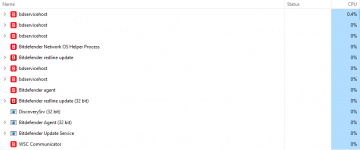
I don't seem to have that experience; when opening a council planning website it uses 0.4% on my PC (below). When opening and navigating a site like Reuters, which has some adverts, it uses about 2.5% for a few seconds. I ventured into a daily rag loaded with ads and it went to about 5% for a second or two.

Maybe if you have a low end computer it could be noticeable, but it's negligible on my computer. Windows Defender showed no usage at all during these times. I'm not sure if that's a good or bad thing.


1727610188050.png
 
I don't seem to have that experience; when opening a council planning website it uses 0.4% on my PC (below). When opening and navigating a site like Reuters, which has some adverts, it uses about 2.5% for a few seconds. I ventured into a daily rag loaded with ads and it went to about 5% for a second or two.

Maybe if you have a low end computer it could be noticeable, but it's negligible on my computer. Windows Defender showed no usage at all during these times. I'm not sure if that's a good or bad thing.


View attachment 435102
Ahh. That's interesting. I just tried it now myself with Eset. I googled routers then I looked at it's performance. I hit 5% then up to 15%. Then I waited a couple minutes and turned on add block for "Chrome" extension. I also turned on Eset "extra" security extension for chrome. It did not go above 5% cpu.

Bit defender tech support says that their program can switch itself to cpu priority level. Like maximum. Locking out all other processes. Which mean they have to wait for their turn. Sometimes the program is just scanning a 7zip file containing text files. And bump it goes to maximum work priority.
 
Ahh. That's interesting. I just tried it now myself with Eset. I googled routers then I looked at it's performance. I hit 5% then up to 15%. Then I waited a couple minutes and turned on add block for "Chrome" extension. I also turned on Eset "extra" security extension for chrome. It did not go above 5% cpu.

Bit defender tech support says that their program can switch itself to cpu priority level. Like maximum. Locking out all other processes. Which mean they have to wait for their turn. Sometimes the program is just scanning a 7zip file containing text files. And bump it goes to maximum work priority.

Aye I'm thinking it will probably depend on what's going on. I think when it's doing a definitions update it can be a little greedy for CPU, but perhaps not so much of a concern with the current levels of tech?
 
Ever since windows 10 came out I've not had any virus programs installed never had any issues relying on windows virus and firewall, Now on new laptop with windows 11 and staying the same. Should imagine I've saved a few bob over the years now.
 
I'm on Win 10 but I do have an AV, I note advice in this thread is that I don't need it and when the Sub expires I won't buy again. That said next October Win 10 will no longer be supported so I am presuming Windows Defender won't get updates so as I don't want to upgrade my computers (desktop and 2 laptops that aren't Win 11 compatible) I will need to find another AV?
 
Back
Top