Improving product photography

caramacula

Suspended / Banned
Messages
5
Name
Zoe
Edit My Images
No
I work as a product photographer for a jewellery company, mainly for their website. I am a photographer and make my own work but when I started a year ago I had no experience of this particular field. I think I've learned and improved a lot but I feel like there is still something missing from my shots, they need something to bring them up to the standard of say ASOS and net a porter (which is what my bosses are looking for) I was wondering if anyone has any knowledge of what gear or studio setup big companies like that use? Budget in my little "studio" is very limited, and turnaround is expected to be speedy on a large number of items per week, but that's no excuse for not trying to improve my shots if I possibly can. Currently I work in a very small office with
two Bowens Streamlite 330's
an additional small daylight lamp
a Canon 5D mkII with an EF 50mm macro lens, shooting RAW.
I am generally not happy with the sharpness of the images, but can't tell if I'm being fussy because I'm used to seeing film grain instead of pixels! Any help and advice would be appreciated (and help me keep my job :D)

PS Here's one of mine
15741.jpg
 
Last edited:
Hi and welcome to TP Zoe. It might help if you posted up a shot that you think is lacking in sharpness, so that other people can give you feedback on your set-up.
 
Yep, had to read up in the FAQ's! I dont know if it is sharpness per se now that I think about it, I just can't seem to figure out how to get the slickness of other websites...

Earrings are the toughest!
17967.jpg
 
Last edited:
Well it looks sharp to me (No expert), you have picked up all the indentations of the metal, on the inside but I think it is also over-exposed to my eyes.
 
Would laying the jewellery on a Black background accentuate it more? The pure White background is over-whelming the pieces IMO.
 
I totally agree about the background but sadly, the big bosses won't allow any thing else :( so I shoot usually on clear perspex (for ease of clipping), and add the white in pp. I do struggle with exposure in silver pieces, I find it really hard to get good contrast without blowing out the highlights.
 
You've just flooded it with light from all directions, it's overexposed, totally lacking in any of the shadows that are needed to define the shape of the pieces, the white background has made matters even worse and has created flare.

I really must do the tutorial on lighting jewellery that someone asked for...

Edit: BTW, what was the lens aperture? I'm guessing that part of the unsharpness is due to diffraction limitation.
 
Last edited:
I totally agree about the background but sadly, the big bosses won't allow any thing else :( so I shoot usually on clear perspex (for ease of clipping), and add the white in pp. I do struggle with exposure in silver pieces, I find it really hard to get good contrast without blowing out the highlights.

The exposure is only part of the problem, and the blown highlights can be just about acceptable, even with such small items it's difficult to create diffused specular highlights with the lighting equipment you have.

What you badly need here is some black absorbers to create some interest. Cinefoil is the obvious choice
 
I really must do the tutorial on lighting jewellery that someone asked for...

Edit: BTW, what was the lens aperture? I'm guessing that part of the unsharpness is due to diffraction limitation.

Yes please to the lighting tutorial! And thank you all for the feedback!
I keep the lens at f/11 and stack images, there are definitely diffraction issues any higher. I've been wondering if there is something up with the lens, because with small items it still doesn't cut it for me but maybe that's as sharp as they get?

I've been so preoccupied with making sure all details on the item are visible, that I probably have made the light too flat, maybe less is more!

Could you explain a little more to me about using the black light absorbers? Are they used like the opposite of reflectors?? :thinking:
 
Yes please to the lighting tutorial! And thank you all for the feedback!
I keep the lens at f/11 and stack images, there are definitely diffraction issues any higher. I've been wondering if there is something up with the lens, because with small items it still doesn't cut it for me but maybe that's as sharp as they get?

I've been so preoccupied with making sure all details on the item are visible, that I probably have made the light too flat, maybe less is more!

Could you explain a little more to me about using the black light absorbers? Are they used like the opposite of reflectors?? :thinking:

f/ll should be just about OK, diffraction wise. And that lens should be perfectly OK, but I suppose it's possible that, with your low powered fluorescent lighting, there could be camera shake if your tripod isn't up to the job or if you aren't shooting 'mirror up' - I would never use continuous lighting for this.

Yes, the cinefoil is used to produce the opposite effect to a reflector in that it absorbs light rather than reflects it, but it does more... it actually creates a black reflection, which makes the pieces look far more attractive.

Your lighting isn't just flat, it's multi-directional. Look at the diffused specular highlight tutorial I linked to and you'll see that a good starting point is to use one light directly overhead and as close as you can get it. You will have to reduce the power, which may be difficult with your lights, but neutral density gel, probably about 0.9 density, should be OK.

Then a second light to define the shape, position will depend entirely on the shape of the piece, but probably at a fairly acute angle, say front left (for this image), and again very close.
15741.jpg

And maybe a much smaller one, at a distance, in the opposite position to create a bit of 'zip' The cinefoil for this shot would be directly in front of the 'diamonds'. A lot of people say that a bit of black card can be used instead, and it can, but cinefoil would be better here because it needs to be curved to match the shape of the piece.
 
Part of the problem is flare caused by having too much white paper surrounding the jewellery. Try masking as closely as possible all around with black paper and then cut out the image in Photoshop.
 
Part of the problem is flare caused by having too much white paper surrounding the jewellery. Try masking as closely as possible all around with black paper and then cut out the image in Photoshop.
Well yes, as already noted above - and the OP is already cutting out the shots in PS.

But that's only a tiny part of the problem. As I see it, the real problem is the usual one - the employer isn't prepared to pay for a pro to do the work so they get a member of staff to do it and expect her to turn out pro results with no training, unsuitable lighting, no space, and an unsuitable lens. I bet their MD doesn't expect their salespeople to visit customers in a Reliant Robin...

Just as an example, she is stacking the images because the DOF is inadequate if she doesn't - why not use a long focal length lens, fitted with an extension tube, instead? Not only will that help with DOF, it will also give her much more working space, and room to arrange the lights where they need to be instead of where there is room for them to go. Of course, that will require more working space, and will cost money...
 
But that's only a tiny part of the problem. As I see it, the real problem is the usual one - the employer isn't prepared to pay for a pro to do the work so they get a member of staff to do it and expect her to turn out pro results with no training, unsuitable lighting, no space, and an unsuitable lens. I bet their MD doesn't expect their salespeople to visit customers in a Reliant Robin...

True, digital makes it easy to produce shots that are "good enough", fair play to the OP for wanting to do the best job possible, as you say, a longer lens would give more room to move at least, but there's no substitute for training.
 
You don't say how you shoot this stuff, but I would have thought that shooting tethered via the canon eos utility and thus seeing the shot on a large screen would be more or less essential for fine tuning your lighting.

My advice for what its worth...

Read Garry's tutorial on brightfield and darkfield lighting, its really excellent.

If you are using continuous lights then try using a small light wand to wave around the object as you watch on screen to get exactly the glint and reflection you want to compliment your main light and reflectors.

Get a extending rubber lens hood, I felt a bit of a nonce with this on my camera then I read one of Garry's tutorials and he uses one so...:)and they're only about a fiver.

Shoot through a square frame hole in a sheet of black card positioned so as you see roughly as much of the black card as you do the white in the shot, I've no idea why, but I get good results doing this shooting small shiny stuff.
 
Read Garry's tutorial on brightfield and darkfield lighting, its really excellent.
Thanks for that, someone mentioned on my lighting workshop on Sunday that he didn't understand a word of it:'( If my writing style isn't clear, I wish people would tell me what wrong with it so that I can improve...

Get a extending rubber lens hood, I felt a bit of a nonce with this on my camera then I read one of Garry's tutorials and he uses one so...:)and they're only about a fiver.
Thanks for that too (I think):lol: I also use the Lee bellows lens hood, not cheap but excellent. It's only good for lenses where the front element doesn't turn, and it blocks the focus assist light on my main camera, so it isn't for everyone. Lens hoods are absolutely vital in any kind of studio photography, and the ones supplied as standard with zoom lenses just aren't up to the job. I just don't understand why some people are prepared to spend a fortune on lenses but not a fiver on a proper lens hood:thinking:

Shoot through a square frame hole in a sheet of black card positioned so as you see roughly as much of the black card as you do the white in the shot, I've no idea why, but I get good results doing this shooting small shiny stuff.
It helps to reduce flare.
 
A good hood would certainly help, as Garry says. There's obviously tons of light flying around in the OP's pic, and lots of flare to go with it.

An ideal hood is only just larger than the image frame, just out of shot but blocking all other light. That's very hard to achieve with anything but the adjustable bellows type hood Garry linked to. Here's a cheaper version, though I've never used it http://www.premier-ink.co.uk/photographic/square-filters/p-type/ptype-bellows-hood-p-1259.html

You can adjust it to suit the focal length to an extent, and you can also cut a rectangle out of black card and slot that in the front for a perfect match.
 
A good hood would certainly help, as Garry says. There's obviously tons of light flying around in the OP's pic, and lots of flare to go with it.

An ideal hood is only just larger than the image frame, just out of shot but blocking all other light. That's very hard to achieve with anything but the adjustable bellows type hood Garry linked to. Here's a cheaper version, though I've never used it http://www.premier-ink.co.uk/photographic/square-filters/p-type/ptype-bellows-hood-p-1259.html

You can adjust it to suit the focal length to an extent, and you can also cut a rectangle out of black card and slot that in the front for a perfect match.
There is (or at least was) a concertina lens hood available with a rail, a bit like a simplified monorail rail, expensive but perfect. The one I linked to has the failing that the setting can 'creep', especially as it gets older. The answer is to varnish the outside every now and then, to stiffen it up again.

BTW, I feel it's a pity that the OP hasn't been back, it would be good to get her response to the various suggestions.
 
Sod it! I want one of them now...

I keep meaning to get one too :)

But my workaround works pretty well for product photography on a white background, using a 70-200L that has a decent sized lens hood on it already - though only optimised for the 70mm end obviously.

Cut a rectangle out of piece of thick black paper, and stick it on with BluTack. You'd be amazed at how small the rectangle needs to be to just clear the image area.

I have a couple for different focal lengths. Bit of a faff and not very elegant, but works well and makes a difference.
 
Blue tack, black card, faffing, just my kind of kit.
I never thought of sticking that card onto the front of the lens hood...:naughty: blue peter night tonight I think:)
 
Blue tack, black card, faffing, just my kind of kit.
I never thought of sticking that card onto the front of the lens hood...:naughty: blue peter night tonight I think:)

I've recently become addicted to foam board. Wonderful stuff :)
 
Looks oversharpened, over exposed and pushed too hard in processing

It is overlit, and thus a lot of the detail has been lost

It would look a lot better on a black or grey background. Part of the issue is pushing the shot to get a white background

This needs HARD oblique directional lighting (as well as a splash of soft global lighing). You have used soft lighting from all angles, which simply washes the shape of the product away

what happened to the colour of the twinkles in the jewels?
 
Last edited:
Blue tack, black card, faffing, just my kind of kit.
I never thought of sticking that card onto the front of the lens hood...:naughty: blue peter night tonight I think:)

Just been playing about with this idea a bit more, to make my naff but effective cardboard cutout idea a bit neater and better. Gonna have a go at a zooming lens hood :D

Lens is Canon 70-200/4, standard hood ET-74 is a bit over 3in long with almost parallel sides. So gonna to fit a cardboard sleeve making the sides truly parallel, then an outer sleeve that slides up and down with a rectangle of black card on the front.
 
From memory, there used to be at least one zooming lens hood once - Vivitar I think...

There's a Wiki explanation of lens hoods here - blame me if you don't like it
 
One of the main problems is sometimes a white background is stipulated, such as Amazon.

We do a batch of makeup (about 30-40 products) every week which is destined for Amazon and it all has to have white backgrounds. When we get black items in black boxes it's a doddle but half the time we get clear bottles and white boxes which we flag both sides with matt black card to absorb light and bounce back some shape into the bottles.

Didn't know about the Cinefoil stuff but will deffo give it a look (cheers Gary.)
 
One of the main problems is sometimes a white background is stipulated, such as Amazon.

We do a batch of makeup (about 30-40 products) every week which is destined for Amazon and it all has to have white backgrounds. When we get black items in black boxes it's a doddle but half the time we get clear bottles and white boxes which we flag both sides with matt black card to absorb light and bounce back some shape into the bottles.

Didn't know about the Cinefoil stuff but will deffo give it a look (cheers Gary.)
Yes, Amazon can be a bit of a pain, and they're not the only ones.
Have you considered shooting on a non-white background and getting someone like Clipping Paths Asia to do the clipping paths for you? The quality difference/ease of shooting makes the small cost well worth while IMO.
 
Wow awesome responses! Here was me thinking there was no rush to check back, I love this place!
It is indeed the usual problem, no budget, expected turnaround of 150 product a week :shake: I do have experience as a photographer though, just not specific product photograhy training! Working hard at changing the attitude of the higher ups but it's something of an uphill battle... I will try a few of those macgyver tricks though and look into the lens hood, thank you for the suggestions! Meantime, I've been trying less flood light with reflectors for highlight and some black card for definition, hopefully this is an improvement!
18202.jpg
 
Wow awesome responses! Here was me thinking there was no rush to check back, I love this place!
It is indeed the usual problem, no budget, expected turnaround of 150 product a week :shake: I do have experience as a photographer though, just not specific product photograhy training! Working hard at changing the attitude of the higher ups but it's something of an uphill battle... I will try a few of those macgyver tricks though and look into the lens hood, thank you for the suggestions! Meantime, I've been trying less flood light with reflectors for highlight and some black card for definition, hopefully this is an improvement!
Well, maybe some improvement but, to be frank, it's nowhere near professional standards and needs to be far better
Working hard at changing the attitude of the higher ups but it's something of an uphill battle...
Just tell them to ring me, I have a knack of educating people in this situation:lol: Or just show them this thread. They need to realise that, however good a photographer you may be, you can't work miracles and can't produce good work unless they give you the tools you need.

Edit: If they spend just £1500 on the right equipment and you are photographing 150 items per week, over a year that amounts to just 5p per item! Even the most obstruse, tight fisted accounts types must see that it's a no brainer...
And, with the right equipment and some training you won't need to stack the images (or at least not often) so will save an enormous amount of time too. I'm going to do a simple tutorial on this very subject.
 
Last edited:
I've been thinking - a lot of people seem to struggle with photographing jewellery, it really isn't difficult but it does require both approaches and techniques that aren't always present in other kinds of product photography - so I really do need to produce a simple tutorial on how it's done.

But I have a problem. Although of course I've photographed a lot of jewellery, I don't actually like it or use it, and nor does anyone in my family, the female members of which have even more expensive interests - like horses:( So, I don't have any available to photograph. I don't mind buying bits and pieces like tomatoes just for a tutorial but I'm not going to go out and buy jewellery:)

So, if anyone wants to know how its done and would like to either come to my studio by arrangement with some small shiny stuff, I can do the photos for the tutorial while they wait, or it can be sent by post and returned when I've finished.

Over to you lot...
 
Just been playing about with this idea a bit more, to make my naff but effective cardboard cutout idea a bit neater and better. Gonna have a go at a zooming lens hood :D

Lens is Canon 70-200/4, standard hood ET-74 is a bit over 3in long with almost parallel sides. So gonna to fit a cardboard sleeve making the sides truly parallel, then an outer sleeve that slides up and down with a rectangle of black card on the front.

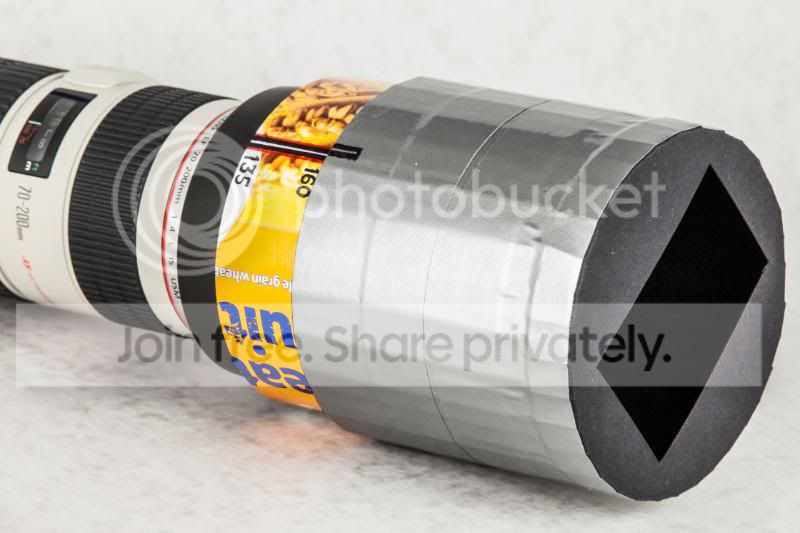
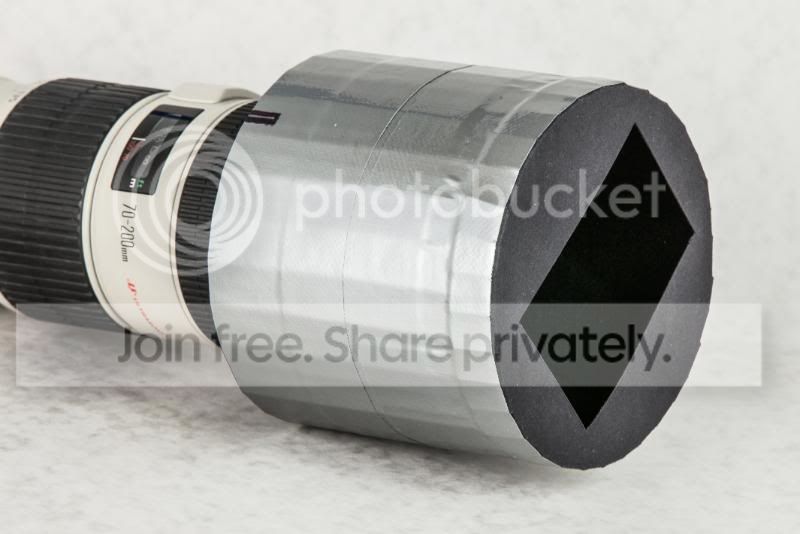
Here's my zooming lens hood, made from cardboard and gaffa tape :D

It zooms to cover the image exactly from about 80mm to 160mm (on full-frame) and works well, if not astonishingly better. See sample pics in next post, over the page.

I started with a replacement hood, a cheapy off Amazon, and lined it with self-adhesive black felt from Hobbycraft (79p). The outside was then covered with cardboard from a Weetabix box, with a little extra packing towards the bottom to make sure the sides of the hood were exactly parallel.

The outer sleeve is made from corrugated cardboard, lined with black felt so it's nice and dark and slides easily. Then a rectangle cut from think black card attached to the front, and the whole lot wrapped in gaffa tape.

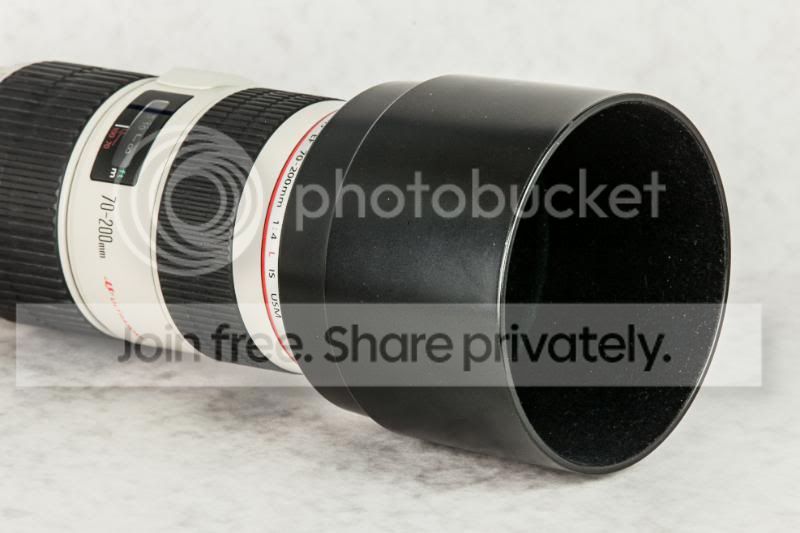
The standard hood is 80mm deep and 100mm wide, and the zooming hood extends an extra 80mm, and plus the front rectangle is only 72mm wide. So the shading is dramatically better.

It's not really intened for general use, just studio work where I often shoot against a bright white background.

Hood at 160mm (about max)
untitled-9655.jpg


Hood at 80mm (min)
untitled-9656.jpg


Standard hood
untitled-9653.jpg
 
Last edited:
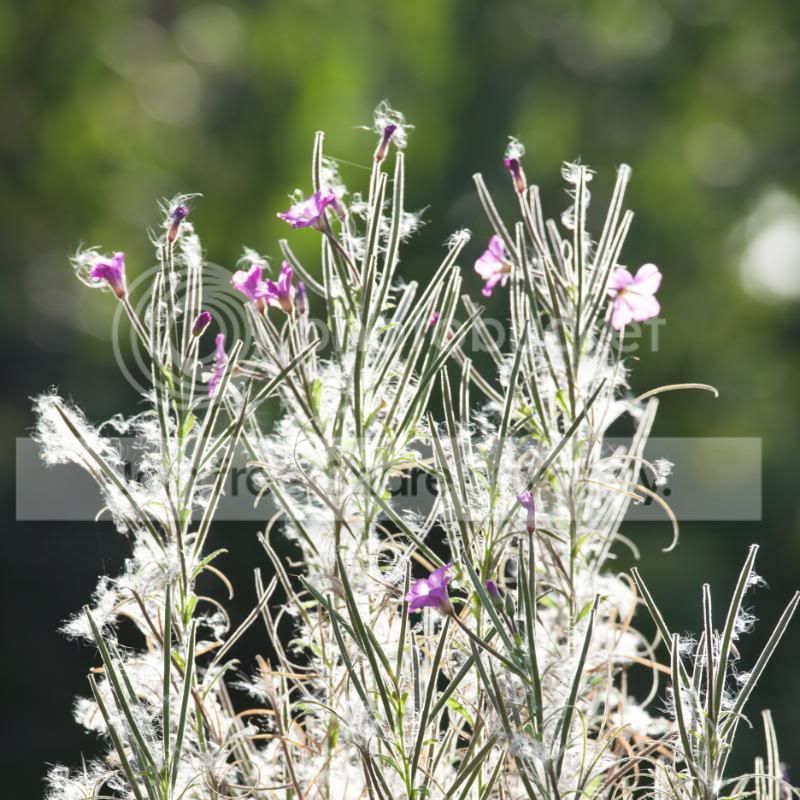
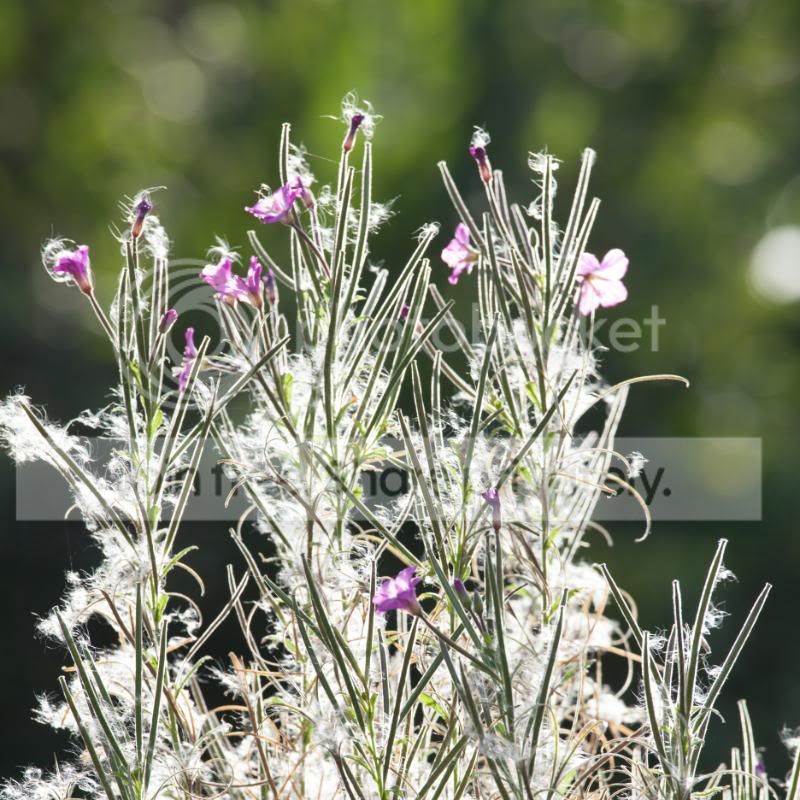
The zooming hood in action, shooting into bright light. The sun is directly above these flowery weeds I found in the garden, though actually well above and out of shot.

In use, with the zoom hood extended, the image has noticeably more contrast and saturation, especially compared with using no hood at all.


Hood at 160mm (lens at 200mm)
Hoodat160mm-9638-1.jpg


No hood
Nohood-9640-1.jpg


Standard hood
Stnrdhood-9641-1.jpg
 
Last edited:
Sorry for heading a bit off-topic, but does the modified hood idea only work for close-up subjects? And now for the silly bit, having seen Richards pics (above) would there be any benefit in making a modified hood for my 600mm (used on a 7D) when doing bird-on-a-stick type stuff?
 
Sorry for heading a bit off-topic, but does the modified hood idea only work for close-up subjects? And now for the silly bit, having seen Richards pics (above) would there be any benefit in making a modified hood for my 600mm (used on a 7D) when doing bird-on-a-stick type stuff?

A good lens hood works at any distance - whenever there is very bright light just outside the frame.

Not sure I would bother with one for a 600mm lens, as the standard one is pretty deep and there comes a point when enough is enough. In theory, you could put a massively long hood on a 600 without vignetting problems, at a guess perhaps 30-40cms long, but I don't think you'd see much improvement over stock.

You'd get most benefit with something like a standard range zoom, but very hard to make one for that and keep it practical. Best to buy one of those bellows type hoods from Lee, or similar.
 
Excellent.
I'm one of those people who is happy to spend money when needed but just as happy to make or modify something. I had to do this a few years ago (OK, quite a lot of years ago) when I had nothing and I'm still happy to do it when necessary - and necessary is often when something just isn't available commercially, or which may be available but hasn't been designed as well as it should.

Also, I don't give a damn what other people think. Personally I find it strange that so many people feel that their photo equipment needs to look 'professional'. Clients don't care, they judge on results not on appearances.

Back to the fancy lens hood - good lens hoods are essential, especially in the studio, and this is the way that lens hoods should be. Most of the lens hoods supplied with zoom lenses work badly at the wideangle end and hardly at all at longer settings. Perhaps Canon should make them, paint a red 'L' on them and charge a fortune for them, people might then realise their worth...
 
The zooming hood in action, shooting into bright light. The sun is directly above these flowery weeds I found in the garden, though actually well above and out of shot.
My flabber is well and truly ghasted. That's quite a difference.

Time to do some experimentation....
 
Cheers guys :) It was fun to do, but actually took a lot of time. Deciding how to do it was easy enough, very much helped by the standard hood having almost parallel sides to start with, but working out the exact dimensions - optimum sizes vs practical/possible etc - took a while. Then actually making the thing.

I'm pleased with the results though, and that's spurred me to perhaps actually get one of those bellows hoods I've been thinking about for ages, to use on 24-105. That's the lens I generally use for blown white background portraits and stuff, when there is always tons of very bright light blasting straight at the lens.

Might get this one (Kood, £50) and enhance it a bit further with some black card masks slotted in the front to extend the range http://www.premier-ink.co.uk/photographic/square-filters/p-type/ptype-bellows-hood-p-1259.html

PS Optium size is tricky. It varies a bit with focusing distance (focus breathing) and at low f/numbers it can intrude almost invisibly, darkening the edges fractionally without you noticing. You need to test it every which way. What I've ended up with is actually quite conservative - could mostly get away with a bit longer/tighter.

Edit: here's another one, £35 from SRB - it does look very similar to the Kood and Lee ;) http://www.srb-griturn.com/bellows-type-lens-shade-687-p.asp Or this one (used, Mamiya) is a work of art http://www.bhphotovideo.com/c/product/800876038-USE/Mamiya_213_376_G3_Bellows_Lens_Hood.html :love:
 
Last edited:
That's brilliant, this is as far as I got with my faffing


Uploaded with ImageShack.us

It squashes the rubber lens hood sort of square and hangs on with just that pressure, then you move it back and forth as required.Mind you,now I've seen yours with weetabix cardboard, corrugated cardboard, black felt...not to mention the stylish gaffer tape embellishment, mine looks a bit crap and amateurish now. That was a bloody good idea putting that hole on the hood Richard, no more messing about with black card and clips.
I will say, these hood things make a massive difference to close in colour accuracy, at least with my stuff anyway. I tried to get one of those concertina things but they were out of stock and still are by the look of it
 
Back
Top