Imported images darker in Capture One?

mrk123

Suspended / Banned
Messages
290
Name
kane
Edit My Images
No
Hi.
Canon 5dmk3 - Canon 70-200 2.8 - Tether cable - Shot RAW

I shot tethered a few weeks ago in a studio environment, tethered to my laptop, images and lightiung looked great.
I shot direct to my macbook. I forgot to set the save as card and mac.

I got back and obvioulsy all the images already on mac - saved in the C1 catalog.

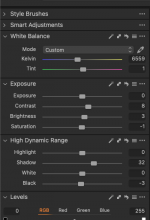
They looked good in C1... But I noticed it had automatically adjusted the levels, I think mainly it boosted all the shadows, but all images were fine. When I sent an image to photoshop to edit it toally wacked out all the levels...

I then got the images form the C1 and saved to my external hard drive... I then added on to my mac docs folder and imported that folder, now the images are all much darker.. what the hell is going on here. I am not a noob, using lightroom for 10 years and come onto C1 5 months ago, but first time I shot tethered with C1.. Not happy....

Is there some silly setting I have to apply on import??
 
Last edited:
Hi.
Canon 5dmk3 - Canon 70-200 2.8 - Tether cable - Shot RAW

I shot tethered a few weeks ago in a studio environment, tethered to my laptop, images and lightiung looked great.
I shot direct to my macbook. I forgot to set the save as card and mac.

I got back and obvioulsy all the images already on mac - saved in the C1 catalog.

They looked good in C1... But I noticed it had automatically adjusted the levels, I think mainly it boosted all the shadows, but all images were fine. When I sent an image to photoshop to edit it toally wacked out all the levels...

I then got the images form the C1 and saved to my external hard drive... I then added on to my mac docs folder and imported that folder, now the images are all much darker.. what the hell is going on here. I am not a noob, using lightroom for 10 years and come onto C1 5 months ago, but first time I shot tethered with C1.. Not happy....

Is there some silly setting I have to apply on import??
Several things could be going on here.

C1 will or won't apply an auto adjustment on import, depending on whether you ask it to You can select which auto adjustments are applied And you can automatically apply a style or multiple styles on import. It sounds as if you have things set up to apply at least the auto-levels on import. So this would be something to check. with C1

When you send the images to Photoshop, are you using the "Edit with" option.

In my experience using "Edit with" to open PS from C1 gives images in PS essentially identical to the ones in C1. When you send to PS using "Edit with", C1 creates a PSD or TIFF, with the C1 edits baked in, before opening it in PS. Any further edits in PS are then made on the PSD/TIFF already in C1, and are visible in C1, everytime you make a save in PS.

The "Open with" option sends the raw file to PS, which will open in ACR, and you start from scratch, C1 will still read all the PS edits made to the PSD/TIFF, and you can still edit on top of the PS edits in C1. but you can't change the edits made by PS in C1

However, if you send a PSD back to PS, using the "Open with" menu, C1 leaves all the PS edits untouched (including layers) and you can carry on editing in PS. You won't be able to see the C1 edits inside PS, but it's still useful to go back and fix things

When you say, You "imported" the folder, is that the raw files being imported into Lightroom, because LR is using a very different set of auto settings on import than C1 does, And assuming you are importing the raws, LR will have no idea what processing has been done by C1.

The fact they are a lot darker, suggests that C1 has been adding exposure at some stage in the process, which of course LR won't be aware of, and will only be visible in C1, or in C1 created PSDs, TIFFs or JPEGs.
 
Several things could be going on here......
Thank for info.
I have decided to get someone on PPH to do this edit (73 images), get them all cut out and placed on clean background (ecommerce shoot)... I am now at a predicament again.
The raw files that are in the C1 catalog as stated are correct light wise... The raw files I took out of catalog and saved ar dark.
I want to send the raw files to an editor now, but the ones I copied from the catralog are all dark.
Should I export original in capture one as what format to send to an editor??
If Capture one had just saved these to my card as well I would not have any of this headache. As if that is not a standard option!

So in short, I need to get these files over to an editor as I see them correct in Capture One...?? What file format??? TIFF would be 90mb? Huge.. I can;t seem to find CR2?
 
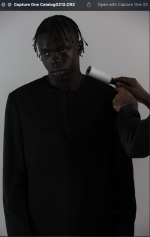
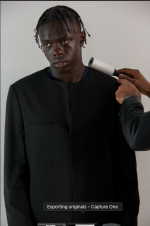
Two images here, the dark one is 'export original' and the lighter one is what is in light room...
What on earth is going on?? Capture One really???!
 

Attachments

  • Screenshot 2025-02-23 at 14.31.15.png
    Screenshot 2025-02-23 at 14.31.15.png
    403.8 KB · Views: 12
  • Screenshot 2025-02-23 at 14.31.22.png
    Screenshot 2025-02-23 at 14.31.22.png
    480.9 KB · Views: 12
I don't understand why C1 is making my life hell..
I shot these images to a good lighting standard, albeit with some adjustments needed.
I should have them in raw format as they were shot... As I always do, but since it's now gone through the C1 system it's all ruined..
 
Thank for info.
I have decided to get someone on PPH to do this edit (73 images), get them all cut out and placed on clean background (ecommerce shoot)... I am now at a predicament again.
The raw files that are in the C1 catalog as stated are correct light wise... The raw files I took out of catalog and saved ar dark.
I want to send the raw files to an editor now, but the ones I copied from the catralog are all dark.
Should I export original in capture one as what format to send to an editor??
If Capture one had just saved these to my card as well I would not have any of this headache. As if that is not a standard option!

So in short, I need to get these files over to an editor as I see them correct in Capture One...?? What file format??? TIFF would be 90mb? Huge.. I can;t seem to find CR2?
The raw files should be on your hard drive (where ever you told C1 to save them to), for you to do whatever you want to do with them. C1 "never" alters the raw files. You only ever see and work on a preview. As does Lightroom.

If you want to send the raws to someone else, there is no need to involve C1. (unless, your retoucher uses C1 and you want to send them your edits along with the raws, you then have two different options)

I am assuming you have followed the advice from the other thread, and and sorted out managed catalogue vs referenced catalogues. And, hopefully created a new referenced catalogue with thm

However, having said that, what do you mean by the "raw files you took out of the catalogue", If they aren't CR2 files they aren't your raw files.
 
Two images here, the dark one is 'export original' and the lighter one is what is in light room...
What on earth is going on?? Capture One really???!
C1s "export original" is exporting the original raw with no C1 adjustments

What are viewing the exported original in?

Whatever it is , you are looking at it's rendering of the original raw, not C1s

And with the LR version you are looking at its default rendering of the raw.
 
When I shot in the studio and seen them on my mac tethered I was viewing a correctly lit image in C1..
Are you saying that C1 was showing me an edited raw file? Because why now are al my raw files darker? Even when I export original from C1 it makes it massivley darker, see above post??
 
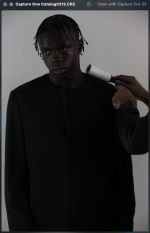
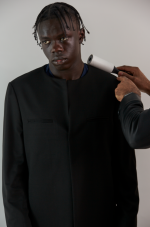
Look here, even if I select 'include adjustments' it still exports it as darker..
What is going on?!
Dark one is the export, the lighter one is as seen in C1
 

Attachments

  • Screenshot 2025-02-23 at 16.48.24.png
    Screenshot 2025-02-23 at 16.48.24.png
    408.6 KB · Views: 3
  • Screenshot 2025-02-23 at 16.51.01.png
    Screenshot 2025-02-23 at 16.51.01.png
    483.1 KB · Views: 3
I tried to export as previpis settings but it exports as jpg... i need original raw files.. When I try to export originals it always saves as darkened! ?

There's has to be something I can do here, like a setting ?? I need to get RAW files off to someone today.
 
Last edited:
Look here, even if I select 'include adjustments' it still exports it as darker..
What is going on?!
Dark one is the export, the lighter one is as seen in C1
You haven't answered my question on how you are viewing the file exported from C1.

When I shot in the studio and seen them on my mac tethered I was viewing a correctly lit image in C1..
Are you saying that C1 was showing me an edited raw file? Because why now are al my raw files darker? Even when I export original from C1 it makes it massivley darker, see above post??
C1 is "never" showing you the raw file, just as LR is "never" showing you the raw file.

Both programs create a "preview" file from the data contained in the raw file, which is what you are looking at.

Each program making their own unique, and different interpretation of the raw data.
 
It looks like for whatever reason, when I was tethered, and shot, capture one has automatically increased adjustments, giving me a false readong pon lighting, ALL the originals are a few stops lower! Now how do I edit them and SAVE as new RAW??? Because if I try to export as PSD its 125mb!
I need to get these RAWS over to someone later. Is there a way to solves this and why hell has C1 messsed with the adjustments during the shoot!?
 
You haven't answered my question on how you are viewing the file exported from C1.


C1 is "never" showing you the raw file, just as LR is "never" showing you the raw file.

Both programs create a "preview" file from the data contained in the raw file, which is what you are looking at.

Each program making their own unique, and different interpretation of the raw data.
OK HOw do I edit ther raw and ave as new raw.. I need to get correctly adjusted raw files to an editor...
 
These are the setting on every single photo that C1 has applied!
 

Attachments

  • Screenshot 2025-02-23 at 17.05.25.png
    Screenshot 2025-02-23 at 17.05.25.png
    43 KB · Views: 8
OK HOw do I edit ther raw and ave as new raw.. I need to get correctly adjusted raw files to an editor...
In terms of getting your raw files. You need to do what was explained to you in this thread:


I think you need to try and slow down a bit, and read what is being said here, and in the other thread, because you are coming back with questions which have already been answered.

1. I still want to know what program you viewed the C1 "export original" file in?

2. Are these the same files that you were asking about in the old thread I posted the link to.?

3. What program is your retoucher using? As I have already explained, the export options (other than export original), only include C1 processing information that can be read by C1. If your retoucher doesn't have C1, they will only have access to the unprocessed raw file, with the default processing of whatever raw converter they use.
 
These are the setting on every single photo that C1 has applied!
As I said in an earlier post This is because you had selected the auto adjust on import option, or asked for a style to be applied on import.

edit, but this does not affect the raw files in any way, just how the preview looks
 
Last edited:
In terms of getting your raw files. You need to do what was explained to you in this thread:


I think you need to try and slow down a bit, and read what is being said here, and in the other thread, because you are coming back with questions which have already been answered.

1. I still want to know what program you viewed the C1 "export original" file in?

2. Are these the same files that you were asking about in the old thread I posted the link to.?

3. What program is your retoucher using? As I have already explained, the export options (other than export original), only include C1 processing information that can be read by C1. If your retoucher doesn't have C1, they will only have access to the unprocessed raw file, with the default processing of whatever raw converter they use.
1. The export lands on my desktop, I just hit space bar and it enlarges.. I don't need to to open in another prpgram to view it..
2. Yes same files.
3. I don't have a retoucher yet, I will find one as soon as i get raw images as they were shown to me in C1.... As to my knowledge this is what I was shooting, but because C1 has auto applied adjustments to my raw files, the actual raw files are actually a few stops darker.
 
1. The export lands on my desktop, I just hit space bar and it enlarges.. I don't need to to open in another prpgram to view it..
OK, that explains why its different (darker) you are just seeing a different rendition of the raw file So you aren't seeing any of the C1 edits
2. Yes same files.
OK, in that thread, you replied that you had been successful at extracting the Raws, from the C1 managed catalogue (that you had accidentally used in C1, even though the default is a referenced catalogue). BUT in this thread you are still saying you cannot find the raws.

Is that correct
3. I don't have a retoucher yet, I will find one as soon as i get raw images as they were shown to me in C1.... As to my knowledge this is what I was shooting, but because C1 has auto applied adjustments to my raw files, the actual raw files are actually a few stops darker.
Well, you now know that you aren't looking at the raw image, but a processed preview. When tethering there is an "exposure evaluation" histogram which shows the histogram for the raw file and can be used to judge exposure, I use this to evaluate exposure of non-tethered images as well.

However the two key things are to try and sort out the status of your raw files ie where are they, and what software your retoucher uses.

If you want to send raw files to the retoucher along with some basic processing instructions (ie exposure adjustment) then you need to know what programs they use.

Most high end retouchers I am aware of, favour C1 + PS, but will also be familiar with ACR (LR). And although you can use the "export original" option in C1 to save the editing instructions into the XMP sidecar that goes with the raw file, or as an EIP file that bundles the raw and the editing instructions into a single file, neither are of any use if you don't have C1.

But first, it seems we still need to srt out what is happening with the raw files.
 
OK, that explains why its different (darker) you are just seeing a different rendition of the raw file So you aren't seeing any of the C1 edits

OK, in that thread, you replied that you had been successful at extracting the Raws, from the C1 managed catalogue (that you had accidentally used in C1, even though the default is a referenced catalogue). BUT in this thread you are still saying you cannot find the raws.

Is that correct

Well, you now know that you aren't looking at the raw image, but a processed preview. When tethering there is an "exposure evaluation" histogram which shows the histogram for the raw file and can be used to judge exposure, I use this to evaluate exposure of non-tethered images as well.

However the two key things are to try and sort out the status of your raw files ie where are they, and what software your retoucher uses.

If you want to send raw files to the retoucher along with some basic processing instructions (ie exposure adjustment) then you need to know what programs they use.

Most high end retouchers I am aware of, favour C1 + PS, but will also be familiar with ACR (LR). And although you can use the "export original" option in C1 to save the editing instructions into the XMP sidecar that goes with the raw file, or as an EIP file that bundles the raw and the editing instructions into a single file, neither are of any use if you don't have C1.

But first, it seems we still need to srt out what is happening with the raw files.

Yes..
I have the raw files saved on hard drive.. they are all dark..

I have just got one of the raw, opened in photoshop and its very dark, I would show screen grab but the upload size on this site is tooo low! they wont alloe me to upload screen shots.
All these raw files are dark no matter what way I view them, nothing I can do will change that.. C1 has tricked me into thinking i had exposure correct, when all it was doing was just adjusting the lighting itself, and not giving me a true representation of light, so I was adjusting the stufio lights according to C1 interpretation of my images. !?
 
Yes..
I have the raw files saved on hard drive.. they are all dark..

I have just got one of the raw, opened in photoshop and its very dark, I would show screen grab but the upload size on this site is tooo low! they wont alloe me to upload screen shots.
All these raw files are dark no matter what way I view them, nothing I can do will change that.. C1 has tricked me into thinking i had exposure correct, when all it was doing was just adjusting the lighting itself, and not giving me a true representation of light, so I was adjusting the stufio lights according to C1 interpretation of my images. !?
I don't need to see how dark they are. I was just confused, because you said in an early post (n this thread) that you couldn’t find the CR2 files.

It would seem that because you weren't checking your exposure, and had auto adjust activated, C1 was correcting for you underexposing by two stops. If you were tethering with. LR and had it set up to auto adjust on import it would have been the same problem, and I'm fairly sure LR doesn't offer the exposure evaluation histogram for the Raw file that C1 offers.

I am still a little puzzled at what has happened, as the screen shot you posted of the C1 adjustments showed no exposure correction, unless it was all in the levels (which I couldn't see), but that also seems odd to me.

Unfortunately, you now realise there is nothing you can do about the underexposed raws. You can send the retoucher raw files + instructions (in an XMP sidecar) for generating corrected previews, but they will still be working with the original underexposed raws.

And you can do this with either C1 or LR, depending on what your retoucher uses.

Do you now have the raws in a C1 reference library?
 
Last edited:
I don't need to see how dark they are. I was just confused, because you said in an early post (n this thread) that you couldn’t find the CR2 files.

It would seem that because you weren't checking your exposure, and had auto adjust activated, C1 was correcting for you underexposing by two stops. If you were tethering with. LR and had it set up to auto adjust on import it would have been the same problem, and I'm fairly sure LR doesn't offer the exposure evaluation histogram for the Raw file that C1 offers.

I am still a little puzzled at what has happened, as the screen shot you posted of the C1 adjustments showed no exposure correction, unless it was all in the levels (which I couldn't see), but that also seems odd to me.

Unfortunately, you now realise there is nothing you can do about the underexposed raws. You can send the retoucher raw files + instructions (in an XMP sidecar) for generating corrected previews, but they will still be working with the original underexposed raws.

And you can do this with either C1 or LR, depending on what your retoucher uses.

Do you now have the raws in a C1 reference library?
Yep looks like they are all underexcposed... the previews on my mac (the larger monitor was not working) where bang on, but C1 was tricking me, why would you need autoadjust?!
Do you think I will suffer some image quality by needing to bump up the darks now?!
Yes they are in C1 previrew...
The folder that was created when I shot are "perfectly lit"
The C1 older I created when I imported the raw files from saving them from the C1 library are all underexposed.
The issue is now I neeed to send this job to someone who does not mind cutting out all the models from backgrounds, whilst the background is goods, I need 100% consistency, and i do not have the patience for pen tool or magic wand and 'select clour' does not work....
Now whoever does this will have underexposed raws...?
 
Yep looks like they are all underexcposed... the previews on my mac (the larger monitor was not working) where bang on, but C1 was tricking me, why would you need autoadjust?!
Do you think I will suffer some image quality by needing to bump up the darks now?!
Yes they are in C1 previrew...
The folder that was created when I shot are "perfectly lit"
The C1 older I created when I imported the raw files from saving them from the C1 library are all underexposed.
The issue is now I neeed to send this job to someone who does not mind cutting out all the models from backgrounds, whilst the background is goods, I need 100% consistency, and i do not have the patience for pen tool or magic wand and 'select clour' does not work....
Now whoever does this will have underexposed raws...?

Tethering is often used in circumstances where the client is watching the images as they come through from the camera onto the monitor. The digitech will have checked, and double checked, the exposure with the exposure evaluation histogram, and other testing before starting the shoot, but the "correct" exposure might not give a preview that the client can judge. So, auto adjust and a "client" style can give a preview that the client can understand.

For example a properly exposed raw, gives an overexposed preview. So, you can't judge "optimal" exposure by looking at the screen. I often expose for the highlights, which can result in important midtones being very dark and impossible to judge for detail and sharpness. So I apply auto levels and a custom style on import, to give me an adjusted image aimed at helping me cull my images.

The auto adjust in C1 allows you to customise which tools are used, and depending on what you are photographing can be useful to see what the picture might look like after processing. For example, you might be doing a low key portrait shoot, so you set the exposure based on producing a good quality raw, but use auto adjust to brighten the preview images so you can quickly check the models expression.

Generally speaking I have "auto adjust on import" switched off in both C1 and LR. Off is the default in both programs.

*Yes they are in C1 previrew*

I don't know what that means is "previrew" a referenced library. As an aside, for tethering I would be using sessions as they are designed around tethering.

I can't really make any assessment on how much the underexposure will have on quality. It depends several things and they might be fine. For example, if they were exposed at 100 ISO, and you are two stops under, that’s still roughly the equivalent of 400 ISO.

If they look OK to you once you bump the exposure up a couple of stops, then I would have thought they would be OK. But I know nothing about cutting out backgrounds or ecommerce requirements.
 
I worked hard to set the lights up, got a good exposure and worked all day... Only to realise that in actual fact - C1 was just making my pictures look good for the client on my laptop screen but only to actually have them all underexposed.
If I do a an interior shoot, and just use the back of my camera as reference, I am 100% sure that what I see on the camera screen is what I will see when I load onto mac,...
Now, I have 200 raw files that are all under exposed and all the lighting work I put into the day was washed down the pan?
I am struggling to believe that this is how it is in the pro world of capture 1.. so everyone who tethers has this same issue?
 
I worked hard to set the lights up, got a good exposure and worked all day... Only to realise that in actual fact - C1 was just making my pictures look good for the client on my laptop screen but only to actually have them all underexposed.
If I do a an interior shoot, and just use the back of my camera as reference, I am 100% sure that what I see on the camera screen is what I will see when I load onto mac,...
Now, I have 200 raw files that are all under exposed and all the lighting work I put into the day was washed down the pan?
I am struggling to believe that this is how it is in the pro world of capture 1.. so everyone who tethers has this same issue?
To be blunt, in the pro world of C1, people have learned to use the program properly, so they don't have any of the issues you have had.

And I am 100% sure that what you see on the back of the camera isn't what you will see when you load it onto the Mac, it might be similar, but not the same, At each stage,what you see is dependent on how a particular software interprets the raw file, and the device displaying it. Your eyes also adapt to different lighting situations and displays. I'm not saying it isn't useful, but it isn't a good way of assessing optimum exposure. I use it to warn me when exposure is way out, but never to assess the final exposure settings.

The important bit, is the data recorded in the raw file, and neither the view on the back of the camera or the view on your Mac, is an accurate measure of the data available in the raw file.
 
OK but the only thing we have when in the field is the back of camera or a screen to view.
So there's no way I can export these 'correct' images as raw again??? Because the only way I can seem to export anythign that resembles what I have shot is sagving as jpg or psd, psd are coming out at 120mb! What can I do here?
 
OK but the only thing we have when in the field is the back of camera or a screen to view.
Well, there is the histogram, which although it still doesn't show what the raw file is capturing, it gives a better indication of what is happening, and you can manually adjust the exposure up and down to get an idea of the tonal range you are trying to capture. But there are other approaches to assessing exposure. Most modern cameras are fairly tolerant , as long as you avoid blowing highlights.

And of course, as I mentioned earlier, the Exposure Evaluation Histogram in C1 displayed when you are tethering, gives a good indication the raw image capture, and gives a better estimate of exposure than a camera histogram does. The exception is Phase One cameras, which give a proper raw histogram in-camera.

I am still surprised that with two stops underexposure this wasn't visible in the C1 Live View window.

So there's no way I can export these 'correct' images as raw again??? Because the only way I can seem to export anythign that resembles what I have shot is sagving as jpg or psd, psd are coming out at 120mb! What can I do here?
Not that I'm aware of.

The raw is the raw. All the options I can think of will involve converting the file into another format, which will involve approximately tripling the size,as because they need separate layers for each colour channel (DNG, TIFF and PSD).
 
When I am shooitng, and with digital, I (and most others) are not doing math equations in the head, I am going off of a visual representation, I don't understand why capture one has done this - shown me their interpretatioj of my image and made me light my shoot according to its own interpretatioj all the while making sure the raw file is almost black.. They have really screwed this up!
 
Well, if the image looked fine to the client when shooting, he/she was looking at an adjusted view of the RAW. you still have the RAW. The same RAW that was taken.

You just need to find what adjustments were made to the RAW to get the image right for the client. Then apply them. With Capture One it is easy to make an adjustment layer and apply it to all images.

Then, next time, do what Graham says and check and double check.
 
OK HOw do I edit ther raw and ave as new raw.. I need to get correctly adjusted raw files to an editor...
You don’t.

A raw file is just that. Exactly as the camera captured it. A raw file is not pixel based file so cannot be edited and saved like a .jpg or .tiff.

All raw editing is “non destructive”. You can only apply edits with a raw editor and export to a pixel based file.
 
When I am shooitng, and with digital, I (and most others) are not doing math equations in the head, I am going off of a visual representation, I don't understand why capture one has done this - shown me their interpretatioj of my image and made me light my shoot according to its own interpretatioj all the while making sure the raw file is almost black.. They have really screwed this up!
No, you have screwed this up.
YOU have capture one setup to apply certain settings when the image is imported. That’s on you
 
Last edited:
When I am shooitng, and with digital, I (and most others) are not doing math equations in the head, I am going off of a visual representation, I don't understand why capture one has done this - shown me their interpretatioj of my image and made me light my shoot according to its own interpretatioj all the while making sure the raw file is almost black.. They have really screwed this up!
I have no idea what you mean by "math equations in your head" but Capture One hasn't "done" anything.

Capture One provides you with the tools needed to get correct exposure (Exposure evaluation histogram and live view); you just haven't used them. At least this is how it appears. Neither of these tools show the effects of autoadjust or styles that you have been looking at in the preview.

It's clearly you that has screwed up. Apparently because you haven't put the time into learning and practising how to use C1, before using it on a :"live" job That isn't C1s fault, it's yours.

However, we all screw up a times, it's one of the ways we learn things, but it isn't useful or productive to blame C1, You need to work out what you have been doing wrong.

I assume there are good reasons why C1 is the industry standard for tethering and the raw developer of choice with high end retouchers, so it's probably still worth the effort to learn even if this experience has put you off it.

I'm pretty sure I gave some links to tutorials in one of your other threads, but there are so many Youtube tutorials about C1 they are easy to find. There are also links to the official C1 tutorials from inside C1.
 
Back
Top