Images look different in Adobe Camera Raw and PS CS4

*kev*

Suspended / Banned
Messages
187
Name
Kevin
Edit My Images
Yes
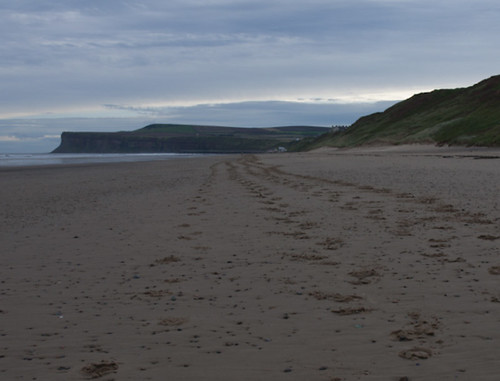
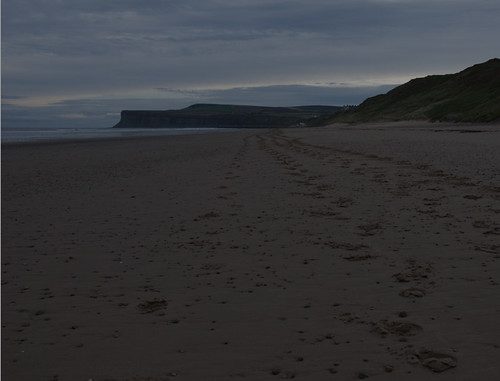
I'm just in the process of going through some images, I give them a quick tweak in ACR so I am happy with them and can convert to JPEG in CS4. The problem is, when I open the image in CS4 it turns out dark than it is in both Bridge and in ACR.

I'm hoping that this is just down to a setting that is different in PS than in bridge and ACR (colour profile perhaps?) the problem is I don't haver a clue on where to start looking so I can make the adjustment to get the images looking the same.

Could some one point me in the right direction?

Thanks

Kev
 
Does anyone have any ideas how I could rectify the problem I'm encountering, detailed above?
 
What happens if you simply save the image as a JPEG without any adjustments?

Also set your colour space in ACR to sRGB to see if this makes any difference. You can also sometimes see a small difference between images from Photoshop and Bridge, but this is usually due to the image sizes being different and appearing to be darker. But it shouldn't be huge. Try increasing the size of the bridge thumbnail and see if it makes any difference
 
Thanks for your input with this Chappers, I've tried your suggestions but to no avail, i did have ACR set to Adobe RGB so I changed that to sRGB, but it didn't make much difference to the images.

Below are the screen shot's from Bridge, and out of Photoshop, I've also attached the color space settings I'm currently using. Any help on the matter would be massively appreciated.

here is the example in bridge

4604848598_d7f2f21a36.jpg


Here is the example from photoshop

4604234601_6ac5b62e8e.jpg


and here are my current color profile settings

4604234331_0385fea09d.jpg


If any one could help get it some my images look the same in ACR Bridge and PS when i initially open them i would be very pleased.

Thanks in advance

Kev
 
Just did a test myself. I've got a good match between bridge and Photoshop.

Just a thought, your set up looks OK. However you might like to changing rendering intent to Perceptual, rather than Relative Colourmetric and see if that helps.
 
Thanks for that little gem Chappers it seems to have made some difference, and the images look more a like now.

In the View menu > Proof Setup I have working CMYK ticked, is this the most sensible option to use?

Thanks

Kev
 
I used a drastic measure to correct the problem i was having, I used the Ctrl Shift and Alt option to reset. I figured that i haven't got many settings saved and this would correct any problems which it has.
 
Thanks for that little gem Chappers it seems to have made some difference, and the images look more a like now.

In the View menu > Proof Setup I have working CMYK ticked, is this the most sensible option to use?

Thanks

Kev

I think you might be better sticking to rgb, as photographers have precious little use for the cymk part of photoshop. The cymk gamut is different (and I think smaller) than rgb.
 
Hi Kev,
Not sure if this will help or if it is the same type of issue. But I also had a different look of my images when I opened them in CS4. My images came out very gray looking and somewhat desaturated.

I realized the problem was when I was in Bridge....the preview setting was not at "always high quality". This was my problem....I must have ticked it to "prefered embedded" at some point...

Not sure if I am hitting your question right or if you resolved the issue but hope this helps in some way!
 
Thanks for the suggestions photodiva and Nsmall, I'm at work at the moment, but i'll have a look at your suggestions when i get home.

Thanks

Kev
 
Back
Top