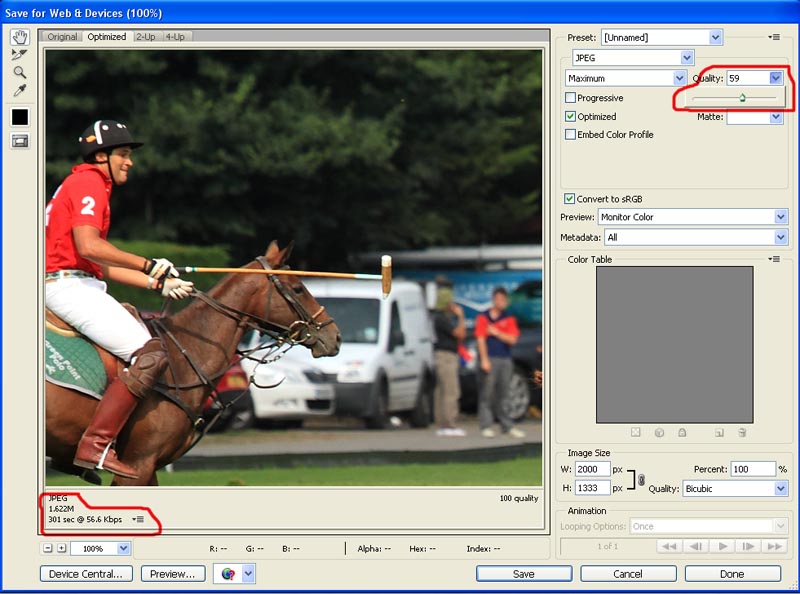
Image save size.

Janice

Suspended / Banned
Messages
11,626
Name
Janice
Edit My Images
Yes
I need to make an image 1.5mb

i have resized in image/resize// and ended up with saying the image is 1.37mb and underneath right on the bottom bar of CS5 it says doc size, 1.37mb
When I do a save as... it then says it is about 436kb.

What am I doing wrong please .. and which one is correct?
 
is it because the one you have open is showing you its full size but the one you go to save as is being compressed ? i bet if you opened it again it would show the full size
 
is it because the one you have open is showing you its full size but the one you go to save as is being compressed ? i bet if you opened it again it would show the full size

when I "get info" on the file once it has been saved on the desktop.. it says it is 436kb :(
 
but open it back up in cs and the doc size should be what it was

yes the doc size still says 1.37 or whatever it was.

so what is the compression on then. is it telling you what the thumbnail is or soemthing??
 
lol i dont have a clue i think its just the compression on the unopened file

ok thanks!! :D:D

I will carry on doing as I was then! :thumbs:
 
YOU ARE WRONG!!!!!!!! :D:D:D

I have just emailed it and it says 650kb.

What the hell is going on... 3 different sizes. :thinking:
 
The PS image bar shows the file size of the image, the info/details ammount is the size the file takes up when stored.
 
So what do I do to get an image down to 1.5mb that someone has requested?
 
What are they asking for, an 1.5mb file, or a 1.5mb image size? What format are you saving in?

"send the image at 1.5mb" i am saving as a jpg.

i last saved it in CS5 as about 5.49mb (in the image size box and on the bottom taskbar) and when i sent that as an attachment it said 1.75mb which is just about right. but how can i tell when i am saving how much it will end up??
 
"send the image at 1.5mb" i am saving as a jpg.

i last saved it in CS5 as about 5.49mb (in the image size box and on the bottom taskbar) and when i sent that as an attachment it said 1.75mb which is just about right. but how can i tell when i am saving how much it will end up??

When you save as a jpeg, in the options box it will tell you the size that the jpeg will be.
 
When you save as a jpeg, in the options box it will tell you the size that the jpeg will be.

Exactly... and i made it 1.5mb but the file on the desktop was 650kb and when i sent the email it was little as well.

to send the email with an attachment that says 1.5mb i need to save it in cs5 at about 5 or 6mb :S

there used to be "save for web and devices" where you could make the file an optimum size with a slider. but that doenst exist any more.
 
Try save as, when you get the box with the different compressions 1-12 it should say on that the file size (circled red here) the opened size in photoshop is a different thing again.

5057371394_74c6f9cfc3.jpg
 
Right... so I dont have to change anything in image size etc? i just say "save as" and drag the jpg slider up till i get it at 1.5mb?

i have seen the file/web& devices in cs5 but it doesnt have the bit where you can optimize an image to filesize like before.
 
Thanks all! :thumbs:
 
AH! thanks! I thought that meant just the quality.. ie, how much compression. so, low meant rubbish quality.
I thought if it meant file size, it wouldve said "file size" :D
 
It's the quality of the image, which is controlled by compression, which in turn dictates image size.
 
Back
Top