Image colour change in Adobe Bridge

dcash29

Suspended / Banned
Messages
3,381
Edit My Images
Yes
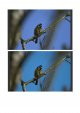
Has anyone else noticed that when an image is viewed between normal viewing size and 100% in Adobe bridge, the colour changes?
The image then retains this colour when the specific image is returned to normal size and if the program is closed and reopened.

Nikon d500 raw file - Is it because of the in-camera setting of ARGB ?

.test.jpg
 
Last edited:
I do not use Bridge but use LR. However, this sounds as you are displaying the Jpeg embedded in the Raw image but when you choose 100% it forced to open the Raw file. With LR, I create large previews when copying the images from my camera so this problem will not occur.

Dave
 
Yeah but it sounds an issue to me
Surely the only issue is understanding what you are doing. The embedded Jpeg will have camera process settings whereas the Raw file will not which is the entire point of using Raw.

Dave
 
Just to check again, I looked at a Raw file of a Color test chart taken on my Sony A6600 and viewing the image using spacebar then clicking to get 100% the colour does not change at all. I also similarly tried with images from my Canon EOS 5D4 and just the same no change in colour. Both cameras are set to Adobe RGB though I never use JPEG so it really does not matter. My version of Bridge is 11.0.1. Perhaps you have set something else different.
My set up will be different from most as I have specific bespoke Raw profiles for each of my cameras so I am calibrated end to end. I notice in my settings for Bridge under camera Raw>Performance I have ticked "Use camera specific profiles and it lists all my cameras and profiles. On the other hand, even if I turn this off, I cannot see a colour change between the two views. I have no wish to use Bridge as I have LR but it seems to work OK to me.

Dave
 
It may be a setting, however I have reset the program and disabled my screen profiling. Bridge 10 works fine.
Hopefully Adobe will resolve the issue later. Thanks for responding though Dave (y)


Dave Canon said:
My set up will be different from most as I have specific bespoke Raw profiles for each of my cameras so I am calibrated end to end.
Have you built them or bought them?
 
Last edited:
Have you built them or bought them?
I have built them using the X-Rite Colour Checker and the free Adobe DNG Profile editor. The profiles are stored in a standard Adobe location and can thus be accessed for LR, PS, Elements and Bridge. The level of calibration is helpful but probably over the top for most photographers. It is particularly useful for fashion photographers, high end wedding photographers and product photographers who need accurate colour. You can read more about this on my website under colour management.
 
I have found the culprit

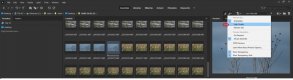
If I change embedded to high quality, the images redraw and remain the same colour whether I view them at normal size or 100%

Bridge.jpg
 
I have found the culprit

If I change embedded to high quality, the images redraw and remain the same colour whether I view them at normal size or 100%
This is what I suggested in my first post. The embedded JPEG was being used but when you enlarge it is forced to use the original Raw to create the view. As I said when uploading/importing my images to LR, I choose a large preview by default so that I will always be reviewing views of the actual Raw files.

Dave
 
At the time it didnt click that there was a alternative setting. Then I remembered that I'd altered the quality setting in ver. 10
 
Last edited:
Back
Top