
and the site receives a small commission
You are using an out of date browser. It may not display this or other websites correctly.
You should upgrade or use an alternative browser.
You should upgrade or use an alternative browser.
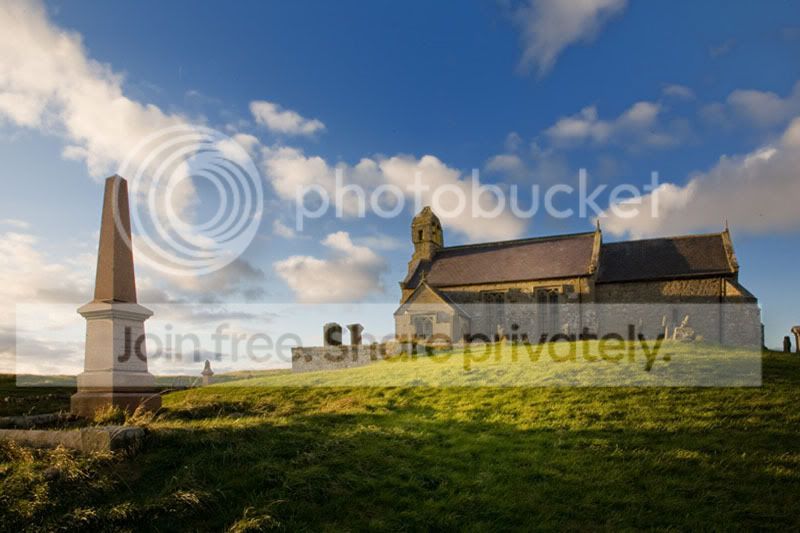
How would I straighten this?
- Thread starter Rooster
- Start date

The image looks straight (vertical nearest the middle of the frame is upright) but your shot is angled up, meaning the verticals are heading towards convergence.
You need to use the perspective crop tool. IIRC on CS2 it's as follows:
Use the crop tool from the tool menu to select the whole image. Make sure the "perspective" box is checked on the main toolbar at the top.
Use the mouse to drag the corners of the image. To correct converging verticals drag the top corners horizontally towards the image centre; this will stretch the top edge and align the verticals.
This will also make the image look a little squashed in the vertical axis, so you want to stretch it by a few percent when you've finished
You need to use the perspective crop tool. IIRC on CS2 it's as follows:
Use the crop tool from the tool menu to select the whole image. Make sure the "perspective" box is checked on the main toolbar at the top.
Use the mouse to drag the corners of the image. To correct converging verticals drag the top corners horizontally towards the image centre; this will stretch the top edge and align the verticals.
This will also make the image look a little squashed in the vertical axis, so you want to stretch it by a few percent when you've finished

martint
Suspended / Banned
- Messages
- 316
- Name
- Martin
- Edit My Images
- Yes
Not sure if this will work in CS3:
In CS4 you can just press the Ctrl + T key, when the box comes up hold down the Ctrl key and click and drag the top left corner point away from the image to the left hand side of the screen and this will pull that part of the image into the correct perspective.
In CS4 you can just press the Ctrl + T key, when the box comes up hold down the Ctrl key and click and drag the top left corner point away from the image to the left hand side of the screen and this will pull that part of the image into the correct perspective.

- Messages
- 6,283
- Name
- Chaz
- Edit My Images
- Yes
how about this

OP

Rooster
Suspended / Banned
- Messages
- 685
- Name
- John
- Edit My Images
- Yes
The image looks straight (vertical nearest the middle of the frame is upright) but your shot is angled up, meaning the verticals are heading towards convergence.
You need to use the perspective crop tool. IIRC on CS2 it's as follows:
Use the crop tool from the tool menu to select the whole image. Make sure the "perspective" box is checked on the main toolbar at the top.
Use the mouse to drag the corners of the image. To correct converging verticals drag the top corners horizontally towards the image centre; this will stretch the top edge and align the verticals.
This will also make the image look a little squashed in the vertical axis, so you want to stretch it by a few percent when you've finished
That's good, I've corrected the monument which is now striaght. However, in my version the church is now leaning forward slightly. Do I have to now do the opposite to drag the church's verticals back straight? Presumably this will cause the monument to sag back a bit too.