xendistar
Suspended / Banned
- Messages
- 162
- Name
- Tim
- Edit My Images
- Yes
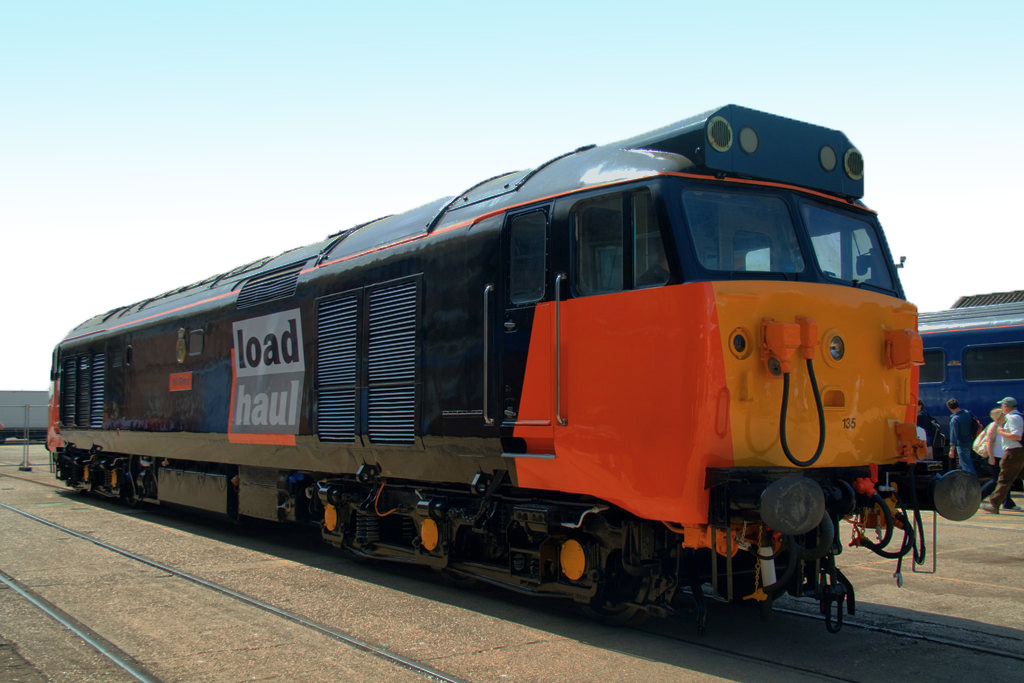
I have got a picture of a train, it has just come out the paint shed so it is all glossy and shiney, the weather outside when shot was very sunny and from the position I had to shoot from I was looking about 45 degrees into the sun, thesun was on my left shoulder, I was shooting from one end of the train at about 45 degree to get the front and the side. The sky for about two thirds on the way across the picture (left to right) is totally blown out, the final third has a bit of blue.
Now I could post the picture and let you guys point me in the right direction but for the moment I would like it if you could give me some hints as to what I need to do. I know with the sky I can make a new one with layers (which is something I have to learn to do) but because the train is so glossy the train just does not look good, any pointers as to what I can do with this.
I did try a black and white convert but it looked even worse in black and white due to the glossiness of the train.
Thanks in advance
Tim
Now I could post the picture and let you guys point me in the right direction but for the moment I would like it if you could give me some hints as to what I need to do. I know with the sky I can make a new one with layers (which is something I have to learn to do) but because the train is so glossy the train just does not look good, any pointers as to what I can do with this.
I did try a black and white convert but it looked even worse in black and white due to the glossiness of the train.
Thanks in advance
Tim