

boccers_2000
Suspended / Banned
- Messages
- 379
- Name
- Andrew
- Edit My Images
- Yes
Hi Guys, I recently posted a picture on Flick (copy attached) but there are a few things that are annoying me about it.
I took the pic using a 10 stop filter, it had some dirt on it which caused blemishes, most notably in the sky.
I have Elements 9. I tried to clone them out (with low opacity) and by using the healing brush too.
Ultimately because of my lack of knowing how to get them out best I think the result is a little rubbish (ie you can see where i tried to get rid of them plus there is this light ring on the horizon).
Taking into account I use Elements 9 can anyone gove any advise about how to get ris of the blemishes (ie resulting in a seamless sky). Please take account of my lack of post processing knowledge.
Thanks for all your help, much apreciated.
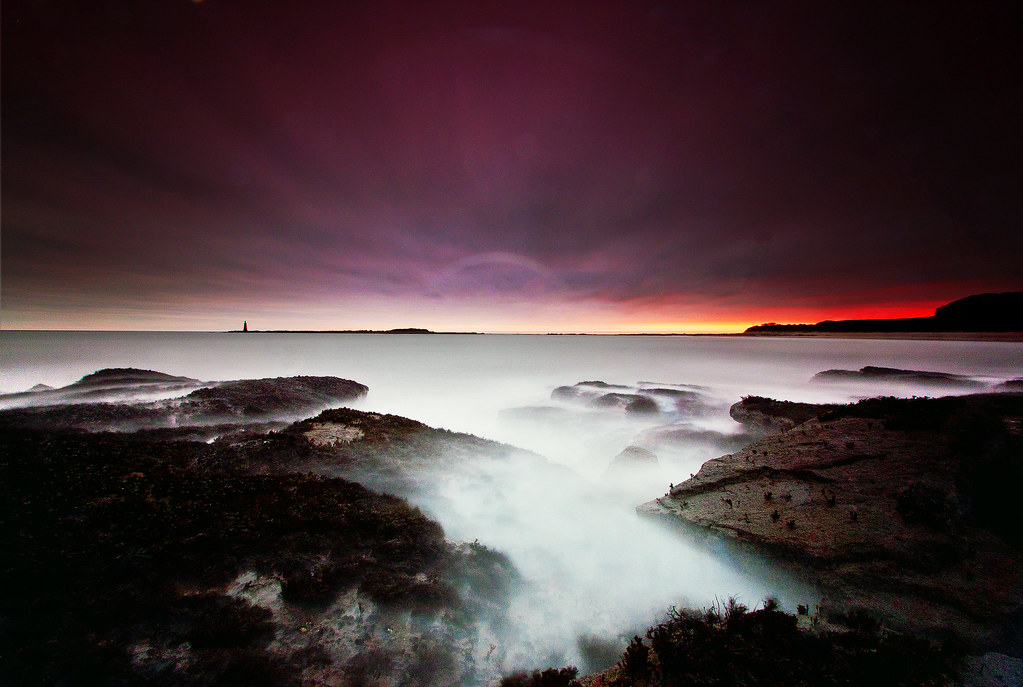
Morning in East Lothian by boccers, on Flickr
I took the pic using a 10 stop filter, it had some dirt on it which caused blemishes, most notably in the sky.
I have Elements 9. I tried to clone them out (with low opacity) and by using the healing brush too.
Ultimately because of my lack of knowing how to get them out best I think the result is a little rubbish (ie you can see where i tried to get rid of them plus there is this light ring on the horizon).
Taking into account I use Elements 9 can anyone gove any advise about how to get ris of the blemishes (ie resulting in a seamless sky). Please take account of my lack of post processing knowledge.
Thanks for all your help, much apreciated.
Morning in East Lothian by boccers, on Flickr


