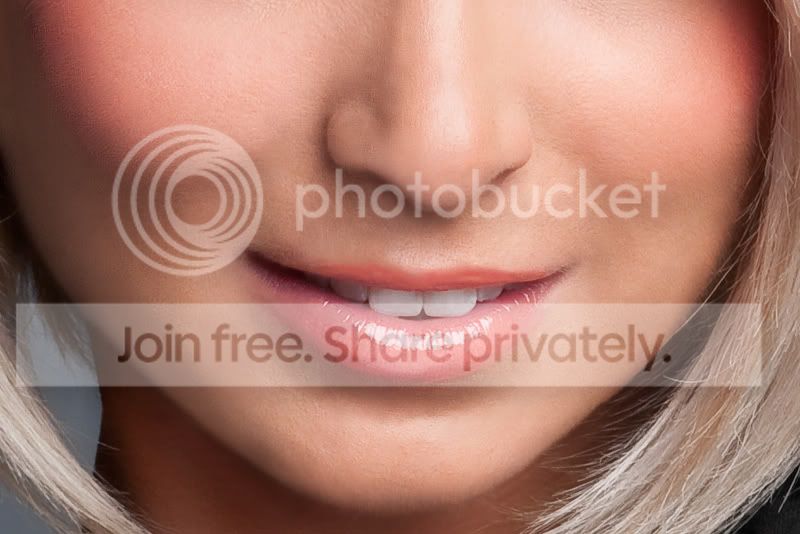
How to remove fine facial hair ?

  • Thread starter Thread starter HCK
  • Start date Start date

HCK

Suspended / Banned
Messages
784
Edit My Images
Yes
Hi,

I need advice on how to remove fine facial hair from this photo. I have a few others that need work on them as well but this is a good example.

The model looks great but she has fine facial hair over most of her cheeks....I have not done any PP on this sort of scale where quite a bit of the face is affected. Normally I would use spot healing brush or clone it out....but I think the area is too large for these....anyone know the best way forward ?
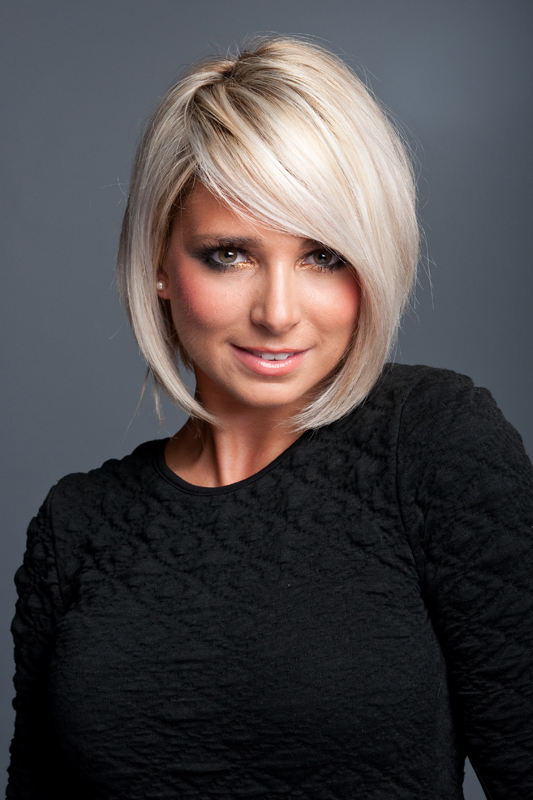
4171167353_179f9d507e_o.jpg


stacey1800.jpg
 
Can you not use the clarity slider to fuzz it up a bit then brush back in the features..?
 
I must say that it's not visible in the picture you show :thinking:
 
I must say that it's not visible in the picture you show :thinking:

I can see it on the right side of her face, it's very fine and blonde (much like the model:thumbs:), probably wouldn't have noticed it straight away if the OP hadn't mentioned it.
 
I'd be inclined to leave it
it is, after all, part of what she is

has she asked for it to be removed?
if not, then it might be wise to leave it
"why did you remove? what's wrong with it? am I so awful looking?" type of slippery slope!
 
Probably no help to you, but i'd say it's her makeup which is making the hair stand out more than it would if she had none on. Looks like the kind of skin/girl which would benfit from a change of make up if she is doing alot of shoots like this. Possibly something for the future which would rule out the need for excessive PP.
 
I had a quick play in PS (hope you dont mind as you haven't enabled editing) and created a duplicate layer, added gausian blur then erased the bits that needed detail like the eyes, mouth etc.
I think it looked better (not sure if right terminology) as it was a lot lot harder to see the fine hair although still not totally removed.
 
Not the answer you're looking for but...

Clone out each individual hair.

For the model above, set the clone tool to darken, as she's got fine blond hair. Low Opacity (or flow if you're using a tablet and in airbrush mode).

You could also dodge & burn a lot of the hairs too.

Don't use the healing tool, it'll make more work in the long run.


Before you start though, do you really need to remove the hairs.

If this were for a full beauty or makeup ad, then maybe so, but if this is a personal portrait, is it necessary because it's not a quick job to do it properly.
 
Go to 'user CP' along the top bar of the page, on the left hand side menu then click on 'Edit your details'. You can then tick the 'Image editing' box at the bottom of the page - Don't forget to save!!
 
She's certainly a beautiful model so I wouldn't play around with editing her looks too much but you could apply some skin softening in a layer mask to ensure you only soften the relevant areas. Google 'skin softening tutorial' and you'll find plenty of info on how to do it.
 
That's a very attractive girl, but unfortunately apart from the facial hair she has a pretty bad complexion too. As others have said I don't see any problem with the head and bust shot - that bit of hair on her cheek is easily dealt with, but doing close-ups with the girl is a different matter.

If you're determined to have a go at the full face shot then as someone who does a lot of retouching I can only tell you how I'd tackle it - forget cloning for a start. I use PSP which has a retouching tool called 'Push.' iI's a simple enough tool, it just picks up the the colour from a group of pixels and smears them around, but it behaves more controllably than any other smear tool of it's type I've come across. It's worth getting PSP just for that tool - you should be able to dowload a free trial version.

Set the tool to a very low opacity and gradually work over the areas with the hairs, blending them away. You need to work slowly and carefully to avoid losing all the modelling in the face with the result looking very flat and mask-like. You soon realise though that you really need to tackle the rest of the face so it's no minor undertaking and it's not an easy job even with quite advanced editing skills.

Adding a little subtle noise to the finished result can help conceal the work you've done. I had a quickish go to give you some idea how it could look, but it's far from finished as I was losing the will to live.:D

4176467954_e906c1f01d_o.jpg


It's good editing practice for sure, but if this girl has aspirations to modelling or is going to be your regular model, then some of these issues are better tackled by her rather than you I have to say, and I mean that in the nicest possible way. Otherwise -avoid the close-ups and she looks great! :)
 
Blimey,, CT....that's brilliant!!! :clap:
 
She's orange and has a beard.

Unfortunate combination!
 
She's orange and has a beard.

Unfortunate combination!

naughty no comments on the model :rules: :nono:


just checked the exif is f9 really nessasary? maybe wider aperture for a softer look, just my opinion.
 
A wider aperture would have helped for sure.
 
Probably no help to you, but i'd say it's her makeup which is making the hair stand out more than it would if she had none on. Looks like the kind of skin/girl which would benfit from a change of make up if she is doing alot of shoots like this. Possibly something for the future which would rule out the need for excessive PP.

I agree with Swordjo, I think its the blusher powder that is colouring the hairs and making them thicker and more visible.
I imagine if she washed all that off the hairs at least would not be as visible.

Carl
 
Lovely fix, CT! :clap:

...and BTW, to the OP, nice shot too! :thumbs:
 
That's a very attractive girl, but unfortunately apart from the facial hair she has a pretty bad complexion too. As others have said I don't see any problem with the head and bust shot - that bit of hair on her cheek is easily dealt with, but doing close-ups with the girl is a different matter.

If you're determined to have a go at the full face shot then as someone who does a lot of retouching I can only tell you how I'd tackle it - forget cloning for a start. I use PSP which has a retouching tool called 'Push.' iI's a simple enough tool, it just picks up the the colour from a group of pixels and smears them around, but it behaves more controllably than any other smear tool of it's type I've come across. It's worth getting PSP just for that tool - you should be able to dowload a free trial version.

Set the tool to a very low opacity and gradually work over the areas with the hairs, blending them away. You need to work slowly and carefully to avoid losing all the modelling in the face with the result looking very flat and mask-like. You soon realise though that you really need to tackle the rest of the face so it's no minor undertaking and it's not an easy job even with quite advanced editing skills.

Adding a little subtle noise to the finished result can help conceal the work you've done. I had a quickish go to give you some idea how it could look, but it's far from finished as I was losing the will to live.:D

It's good editing practice for sure, but if this girl has aspirations to modelling or is going to be your regular model, then some of these issues are better tackled by her rather than you I have to say, and I mean that in the nicest possible way. Otherwise -avoid the close-ups and she looks great! :)

what is PSP?
 
WOW, you did grate looks like she did get the waxing i suggested:lol:
 
Thought I too would have a quick play around with the image:

4176733800_dc2d028ca9_b.jpg


Used Photoshop with varying amounts of Gaussian Blur and High Pass filter within a mask.
 
f9 was suggested by the flashmeter.....I guess I could have changed it....but I didnt foresee this problem until I got home. I'll try some suggestions when I get back and post the results!

Forgot to add thx for all your help and suggestions!!
 
Paint Shop Pro - The 'cheaper' but by no means lesser photoshop!
Indeedy. Jasc did drop the 'push' tool in one of the PSP versions way back - Version 3 or 4 I think, but they re-introduced it after a hue and cry from users, and it's been there ever since, even with the newer versions as well since Corel has taken over Jasc.
 
ui think that edited image above just looks too fake..

i rekon.... i would leave it.. after all its part of her character... if she looks at the pitcure and then says she wants it removed.. then fair play but i dont think she will be too bothered about it...
 
Nice job CT!

If I had such a post job, I'd be reaching for the spot healing brush though.

Although it's a much more difficult case here as the model is in need of a wax, the spot healing brush would still be my first port of call.

Blurring is no good IMO, the results always end up lookin similar to this fella:
odo.jpg


For the OP and anyone else who may be interested:

Have a butchers at Mama Shan's youtube tutorials, this very talented retoucher has masses of them.

Here's a great explanation of the spot healing brush.

[YOUTUBE]<object width="425" height="344"><param name="movie" value="http://www.youtube.com/v/03eqlgkbsXM&hl=en_US&fs=1&"></param><param name="allowFullScreen" value="true"></param><param name="allowscriptaccess" value="always"></param><embed src="http://www.youtube.com/v/03eqlgkbsXM&hl=en_US&fs=1&" type="application/x-shockwave-flash" allowscriptaccess="always" allowfullscreen="true" width="425" height="344"></embed></object>[/YOUTUBE]
 
Nice job CT!

If I had such a post job, I'd be reaching for the spot healing brush though.

Although it's a much more difficult case here as the model is in need of a wax, the spot healing brush would still be my first port of call.

Blurring is no good IMO, the results always end up lookin similar to this fella:


Have a butchers at Mama Shan's youtube tutorials, this very talented retoucher has masses of them.

Here's a great explanation of the spot healing brush.

Thanks Tomas. I agree with you mate about facial blurring -I hate those plastic women you see in the mags - you can do a lot of improvement work and still leave them looking human and like their skin is their own.

I think this image is way beyond the reach of the spot healing tool, but everyone to their own - there's always another way of doing it. I've evolved this way of doing it over 20 years or more and I find it the best way of working for me. Before the advent of home computers, I was restoring diisntegrating images by photographing them, working on them with photographic tints and then photographing them again. Some images just don't have a handy tool or filter to rescue them though, and you just have to go hands on. People always think there's an easy Photoshop answer to any problem, but sometimes - there isn't.
 
That's a very attractive girl, but unfortunately apart from the facial hair she has a pretty bad complexion too. As others have said I don't see any problem with the head and bust shot - that bit of hair on her cheek is easily dealt with, but doing close-ups with the girl is a different matter.

If you're determined to have a go at the full face shot then as someone who does a lot of retouching I can only tell you how I'd tackle it - forget cloning for a start. I use PSP which has a retouching tool called 'Push.' iI's a simple enough tool, it just picks up the the colour from a group of pixels and smears them around, but it behaves more controllably than any other smear tool of it's type I've come across. It's worth getting PSP just for that tool - you should be able to dowload a free trial version.

Set the tool to a very low opacity and gradually work over the areas with the hairs, blending them away. You need to work slowly and carefully to avoid losing all the modelling in the face with the result looking very flat and mask-like. You soon realise though that you really need to tackle the rest of the face so it's no minor undertaking and it's not an easy job even with quite advanced editing skills.

Adding a little subtle noise to the finished result can help conceal the work you've done. I had a quickish go to give you some idea how it could look, but it's far from finished as I was losing the will to live.:D

4176467954_e906c1f01d_o.jpg


It's good editing practice for sure, but if this girl has aspirations to modelling or is going to be your regular model, then some of these issues are better tackled by her rather than you I have to say, and I mean that in the nicest possible way. Otherwise -avoid the close-ups and she looks great! :)


I think that's an amazing edit. Fantastic job, CT.
 
LOL. Thank you. It's not finished though - I got bored with it. :D The shiny nose wants sorting and it's bit rough in patches.
 
I'm a huge fanatic of the healing tool, admittedly it takes a little longer in this case but it does allow more detail to be preserved.

Here's my effort, spot healing tool, healing tool, curves and a smidge of airbrushing ;)

stacey1800-1.jpg
 
I'm a huge fanatic of the healing tool, admittedly it takes a little longer in this case but it does allow more detail to be preserved.

Here's my effort, spot healing tool, healing tool, curves and a smidge of airbrushing ;)

stacey1800-1.jpg

That not bad at all Tomas :thumbs:- not keen on the boxers'; nose though.:D
 
LOL. Gimme a shout next time. You do get very some verrrrry odd requests!

Indeed y'do. They were quite dissapointed when I said that the quickest, simplest and cheapest way around the absence of legs, was to re-shoot.

"Oh, but isn't anything possible in photoshop". :|
 
Back
Top