How to get 'Olympus look' with Panasonic JPEG Settings?

  • Thread starter Thread starter Deleted member 86975
  • Start date Start date
D

Deleted member 86975

Guest
Hi All,

I recently bought a Panasonic Lumix GX800 with a 20mm pancake lens which I absolutely love. I mainly shoot RAW and then post-process in lightroom but I find that when I go on days out I am taking loads of shots which I like and which would be far too time consuming to go through in lightroom.

The obvious solution to this is to shoot in JPEG on big day trips so I have them available to use immediately but so far I have found the overall colours to be a bit cooler than my personal tastes. I have been scanning the internet for ages but can't find any specific guide on how to get the warmer famed olympus style JPEG through altering the settings on the panasonic system. Can anyone let me know if a guide exists at all and if not if anyone has tried and succeeded in trying to achieve the same outcome?
 
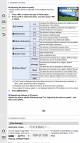
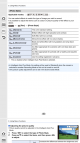
P188/189 in the manual explains how to change the image settings....
Screenshot_20180102-103133.png


Screenshot_20180102-103143.png
 
Hi, thanks for this... I should have rephrased. I understand HOW to change the settings, i'm just not sure what to change them to! Thanks
 
Be easier to make the image look the way you want in post from RAW.

Otherwise you'll have to experiment with the various jpg settings I'd have thought.

May be easier to buy an Olympus body for the Olympus "look".

Can't say I've noticed a certain look on the Olys.
 
I have never tried this but I believe you can create a preset in Lightroom and then have it applied to every photo you import. This will presumbaly get you closer to the "look" you want than in camera settings.
 
Hi, thanks for this... I should have rephrased. I understand HOW to change the settings, i'm just not sure what to change them to! Thanks


Spend some time playing with settings to see which give you results that YOU like.
 
I was going to say, what is the "famed Olympus look"???
I was wondering what that was also. I did a search for "famed Olympus look" and all that popped up, was this thread. The same thread also on dpreview.
 
Last edited:
I was wondering what that was also. I did a search for "famed Olympus look" and all that pooped up, was this thread. The same thread also on dpreview.

Think its more of a furtive glance as the execs leg it with the company cash
 
I wish some clever geek somewhere would have a app so I can have all my Fuji simulations on my phone pics
 
I used to like the Kodachrome and fuji Classic Chrome look, but I can't emulate those colours. Oh well, will just make do with saturation and contrast etc.
 
... if anyone has tried and succeeded in trying to achieve the same outcome?
In my opinion it is not possible in-camera.
Altering the global white balance a stop or two warmer is good, but not the solution.
Putting Panasonic RAWs through a good programme and spending time on skies and flesh tones will do the trick, but that is work.
Some folk report the very newest Panasonics have the best Jpeg colours, I do not own them.
I own a LOT of older Panasonic and Olympus cameras and Jpeg colours are important to me.
 
I was going to say, what is the "famed Olympus look"???

Quite, don't think there is one.

To those that realise there is a world beyond Canikon, Oly JPGs are quite often said to be very good (neutral but punchy with good skin tones and well judged noise reduction that squashes noise but retains detail) and conversely Panasonic JPGs are generally said to be arse (except for the most recent G9).

I recently shot a friends wedding using Oly JPGs and was very pleased with the output and almost total lack of requirement for editing (it wasn’t a fancy wedding, they just wanted some keep-sake reminders and I was too ill to be spending hours editing on Christmas eve)..
 
Some of my favourite jpegs were those taken with a Pentax DSLR, if it hadn't been for Fuji I would have returned to them.
 
This is available on the net

Set white balance to 2 steps to the right (blue) and 1 step down (magenta)
and set that.

Go into REC settings and set iExposure to 'Standard'

Now go into Film Mode and change the colour type to 'Nostalgic' this sounds strange but this is the killer setting here.

Nostalgic
contrast +2
sharpness 0
Saturation +1
NR -2
 
Never heard of it, but then I'm a fuji guy (and fuji jpegs are the absolute tits!)
I assume you mean in a good way :D

Lurking in the various threads I think that at least some Fuji users live on a different planet, one with colours so different to those on earth. That's not usually what I like but each to their own.

On the OP's question - I have no idea how to fiddle the JPEG's but I bet there's an app and in the OP's place I'd ask a 7 year old (they'll know) family member to show me how to do it :D

PS.
I've never had a problem with Panasonic colours but I shoot raw and process for best effect in CS5.
 
Last edited:
This is available on the net

Set white balance to 2 steps to the right (blue) and 1 step down (magenta)
and set that.

Go into REC settings and set iExposure to 'Standard'

Now go into Film Mode and change the colour type to 'Nostalgic' this sounds strange but this is the killer setting here.

Nostalgic
contrast +2
sharpness 0
Saturation +1
NR -2
I might give that a go just for fun :D
 
This is available on the net

Set white balance to 2 steps to the right (blue) and 1 step down (magenta)
and set that.

Go into REC settings and set iExposure to 'Standard'

Now go into Film Mode and change the colour type to 'Nostalgic' this sounds strange but this is the killer setting here.

Nostalgic
contrast +2
sharpness 0
Saturation +1
NR -2

Where did you find that? Thanks so much
 
I hope this 'Olympus look' doesn't include the extremely yellow hue you experience at times?
 
Quite, don't think there is one.

Warm images, very rich browns, greenish blues. Panasonic can't replicate it in camera, that's for sure. Olympus has a beautiful JPEG engine, Panasonic has one of the worst - particularly if shooting people.
 
Warm images, very rich browns, greenish blues. Panasonic can't replicate it in camera, that's for sure. Olympus has a beautiful JPEG engine, Panasonic has one of the worst - particularly if shooting people.
What's so bad about the panasonic images?
Any examples?
 
What's so bad about the panasonic images?
Any examples?

Mostly the badge on the camera.

Don't you know that Olympus make cameras for cool trendy types who need pictures that look like they were taken in 1973 and Panasonic make video cameras that can just about be used to take stills with, at a pinch :D
 
What's so bad about the panasonic images?
Any examples?


You ever seen skin the colour it comes out on a Panasonic? I haven't! Loads of Panasonic pics in my gallery and on my walls etc but all were processed from Raw files (and aren't of people). Good cameras, crap jpegs.
 
You ever seen skin the colour it comes out on a Panasonic? I haven't! Loads of Panasonic pics in my gallery and on my walls etc but all were processed from Raw files (and aren't of people). Good cameras, crap jpegs.

Actually, I need to correct that - I have seen that colour on skin, like on a thumb that's been hit with a hammer, but normally, no.
 
You ever seen skin the colour it comes out on a Panasonic? I haven't! Loads of Panasonic pics in my gallery and on my walls etc but all were processed from Raw files (and aren't of people). Good cameras, crap jpegs.
Don't remember thinking there was an issue with the JPEGs when I had my G3
 
Everything has a 'look'. Lenses, films, processing engines ... isn't it interesting, isn't it fun?!
 
I had to take some photo's at a family event yesterday using my Panasonic G80, was inside and had to use the built in flash as I haven't brought a flash gun yet (still trying to decide which is the best one) and overall I don't think the skin tones look too bad to me on the JPEG's. Considering it was direct flash and not bounced off the ceiling or a wall. Probably could be improved by processing the RAW files but to be honest the family are happy with the JPEG's so doubt I will spend time processing the RAW files. No one's skin looks a horrific shade or too far off how they look in person.
 
Older Panasonics, and especially the GH2, sometimes emphasize magenta&green in Jpeg for European skin tones, instead of a pleasant middle ground of "flesh" tones ... a very similar thing is seen in many early videos on the telly, compared to film.
My Pansonics (except the GH3) are all taking RAW+B&WJpeg,
my Olympii are taking Jpegs.
 
Back
Top