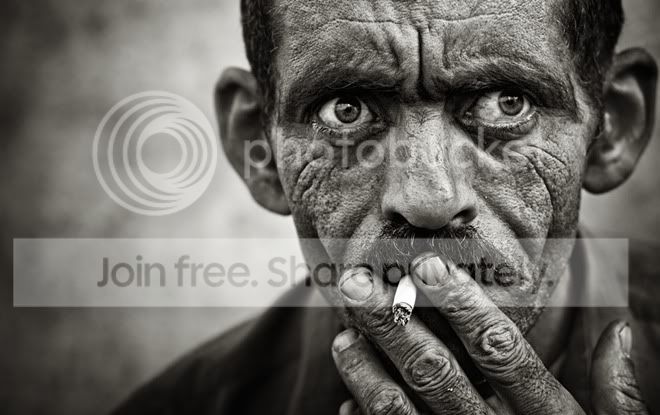
How to create this effect

ScubaSteve

Suspended / Banned
Messages
86
Name
Steve
Edit My Images
Yes
picture.jpg


I love the texture that this guy gets in this photo, but im not really sure how to go about doing it when it comes to editing my photos.
Is it all down to PP techniques or is it just down to the original image.

Any help would be appreciated

There are a couple more like it on his flickr:
http://www.flickr.com/photos/snocturnus/
 
It doesn't look like it's been 'Draganized' to me... Definitely lots of dodging, burning and some selective sharpening (or high pass filtered).

Si
 
This style is a black and white variation on Lomo photography. Will try and dig up a good tutorial on it for you.
Actually i think if i recall correct you do the picture lomo style, make it black and white then draganise it.
 
Thanks a lot for all your responses guys.

At the moment i have only got the GIMP for my editing so im not sure how possible it will be to do all of these tutorials, although ive looked at them and they seem pretty useful.

Perhaps i would just be best investing in photoshop :thinking:


i followed this tutorial through, just converting it from photoshop to gimp and it seemed to be going ok until about 9 minutes, where he starts talking about adding a new fill layer and "painting with light". I cant work out how to do this part atall. :bonk:
if anyone could explain this part of the tutorial it would be great,

Thanks again.
 
This is 'high structure' BW photography. Any serious BW shooter will probably be using Nik Silver Efex where a "High Structire" filter can be used. Likewise a BW photo can be fired into Nik Color Efex and the "Tonal Contrast" filter used to get the desired effect,

My guess is that the midtone contrast is upped to some degree here.

Scott
 
Back
Top