

You are using an out of date browser. It may not display this or other websites correctly.
You should upgrade or use an alternative browser.
You should upgrade or use an alternative browser.
How do you 'bracket'?
- Thread starter microbike
- Start date


incapete
Suspended / Banned
- Messages
- 1,149
- Name
- Peter
- Edit My Images
- Yes
Like Ken said, the simplest form of bracketing is to take the same shot multiple times with different exposures, generally an extra shot up to one stop above and below the exposure you think is correct.
It's these extra exposures which 'bracket' the theoretically correct one which gives it it's name.
Bracketing is often used if you're really not sure what is the correct exposure, although with dSLRs it's not as vital since you can check your lcd screen and also the exposure histogram.
Most dSLRs have an automatic exposure bracketing mode - this is where you can set how much above and below your central exposure you want to shoot and then the camera will automatically adjust your exposure over the next three shots for you.
These days bracketing is more often used to generate the source images for an HDR (high dynamic range) image - to create the increased dynamic range you need a range of images that are well under- and well over-exposed to ensure you capture all the data available. The HDR process then merges these into a single image.
It's these extra exposures which 'bracket' the theoretically correct one which gives it it's name.
Bracketing is often used if you're really not sure what is the correct exposure, although with dSLRs it's not as vital since you can check your lcd screen and also the exposure histogram.
Most dSLRs have an automatic exposure bracketing mode - this is where you can set how much above and below your central exposure you want to shoot and then the camera will automatically adjust your exposure over the next three shots for you.
These days bracketing is more often used to generate the source images for an HDR (high dynamic range) image - to create the increased dynamic range you need a range of images that are well under- and well over-exposed to ensure you capture all the data available. The HDR process then merges these into a single image.

POAH
Suspended / Banned
- Messages
- 7,882
- Edit My Images
- No
Help! What is bracketing, and how do I do it?!
read your manual, its quite helpful in telling you how to operate the camera


- Messages
- 7,625
- Name
- Colin
- Edit My Images
- Yes
read your manual, its quite helpful in telling you how to operate the camera
And maybe you should read what this particular forum is for, its quite helpful in telling you how you should behave
:Talk Basics If you are new to photography, or just have a question you think is basic, then fire away! Absolutely no question is too silly or basic for us in here.
POAH
Suspended / Banned
- Messages
- 7,882
- Edit My Images
- No
And maybe you should read what this particular forum is for, its quite helpful in telling you how you should behave
and you you maybe understand that I don't know how to bracket on every camera out there hence why he should read the manual to know how to set it. I've read the manual of every camera I owned.

Rockshifter
Suspended / Banned
- Messages
- 6,229
- Name
- Charles
- Edit My Images
- No
And maybe you should read what this particular forum is for, its quite helpful in telling you how you should behave
touché !

- Messages
- 3,572
- Name
- Chris
- Edit My Images
- Yes
and you you maybe understand that I don't know how to bracket on every camera out there hence why he should read the manual to know how to set it.
But (s)he has the same camera as you

Maybe (s)he's lost the manual? Or can't find it in there?
To the OP: There should be an option somwhere called AEB, this stands for Auto Exposure Bracketing. You set it to a value each side of the 'correct' exposure, and it'll take 3 shots. One at the right exposure, one under exposed, and one over exposed. You can chose how much under or over exposed by moving the silder. +1 and -1 stop is quite noticable, the max it +2 and -2.
Tripod mount the camera, otherwise the images won't line up when you come to merge them (assuming that's what you're doing?)
Chris

- Messages
- 34,670
- Edit My Images
- Yes
and you you maybe understand that I don't know how to bracket on every camera out there hence why he should read the manual to know how to set it. I've read the manual of every camera I owned.
Well apart from the fact that the OP has the same camera as you, if you didn't know the answer, then it is just as easy to not bother posting. But you were never one to forego an opportunity for an acerbic comment.

- Messages
- 19,708
- Name
- Darren
- Edit My Images
- Yes
read your manual, its quite helpful in telling you how to operate the camera
Often the manual will tell you WHAT to do but if you ask a question on here people will explain in it simple terms, explain WHY you would do it, give examples etc etc. Questions like this are perfectly reasonable.
Often the manual will tell you WHAT to do but if you ask a question on here people will explain in it simple terms, explain WHY you would do it, give examples etc etc. Questions like this are perfectly reasonable.
Agreed: My D3 and D3x manuals tell me how to bracket and how to set the cameras up to do it but not why I'd need to do it in the first place.
I'm a BIG fan of 'RTFM', but can see instances where a question here is more beneficial...

- Messages
- 11,633
- Name
- Doug
- Edit My Images
- Yes
Often the manual will tell you WHAT to do but if you ask a question on here people will explain in it simple terms, explain WHY you would do it, give examples etc etc. Questions like this are perfectly reasonable.
Yes, often the independent guides to specific cameras expand on the bare info in the manual.

Dogmatix
Suspended / Banned
- Messages
- 268
- Name
- Martin
- Edit My Images
- Yes
As said, its a process of taking an under-exposed picture, and a over exposed picture.
There are many "steps" of over and under exposure you can have.
For example:
This is a properly exposed picture (well to me)
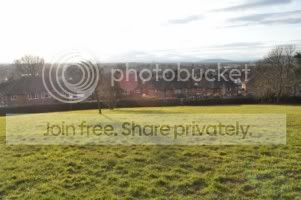
Over and under-exposed picture (on a tri-pod to help campture the exact same picture)
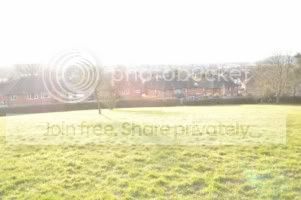
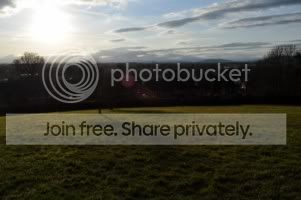
As you can see, the same picture is darker or lighter.
This can be used for many different things. For example, shooting in bright light, or low light, or if you want to HDR.
I captured the above pictures for HDR, and ended up with this:
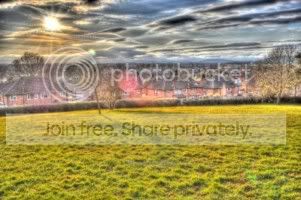
This is basically, each of those pictures, overlayed on top of each other. Helps highlight the low areas, and if your not going for a artistic shot, keep the high-lights, giving you a better exposed picture.
(Hope that helps, I am fairly new to photography myself, so I hope my above post doesn't get me shot down in flames, but I hope it helped the OP)
There are many "steps" of over and under exposure you can have.
For example:
This is a properly exposed picture (well to me)
Over and under-exposed picture (on a tri-pod to help campture the exact same picture)
As you can see, the same picture is darker or lighter.
This can be used for many different things. For example, shooting in bright light, or low light, or if you want to HDR.
I captured the above pictures for HDR, and ended up with this:
This is basically, each of those pictures, overlayed on top of each other. Helps highlight the low areas, and if your not going for a artistic shot, keep the high-lights, giving you a better exposed picture.
(Hope that helps, I am fairly new to photography myself, so I hope my above post doesn't get me shot down in flames, but I hope it helped the OP)

HoppyUK
Suspended / Banned
- Messages
- 23,200
- Name
- Richard
- Edit My Images
- No
As said, its a process of taking an under-exposed picture, and a over exposed picture.
There are many "steps" of over and under exposure you can have.
For example:
This is a properly exposed picture (well to me)
Over and under-exposed picture (on a tri-pod to help campture the exact same picture)
As you can see, the same picture is darker or lighter.
This can be used for many different things. For example, shooting in bright light, or low light, or if you want to HDR.
I captured the above pictures for HDR, and ended up with this:
This is basically, each of those pictures, overlayed on top of each other. Helps highlight the low areas, and if your not going for a artistic shot, keep the high-lights, giving you a better exposed picture.
(Hope that helps, I am fairly new to photography myself, so I hope my above post doesn't get me shot down in flames, but I hope it helped the OP)
Do you have a filter on that lens there? The red spot in the middle looks like filter flare - light bouncing off the surface of the sensor, then back again off the rear of the filter to form a ghost image. It's worse with cheaper uncoated filters.
HoppyUK
Suspended / Banned
- Messages
- 23,200
- Name
- Richard
- Edit My Images
- No
Yeh I have a UV filter. A jessops one.
I've been meaning to get a hood for my little
lens, just not got round to it.
Shooting straight into the sun like that is bound to cause problems, even with the best filter. A lens hood won't help in that situation - it can only shade the lens from light outside the image area.
HoppyUK
Suspended / Banned
- Messages
- 23,200
- Name
- Richard
- Edit My Images
- No
So when shooting into the sun, only a Polorising and/or a ND filter should be used then?
I'm still new to it all.
Shooting into the sun, never use more filters than you have to (take off the UV) and only use the best quality multi-coated ones. Hoya HD or Pro-1 are best.
Lens hood help with flare, even if they don't do much in some situations. But they can never harm the image and offer good protection too. Personally, I would throw that Jessops UV away - it serves no purprose whatsoever apart from giving protection, UV is an old film related problem.

Gordon Scott
Suspended / Banned
- Messages
- 794
- Name
- Gordon
- Edit My Images
- Yes
As said, its a process of taking an under-exposed picture, and a over exposed picture.
There are many "steps" of over and under exposure you can have.
For example:
This is a properly exposed picture (well to me)
Over and under-exposed picture (on a tri-pod to help campture the exact same picture)
As you can see, the same picture is darker or lighter.
This can be used for many different things. For example, shooting in bright light, or low light, or if you want to HDR.
I captured the above pictures for HDR, and ended up with this:
This is basically, each of those pictures, overlayed on top of each other. Helps highlight the low areas, and if your not going for a artistic shot, keep the high-lights, giving you a better exposed picture.
(Hope that helps, I am fairly new to photography myself, so I hope my above post doesn't get me shot down in flames, but I hope it helped the OP)
Leaving aside the flare issues... you need to take more exposures of scenes like this to ensure capture the complete dynamic range... a couple more stops brighter and darker would have helped. You also seem to have turned the tone mapping controls up a bit to high....
Dogmatix
Suspended / Banned
- Messages
- 268
- Name
- Martin
- Edit My Images
- Yes
Leaving aside the flare issues... you need to take more exposures of scenes like this to ensure capture the complete dynamic range... a couple more stops brighter and darker would have helped. You also seem to have turned the tone mapping controls up a bit to high....
I purposely wanted that affect
I do have more "pratised" shots of HDR, I'll post them later when home. But thanks for your input