
How do people edit the tone curve in lightroom (classic)

A_S

Suspended / Banned
Messages
864
Name
Andrew
Edit My Images
Yes
Just wondering as its been on my to do list to learn. I am capable of adjusting levels and adding an S curve etc but anything more and using all these points seems a bit like a black art.

First question: do people use it as their premier contrast editing tool or do they do it after basic slider adjustments?

second question is a general how:

I've watched 3/4 20 to 40 minute videos on youtube and the authors are very good at explaining it, using what seem like very specific images - i.e when they click points in the highlights and drag the sliders the highlights move but the rest of the image stays fairly balanced. When I do stuff like this on my images it just seems to edit the "tone" of everything and the lights seem much more in the midtones than on their images, hence the curve seems to edit everything.

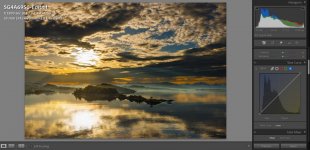
I have just spent about 20 mins trying to bost the yellows in the highlights of this image I've already edited from a trip to Norway earlier this year. Whatever I seem to do the image just looks worse and much less balanced. Screenshot 2024-12-29 234309.jpg
 
There are many ways to skin a cat. If you’re not comfortable with the tone curve tool then why not use the colour editor tool to boost the yellows?

You don’t have to use a tool just because it’s there. I very often won’t use the tone curve at all.
 
Last edited:
I almost never use the tone curve; I use targeted adjustment brushes much more.
What are you calling "highlights" in the image? Because you can't really add color/saturation to blown or clipped areas. Also note that Highlights and Lights in the tone curve equate to Whites and Highlights in the basic panel... i.e. highlights = lights
 
Curves is pretty much for adding more contrast! Yours is way way too contrasty already, some blown highlights, some black clouds. Just take a big step back


I know - this is why i picked the image, to have a play and see what I could do. Maybe i should have picked something a bit more simple to start.
 
Last edited:
Curves is pretty much for adding more contrast! Yours is way way too contrasty already, some blown highlights, some black clouds. Just take a big step back

The shape of the curve controls the contrast. The steeper the curve the more the contrast the flatter the curve the less the contrast.
However each point on the curve represents pixels of a particular brightness level . Those on the left are the shadow tones and those on the right the highlight tones, with mid tones in the middle. Many images benefit from an s shaped curve , which flattens the highlights Ans darkens the extreme shadows.
 
Just wondering as its been on my to do list to learn. I am capable of adjusting levels and adding an S curve etc but anything more and using all these points seems a bit like a black art.

First question: do people use it as their premier contrast editing tool or do they do it after basic slider adjustments?

second question is a general how:

I've watched 3/4 20 to 40 minute videos on youtube and the authors are very good at explaining it, using what seem like very specific images - i.e when they click points in the highlights and drag the sliders the highlights move but the rest of the image stays fairly balanced. When I do stuff like this on my images it just seems to edit the "tone" of everything and the lights seem much more in the midtones than on their images, hence the curve seems to edit everything.

I use it now and then as it can give better results than the sliders. It's not just about identifying whether the adjustment you want is to the highs, mids, shadows, or lows, it's also about identifying the best spot to place your point, which can involve dragging it around in all directions, and also to limit its effect by adding an anchor point to one or both sides of it to prevent the rest of the curve from moving around too much.

Most modern cameras have settings that control the dynamic range of the image. Getting a 'flatter' image to start with can sometimes help to get the effect you want.
 
I know - this is why i picked the image, to have a play and see what I could do. Maybe i should have picked something a bit more simple to start.
Start point always need to be quite low contrast. You use local adjustments to get there if needed. Then as you literally work your way down you get to curves almost at the very end. It is intentionally there
 
Back
Top