How do I.....please

Tori

Suspended / Banned
Messages
2,749
Name
Tori
Edit My Images
Yes
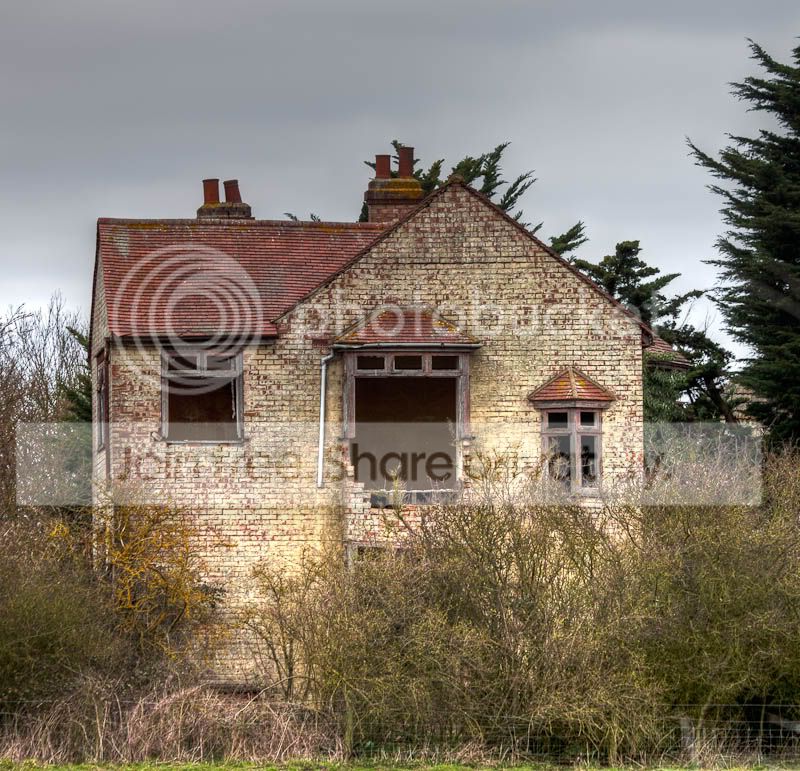
...get rid of 'ghosting'...other than start again with more accurately taken photo's with a tripod? (These...it's three images layered, were hand held and clearly not all exactly the same) Just a chance opportunity without my legs in tow :(

Basically, can I do anything with it now?

Spooky house complete with ghost lol ~~~>
IMG_2994_6_7.jpg
 
Last edited:
I'm no expert but I would definitely say s tripod.
Maybe an IS lens if you are going hand held. Failing that, try resting your hands on a fence or post when taking the shot.

The more experienced on here are the best to ask though :)
 
Thanks Jon, I didn't have my tripod with me (Just adjusted my post above)
 
IMO seriously if you wish to take a set for HDR [or similar reason for exposure ranging] a tripod is best though with a nice fast shutter speed and at least 6fps (frames per second) burst it is possible AFAIK to get a reliable set when handheld???

Edit ~ this is the tutorial (?) http://www.outbackphoto.com/CONTENT..._tonemapping_2009/20100216_FastHDR/index.html I recalled that mentioned "burst bracketing" HTH :D
 
Last edited:
Thanks, I'll take a look. Meanwhile, can I do anything to put my picture a bit more 'right'?
 
Try making it a mono colour (black/white) that should get rid of some of the double exposure, or at least have a play with mono.

Realspeed
 
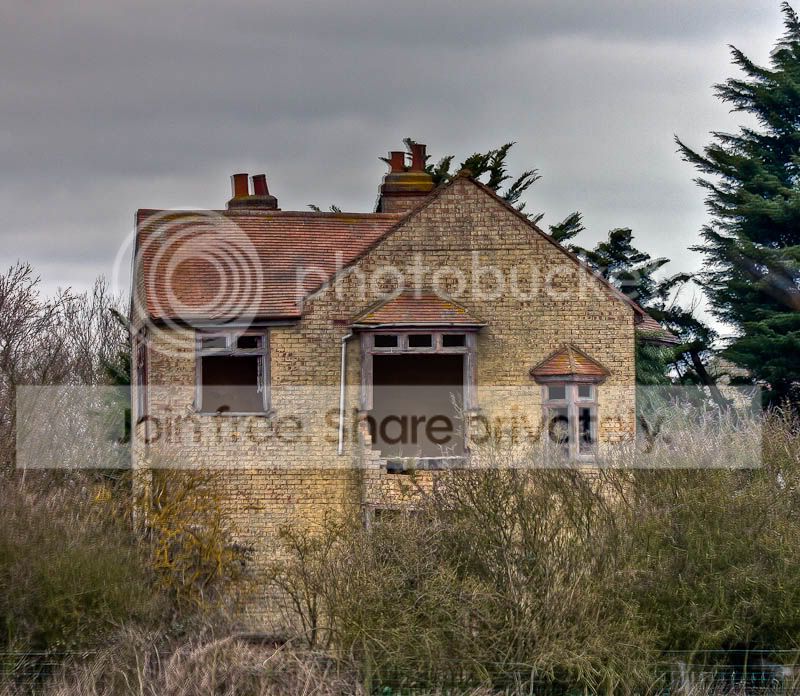
I think this might be a bit tidier, but I've cheated somewhat....

The marks in the windows are marks on the internal walls, I'm thinking I should maybe tidy those up...

IMG_2996_tonemapped.jpg
 
Hmmmmm! looking at the "shift(s)" I wonder if and this may take a lot of effort???

Can you reposition each layered image to 'compensate' for the camera shake......????? Having never done or even tried this I am likely talking out the back of my hat......but if you zoom in to say 75% to concentrate on a small area to see the effect of slight shifting required...is that possible. I surmise if that was so you may have to use #1 and #2 then flatten that to make #3 then add in the 3rd image to repeat the process???

Purely for knowledge purposes I wonder if that would work???

EDit ~ you posted while I was thinking & typing ;) Do I take it by the file title you used a single image and ran it through Photomatix type program ???
 
Last edited:
<ahem> I may of done....LOL Yes, the second pic is only one image. Back to the drawing board...thanks though! ;-)
 
tryout800x600.jpg


Something like this? ok it can be improved on but this is just an example.

Realspeed
 
Last edited:
When you export from Lightroom to Photomatix there is an option to align the images for horizontal and vertical shifts vs matching features in the initial export window. You might want to try another export changing that setting to matching features. You might also want to change the reduce ghosting artifacts setting too.

If that doesn't help much you could also try creating 2 virtual copies of one image, with exposures set 1 or 2 stops apart + and -, and export all 3 images to Photomatix again. The results won't be as good as 3 separate images but will be better than 1 image pseudo HDR.
 
Last edited:
Thanks Jon, yes I noticed the ghosting thing and have been using that. And again, the second time I used two copies of the same image with slightly changed exposures.

You taught me so well ;-)
 
Do you have photoshop? theres an align layers option in the newer versions.
 
Yes I do, I've not experimented that far as yet though! Maybe something for another free weekend :) Thanks.
 
When you export from Lightroom to Photomatix there is an option to align the images for horizontal and vertical shifts vs matching features in the initial export window. You might want to try another export changing that setting to matching features. You might also want to change the reduce ghosting artifacts setting too.

If that doesn't help much you could also try creating 2 virtual copies of one image, with exposures set 1 or 2 stops apart + and -, and export all 3 images to Photomatix again. The results won't be as good as 3 separate images but will be better than 1 image pseudo HDR.

As Tori says, learn something new everyday, must look at that feature or atleast stick a postit note somewhere to remind me!

Edit - just looked in LR Export and cannot readily see such a settings choice selection???
 
Last edited:
Thanks Jon, yes I noticed the ghosting thing and have been using that. And again, the second time I used two copies of the same image with slightly changed exposures.

What exposure differences did you use? Try one at -2, one at 0, and one at +2 stops. Make sure you tell Photomatix to use those exposures too when it prompts you to confirm them.

Have you tried exporting with "align features" selected? And if so, what about trying the other setting?

Don't forget you can further process the TIFF image in LR after it's reimported. That's how I often acheive a more natural look to my HDRs, but you could also use it more creatively.
 
Last edited:
Lol, it's certainly a steep learning curve! My sponge occasionally reaches saturation point and I have a melt down, but I'm getting there! :)
 
I'm not sure now Jon. I'm quite happy with my second result for now. I might have another experiment when I have a bit more time. It's an interesting subject don't you think? If a bit spooky...
 
It's an interesting subject don't you think? If a bit spooky...

I can't say it does a lot for me as a subject, no. The disused church at Birch however... Very photogenic, especially on a misty morning.
 
Last edited:
Each to their own I guess! I've not seen the one in Birch. Maybe next on my list. I did try Arlesford but it gave me the creeps...
 
Indeed.

I've also shot that one. Didn't notice any creepy feeling. It was just a shell... Best angle there was shooting through aligned doorways IIRC.
 
Last edited:
Yes I got that shot but wasn't all that that happy. I struggled today. Cold, dark and bad karma I think.

There's a thread in birds that may interest you though jon..a bird id one...
 
I was cold. I don't function so well in the cold.

:razz: Same to you! lol
 
I don't suppose you have Photoshop cs5 do you? The HDR layering tool also has a setting to automatically remove ghosting... And if you don't have cs5 - do you care that much to buy it? Lol
 
Blimey, when I've asked for help from god before he's never replied!! And now, here you are!! LOL

I do have cs5 yes. I'll go take a look when I get five minutes. Thanks! :)
 
Tori said:
Blimey, when I've asked for help from god before he's never replied!! And now, here you are!! LOL

I do have cs5 yes. I'll go take a look when I get five minutes. Thanks! :)

LOL!! Well i do tend to appear in the most random places ;-)

I cant remember the settings exactly but im sure there's A tick box to remove ghosting and you can also choose which of the HDR images takes priority, so say you had someone in one of the images that you wanted to keep there, you could :)
 
Thanks god. I promise that I will be good now (At least for a bit) now that you've finally spoken....;-)

I shall indeed check this out (CS5 frightens me a bit, but I'll be brave when I have longer to browse...)

Ta muchly :)
 
:D

A great source of info I have found is julienne kosts' videos on adobe tv, they have seriously helped me get to grips with LR3 and CS5, in fact I think that's where I learnt about the hdr settings!

Have fun!
 
:D

A great source of info I have found is julienne kosts' videos on adobe tv, they have seriously helped me get to grips with LR3 and CS5, in fact I think that's where I learnt about the hdr settings!

Have fun!

:agree: There is some really useful stuff on Adobe TV on the Adobe website.
 
Back
Top