

yoby
Suspended / Banned
- Messages
- 1,254
- Name
- Dave
- Edit My Images
- Yes
OK, this is going to be quite a lengthy question......
Was out the other day and saw this, but had no camera. returned the following evening, but the lack of Tripod was a bit of a killer really. Of the 20 or so shots I rattled off, there were two or three worth working on (I think).
The probnlem is that my PS skills are limited to re-sizing and very very basic application of colour tweaks and contrast tweaks etc. My "vision" for this is a nice monochrome image, with a stark and moody feel, but I just can't seem to achieve it. Althought the original isn't as sharp as I'd like it, there's still something to work with imo but I'm just not sure how....
Would really appreciate it if someone could have a pop at it and let me know how you did it. I'm currently working my way through PS for dummies, but kids, work and other stuff seems to preclude any retention of the stuff I'm "learning".......
One of my many attempts....
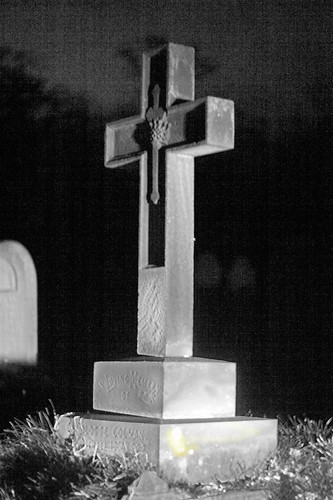
Which as you can see is noisier than a rock concert in a one bedroom flat.
The original was shot in RAW format so I should (in theory) have a bit more scope to correct the blown bit at the bottom of the plinth, again haven't figured out how to do this successfully (can provide the RAW file if required).
RAW to JPG Conversion for the above attempt is here
http://picasaweb.google.com/ytsorf6/Miscellaneous/photo#5150894582629664466
Sure it has the potential to be a really striking image, and the best bit is, it isn't going anywhere so I will be able to return with a tripod, once I've acquired one...
Thanks for looking and any advice....
Was out the other day and saw this, but had no camera. returned the following evening, but the lack of Tripod was a bit of a killer really. Of the 20 or so shots I rattled off, there were two or three worth working on (I think).
The probnlem is that my PS skills are limited to re-sizing and very very basic application of colour tweaks and contrast tweaks etc. My "vision" for this is a nice monochrome image, with a stark and moody feel, but I just can't seem to achieve it. Althought the original isn't as sharp as I'd like it, there's still something to work with imo but I'm just not sure how....
Would really appreciate it if someone could have a pop at it and let me know how you did it. I'm currently working my way through PS for dummies, but kids, work and other stuff seems to preclude any retention of the stuff I'm "learning".......
One of my many attempts....
Which as you can see is noisier than a rock concert in a one bedroom flat.
The original was shot in RAW format so I should (in theory) have a bit more scope to correct the blown bit at the bottom of the plinth, again haven't figured out how to do this successfully (can provide the RAW file if required).
RAW to JPG Conversion for the above attempt is here
http://picasaweb.google.com/ytsorf6/Miscellaneous/photo#5150894582629664466
Sure it has the potential to be a really striking image, and the best bit is, it isn't going anywhere so I will be able to return with a tripod, once I've acquired one...
Thanks for looking and any advice....


