


Hockeynut
Suspended / Banned
- Messages
- 82
- Name
- David
- Edit My Images
- Yes
I wasn't sure whether this should go into the Lighting forum or just here, please move if I got it wrong.
I hope I'm OK to link to someone on Flickr as my example, as he's someone I've followed on there for a while. I love his outdoor portraiture, everything seems really light and soft, and I want to try this style.
I have no idea whether it's done on camera or post with a lightroom filter or similar. It's the ones that seem to have a pale washed out light kind of look. It seems he gets really light backgrounds, in particular fields of straw or similar, but the subject is also very light as well lit.
Can anyone give me any tips as to how to achieve this style?
Here are some examples of the style I'm referring to:
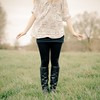
Whisper by Friedemann.Thomas, on Flickr
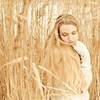
Für immer... by Friedemann.Thomas, on Flickr

Untitled by Friedemann.Thomas, on Flickr
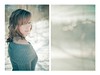
Untitled by Friedemann.Thomas, on Flickr

Untitled by Friedemann.Thomas, on Flickr
I hope I'm OK to link to someone on Flickr as my example, as he's someone I've followed on there for a while. I love his outdoor portraiture, everything seems really light and soft, and I want to try this style.
I have no idea whether it's done on camera or post with a lightroom filter or similar. It's the ones that seem to have a pale washed out light kind of look. It seems he gets really light backgrounds, in particular fields of straw or similar, but the subject is also very light as well lit.
Can anyone give me any tips as to how to achieve this style?
Here are some examples of the style I'm referring to:
Whisper by Friedemann.Thomas, on Flickr
Für immer... by Friedemann.Thomas, on Flickr
Untitled by Friedemann.Thomas, on Flickr
Untitled by Friedemann.Thomas, on Flickr
Untitled by Friedemann.Thomas, on Flickr


