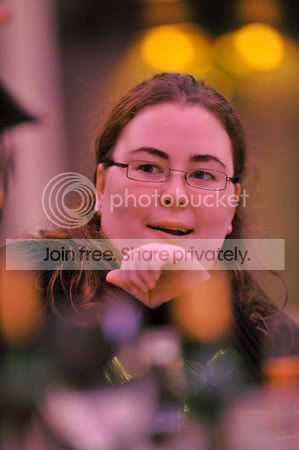
Horrendous colour lighting at venues - can this be fixed in post?

tfboy

Suspended / Banned
Messages
997
Name
Xavier
Edit My Images
Yes
Just back from a Christmas bash with swmbo's work colleagues. Was my first time trying out the 200 f/2 and despite my left arm aching somewhat, it just amazes me what it produces given pretty atrocious conditions...

My biggest gripe and one I can't get over working on the photos is that they used pretty much ultraviolet lighting in the venue. Of course, human eyes adjust somewhat, but the resulting picture make everyone magenta. And I can't come up with a way of fixing it relatively easily.

Here are a few jpegs straight out of camera. I have the RAW files if someone would like a play. None of the RGB values are blown out on the histograms. I'd be really interested to see if it's possible to make the colours a bit more natural without requiring ages of time and effort on each pic...

Thanks!

733626458_T26Xy-M.jpg


733626405_xxXez-M.jpg


733626274_Qxk8q-M.jpg


733626293_hUBsM-M.jpg


733626370_JmMDW-M.jpg
 
You mean like this?

showphoto.php
[/url][/IMG]
 
LOL.

Try setting the wb of your image to 6500K - you might need to run the filter a few times. It should look more natural, but stilll a bit red/blue. Adjust the RGB sliders to get a more natural skin tone. There's no easy way that doesn't involve a bit of suck it and see...

4164102781_2350694d1f_o.jpg


The easiest way to do it is use the raw image and using the eye dropper tool select a white bit - in the case of this image - one of the white stripes on his jumper. That should get you pretty close, although you you might still need a bit of tweaking of levels to get anything like a natural look.

Converting to mono and adjusting for contrast would save a lot of grief and messing about. ;)
 
Nuttyboy, yes, that looks a bit more natural.

Thanks CT, I'll have a play.

Last resort / lazy step would be just to have B&Ws :) Just wondering if there's an easy approach. SIAS is the way forward :)
 
Nuttyboy, yes, that looks a bit more natural.

Thanks CT, I'll have a play.

Last resort / lazy step would be just to have B&Ws :) Just wondering if there's an easy approach. SIAS is the way forward :)

Takes all of 2 seconds on Lightroom, mate.

All I had was the jpeg and you just slide the tint all the way to the green side. Stop when you feel it's right. Adjust the temp a little and you're there.

If you have the RAW files, you can be even more accurate by using the dropper as CT suggested above. The problem with using the dropper in this case is that there is no neutral area to pick as it is all PINK!! :lol:
 
Yeah. It's a bit desaturated, but certainly looks a hell of a lot better than the stuff SOOC.

Funny how LR can get really confused. On the same photo, what appears to be a very similar shade of natural grey gives a WB of 2000K or 50000K for virtually the same thing LOL

I'll just quickly tweak the ones that look OK, and the ones that still are too bad, just have them in mono.

Thanks :)
 
2 more. Still a touch too pink but like I said, if you have the original RAWs and a bit more time, you can recover most of them.


Takes all of 2 seconds on Lightroom, mate.

All I had was the jpeg and you just slide the tint all the way to the green side. Stop when you feel it's right. Adjust the temp a little and you're there.

If you have the RAW files, you can be even more accurate by using the dropper as CT suggested above. The problem with using the dropper in this case is that there is no neutral area to pick as it is all PINK!! :lol:

:thumbs:
 
And another slight improvement. Taken off some more of the "pinkness" :)


Last one -- you can get pretty close with these. If you're getting a reasonably clean white you should be close.

4164233355_b8db9e6466_o.jpg


Raw is the way to go. It doesn't actually matter about the overall cast as long as you use the eye dropper on a white bit -regardless of what cast it has, your'e effectively saying "This is what white looks like"
 
Yeah thanks.

Actually, as I'm learning a lot with LR and appreciating how fast your workflow can be once you get to grips with the shortcut keys. Fortunately, most of the photos have bits of table cloth which is (normally!) white and just hitting W selects the eyedropper for white balance and it's dead quick to click, next photo, click, next photo.

Also, to be fair, the photos I hosted are all a bit underexposed, so get the exposure right, then tweaking the WB is pretty accurate :) Sometimes, a few more picks with the eyedropper are required to make sure it's tweaked as best as possible and then it's done. :thumbs:

And yes, once again, RAW saves the day. To be honest, some aren't too bad because there were the occasional halogen spotlights giving a much warmer colour, overpowering the ambient magenta. :)
 
A quick play with curves. Moving the black and white point sliders to meet the start of the channel information in all three RGB channels as a starting point then adjust mid tones and general fine tune. The problem with this image is there's no real white point to set which makes it a bit difficult.

733626458_T26Xy-M.jpg
[/IMG]
 
Back
Top