Horizontal Scratches on Negatives - Cause?

cedge

Suspended / Banned
Messages
98
Name
Mr Chris Edgecombe
Edit My Images
No
I've been developing film in a Lab Box at home for a number of years now and I have in the past seen some scratches on my films but I'm trying to pin down the issue with my current roll of film (Kentmere Pan 100 in a Seagull 203 folding camera utilising the 6x4.5" masks; the camera has recently been serviced but the problem existed before (and on images shot in 6x6) and I think this camera seems to be the worst when it comes to these kinds of scratches. In the resultant digital image they show up as white or black lines. The below image is a good example.

I can't see how the Lab box could be the cause as the lines are all down the negative at points where the film doesn't touch anything in the box, I've looked inside my camera and felt the path of the film and can't see anything obvious. I tried digitising the image with 2 cameras, same problem in both images. I scan using a Pixl Latr over an ipad but as I don't pull the negative through but tend to open the pixl latr and reposition the negative I can't think it is that either thats causing the issue. Any ideas? What am I missing?

 
Last edited:
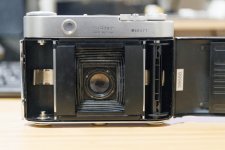
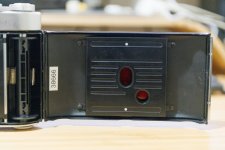
I've attached two images from the back of my Seagull 203 camera. The pressure plate intendations are the only thing I can think of as the cause but would they assert enough pressure through the backing paper to cause it?

IMG_3040-1.jpg

IMG_3041-1.jpg
 
Last edited:
I doubt that it is the pressure plate as the film is protected by the paper backing, I would think that it is more likely to be the reducing mask as the emulsion will be in direct contact with it.

Thinking about it, the scratches show as black so are missing emulsion on the negative.
 
The scratches are there if the masks are folded back into the camera so when shooting 6x6.
 
  • Like
Reactions: zx9
If the scratches are always present, then my approach would be to sacrifice a roll of film. Check for lack of scratches, then wind back onto the roll, load the camera and shoot off the film as normal. Finally, reexamine the unprocessed film for scraches.

If still OK, process the film in the lab box - you can just use water after all - and check again.

If the problem hasn't recurred, you've wasted a roll of film; but if it's present, you'll know what stage it happened.

If you squeegee your films, that could of course be the problem, so don't omit your usual stages.

I'd count the cost of the wasted film as a necessary expense to save further losses down the line.
 
Wouldn’t the film be exposed though so developing wouldn’t show anything?

I don’t squeegee; photo flo and air dry hung up.
 
Wouldn’t the film be exposed though so developing wouldn’t show anything?

I don’t squeegee; photo flo and air dry hung up.
It wouldn't show an image, but scratches should be visible.
 
Thanks, will give it a try.
 
I've just reviewed my past 120 negatives and certainly the last couple of rolls of Kentmere from the Seagull including the current roll seem to be the worst; the shiny side is littered with horizontal scratches right across the entire roll (not visible on the matt side but then the scratches still show up in the digitised image). I will still sacrifice a roll though and perhaps only shoot 8 or so exposures so I can see whether the scratches suddenly stop on the roll as well.
 
The shiny side is the non emulsion side - that means the camera is in the clear and the problem occurs in the Lab box or later...
 
  • Like
Reactions: zx9
Interesting, I guess the shiny side of the film is protected by the backing paper in the camera so like you say, the damage is happening elsewhere. I've since given the lab box 120 module a thorough clean to see whether this helps. Not sure how the scratches would appear once they are hung to dry so it must be the box. I might just shoot another 120 roll in a different camera and see whether the lab box scratches that film rather than completely waste a roll.
 
Last edited:
  • Like
Reactions: zx9
I can't help with the cause, but can at least offer a partial solution to the final print.

The latest version of Photoshop is excellent at using Generative fill to remove the scratches if you're not doing any PP at the moment.
 
No I agree, Lightroom's AI heal/clone tool is great now at removing these compared to the old clone tool. But it would be good to eliminate the source as the lines might not always be easy to remove depending on where they cross.
 
Last edited:
Right, I've done some more investigations today (without sacrificing a roll) and I think I've pinpointed the issue after it was made clear that as the scratches were on the shiny side that it was unlikely that the camera was causing the issue.

For those not familiar with a lab box; when you load 120 film into the box, there is a point where a piece of film is left exposed to allow you to clip on a clip, you then replace the light tight seal lid and then wind the film onto a reel in order to start developing. It was plain to see when I examined the last roll, that the scratches were not present on the piece of film that is exposed/used to clip the clip on but were present on the rest of the film so it must be being scratched when winding the film onto the reel.

To be fair, I've never really cleaned this part of the lab box as it detaches and generally looks dry. The manual does say that a dry cloth should be used as a minimum. Looking back in my negative collection, scratches were present in other films used on other cameras but I would say that the Kentmere film seemed to be more suceptible in picking up and showing the scratches; the ilford fp4/tri-x negatives seemed more hardy and perhaps more scratch resistant.

But, anyway, hopefully a good clean after each development (as per the manual) should sort the issue assuming it was development debris building up/getting attached to a surface in the lab box in which the film is wound against.
 
Last edited:
Or - One dodge used by Fleet Street photographers in the past if they had scratched film was to wipe a finger on the side of their noses where natural grease accumulates, and then wipe it over the damaged part of the film. Apparently this 'deposit' (but non of the green bits) when applied, had the propensity to hide the scratches. Purely anecdotal, I have never tried it
 
Last edited:
Or - One dodge used by Fleet Street photographers in the past if they had scratched film was to wipe a finger on the side of their noses where natural grease accumulates, and then wipe it over the damaged part of the film. Apparently this 'deposit' (but non of the green bits) when applied, had the propensity to hide the scratches. Purely anecdotal, I have never tried it
It did work, at least in the 1960s and provided the scratches weren't too deep.

I was taught the trick when I worked at a studio in London. We only used it for news work, because once you started dodging and burning, the changed contrast showed the marks.
 
Back
Top