
You are using an out of date browser. It may not display this or other websites correctly.
You should upgrade or use an alternative browser.
You should upgrade or use an alternative browser.
Hippo's 52 -2011. Week 9 'FINISH' uploaded - Index on 1st page
- Thread starter Hippo_MC
- Start date


- Messages
- 1,863
- Name
- Mike
- Edit My Images
- Yes
Great take on the theme.

OP

Hippo_MC
Suspended / Banned
- Messages
- 554
- Name
- Ray
- Edit My Images
- Yes
Thanks Mike,
Thanks Steve.
I am only a novice as well, (all the gear, no idea) In fact not quite all the gear I would like This was taken today on a walk into the High Street with my S90. I saw a for sale sign in my road, which got me thinking and knew there was a recent renovation not to far away, so was hoping for something like this. Quite pleased there was a range of colours in the estate agent's boards. Although maybe some green would have been nice. Beggars can't be choosers though.
Thanks Steve.
I am only a novice as well, (all the gear, no idea) In fact not quite all the gear I would like
This was taken today on a walk into the High Street with my S90. I saw a for sale sign in my road, which got me thinking and knew there was a recent renovation not to far away, so was hoping for something like this. Quite pleased there was a range of colours in the estate agent's boards. Although maybe some green would have been nice. Beggars can't be choosers though.


OP
Hippo_MC
Suspended / Banned
- Messages
- 554
- Name
- Ray
- Edit My Images
- Yes
although the verticals look ever so slightly off but that's just nit picking.
The road slopes
Thanks for all your comments folks.


soggydiverdan
Suspended / Banned
- Messages
- 244
- Name
- Dan
- Edit My Images
- Yes
Oooh I like it...
I've got to learn image editing...
I've got to learn image editing...

GSDlover4ever
Suspended / Banned
- Messages
- 628
- Name
- Robyn
- Edit My Images
- No
I'm not usually a fan of the selective colouring, but it is quite effective in this shot 


OP
Hippo_MC
Suspended / Banned
- Messages
- 554
- Name
- Ray
- Edit My Images
- Yes
brilliant!
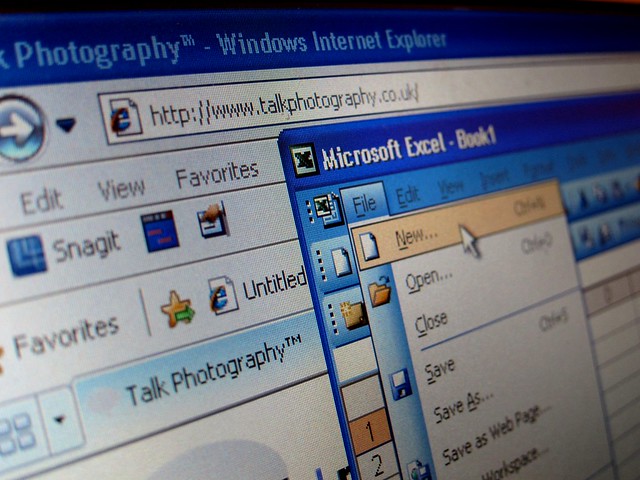
Love the idea, great DOF and looks like you've been putting your sticky fingers on your computer screen
That will be my 14 month old boy :baby:

- Messages
- 7,655
- Name
- Frank
- Edit My Images
- No
brilliant first 2 weeks of your 52... love both ideas...

chriseve1979
Suspended / Banned
- Messages
- 274
- Name
- Chris
- Edit My Images
- Yes
Two great photos to start the 52. "New" is a novel idea!

crazy badger
Suspended / Banned
- Messages
- 463
- Name
- Adrian
- Edit My Images
- Yes
What a fantastic start!
How do you go about separating out the colour and b&w background in Photoshop?
And any way of using Excel is always a winner! When I left home for University my Dad offered me the following wise words: "if it can't be done in Excel it's probably not worth doing!" Has served me well in my business career, although not the accountancy one my Dad chose!
Looking forward to next weeks already...
How do you go about separating out the colour and b&w background in Photoshop?
And any way of using Excel is always a winner! When I left home for University my Dad offered me the following wise words: "if it can't be done in Excel it's probably not worth doing!" Has served me well in my business career, although not the accountancy one my Dad chose!
Looking forward to next weeks already...


OP
Hippo_MC
Suspended / Banned
- Messages
- 554
- Name
- Ray
- Edit My Images
- Yes
Shame you are using IE though
Twitch, I know, sacrilege!! I should have used firefox!
What a fantastic start!
How do you go about separating out the colour and b&w background in Photoshop?
Adrian,
I created a duplicate layer, converted to B&W and then used the erase tool
I am a photoshop novice myself
 . If you do a search in Google for 'selective colouring' in photoshop, you will find loads of tutorials. However, I bought the Photoshop 'Missing Manual' from Amazon which covers just about everything.
Et al. Thanks for your comments. Much appreciated

soggydiverdan
Suspended / Banned
- Messages
- 244
- Name
- Dan
- Edit My Images
- Yes
Love the second shot, agree with excel, but you really should be using chrome/ff, not ie...

- Messages
- 5,519
- Name
- Dawn
- Edit My Images
- No
Hi Ray,
Well done, another great take on the theme for this week, very clever thinking there.
I can't see any fingerprints, but hey that is probably because there are so many on my own screen
Love the angle and depth of field you used here and getting the TP in. Have to agree with your dad about Excel, I have used it for so many projects over the years.
Look forward to seeing your photo for the next theme.
Cheers
Dawn
Well done, another great take on the theme for this week, very clever thinking there.
I can't see any fingerprints, but hey that is probably because there are so many on my own screen
Love the angle and depth of field you used here and getting the TP in. Have to agree with your dad about Excel, I have used it for so many projects over the years.
Look forward to seeing your photo for the next theme.
Cheers
Dawn
OP
Hippo_MC
Suspended / Banned
- Messages
- 554
- Name
- Ray
- Edit My Images
- Yes
Thanks for all the comments
A couple of people have said that they agree with my Dad regarding Excel. My old man doesn't even know what the return key is and a mouse to him has 4 legs and squeaks
It was Crazy Badger's comment re his Dad. But I do agree, you can't beat a good vlookup or nested IF statement
A couple of people have said that they agree with my Dad regarding Excel. My old man doesn't even know what the return key is and a mouse to him has 4 legs and squeaks
It was Crazy Badger's comment re his Dad. But I do agree, you can't beat a good vlookup or nested IF statement
- Messages
- 5,519
- Name
- Dawn
- Edit My Images
- No
Thanks for all the comments
A couple of people have said that they agree with my Dad regarding Excel. My old man doesn't even know what the return key is and a mouse to him has 4 legs and squeaks
It was Crazy Badger's comment re his Dad. But I do agree, you can't beat a good vlookup or nested IF statement
it's amazing how one can get so lost in these threads, a bit like chinese whispers Obviously you know about Excel too and have to agree about a good vlookup and nested IF statement, very sexy! As for your dad's knowledge re Excel, I think my mom is of the same mind, hence all the mouse traps she leaves out around her house
Cheers
D

OP
Hippo_MC
Suspended / Banned
- Messages
- 554
- Name
- Ray
- Edit My Images
- Yes
I like your thinking on that one, although it's a bit ironic that for the "new" week your copy of Excel is several versions out of date.
ha ha. Good Point. I am a trainer by trade, so I have about 3 or 4 versions of Office.
I really like this idea. Must have been very tricky to put together. My final thought:
=SUM(tog+camera)*(light+subject)
*Glad to see another Snagit user as well!
I like your formula, but I think that my formula was =IF(subject="New","rack brains",IF(topic_date>7,"failed 52 project","take photo")) Obvioulsy, this would include conditional formatting as well
nice! I like the selective colouring in the first one - while not normally a fan of it it really works in a few shots -and this is one of them!
Love your take on new too! Very clever, great use of DOF and fab composition!
Thanks for you comments

