Help

taff63

Suspended / Banned
Messages
841
Name
mark
Edit My Images
Yes
Few questions needing help plz

1/ ive just bought a new laptop running windows 10 and when it starts up it opens with chromium how can i stop that where i just want google (used to that now)

2/ cc cleaner is on there also but all boxes are ticked are there any on there that i should untick as not to delete files by accident.

Mark
 
1/ not sure what you mean, are you saying that it immediately opens "chrome" Browser or that the Desktop is showing Chromium as an Option??

2/ I use Ccleaner as downloaded, installing every Update, with no problem. If you are concerned that the "Registry Cleaner" may be deleting important
info than save a copy before cleaning. You can then reinstall if needed, but I`ve never needed to.
 
1) Do you mean that Chromium (Chrome?) opens as part of the startup process? Open control panel, type startup into the search box & follow the link to see what processes open at startup. Remove Chrom(ium).

2) CCleaner can be a pain in the bum, because it will delete browsing history, tabs, lists of previously opened documents in MSOffice. if you must use it, I'd advise to uncheck everything that looks like it might remove something useful.
 
Sounds odd for a new machine to be set up like that.

To disable startup programs on w10 go to task manager and the startup tab, right click the program and disable.

Ccleaner just uninstall it, can cause more bother than its worth. Especially if you aren't sure what you're ticking.
 
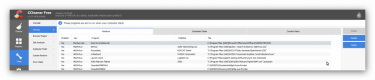
upload_2017-3-8_8-46-31.png
Ccleaner gives you an easy Option under "Tools" to Disable or delete a start up Programme, you can also right click and chose from the Drop-down menu.
 
Back
Top