Help with "soft" bird image

PatrickO

Suspended / Banned
Messages
2,808
Name
Patrick
Edit My Images
Yes
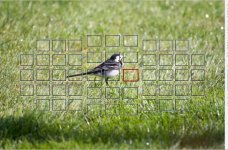
Advice appreciated on this image. I'm using a Nikon D7200 and 200-500mm lens. I've used this combo lots in the past, but just got this specific lens used from MPB. I'm having trouble getting decent sharp images. Everything seems a bit soft. Is it me or the lens?

This is an unedited jpeg shot at 500mm, f/5.6, 1/2000, ISO560. Just converted from RAW to jpeg.

View: https://flic.kr/p/2qZ61te
 
Last edited:
sometimes when you think the shot is sharp it turns out to be "soft" - you cannot judge (anything) based on one image

at that distance and at 500mm and f/5.6 the DOF is quite narrow- I noticed from the EXIF that you used spot metering - if you use LR there is a plug in which (can) show you the exact focus point, (on or off the bird)
 
Last edited:
sometimes when you think the shot is sharp it turns out to be "soft" - you cannot judge (anything) based on one image

at that distance and at 500mm and f/5.6 the DOF is quite narrow- I noticed from the EXIF that you used spot metering - if you use LR there is a plug in which (can) show you the exact focus point, (on or off the bird)

Interesting result from the focus point plugin. Show my focus point was off. Useful. Thanks

Screenshot 2025-04-22 182121.jpg
 
The other thing to look at concerning each of your lens, is calibration, as mentioned by Steven ........... I think the facility to adjust for each lens is available within the D7200 menu ............... it can be a long and confusing exercise - there are charts available online that you can print off, or you can buy a ready made "kit" which is of heavy duty quality, (Datacolor Spyder LensCal), or Amazon do much cheaper copies plus, ideally, you need two good tripods.
BUT with a zoom lens you may get differing results and the different focal lengths, so some record the readings at 200mm and 500mm and then take an average
 
Last edited:
It is not hard to see what is sharp and that's grass in front. DSLRs unfortunately were never that accurate.... Any mirrorless these days would ace this
 
Interesting result from the focus point plugin. Show my focus point was off. Useful. Thanks

View attachment 451379
Still doesn't explain the front focus as it shows focus was achieved there; and it wasn't.

Also keep in mind that release priority and/or camera shake can make the focus point position a bit off (i.e. you moved the focus point and the camera hadn't reacted yet). And worse yet, some cameras flat out lie about focus confirmation in some/most modes (like my Z9).
 
Still doesn't explain the front focus as it shows focus was achieved there; and it wasn't.

Also keep in mind that release priority and/or camera shake can make the focus point position a bit off (i.e. you moved the focus point and the camera hadn't reacted yet). And worse yet, some cameras flat out lie about focus confirmation in some/most modes (like my Z9).

Steven, it looks to me as though the focus point is where it is indicated by the red square, (or maybe just below it)
 
Back
Top