
Help! Why are my RAW and Jpeg white balances different?!

AshMashMash

Suspended / Banned
Messages
2,043
Edit My Images
Yes
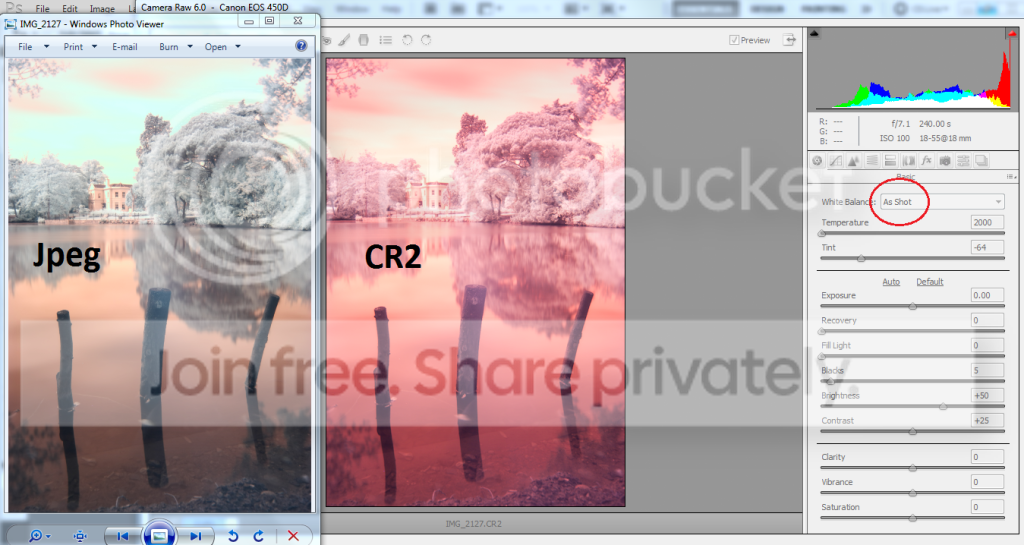
So I am doing some InfraRed shooting which includes funky custom white balances, but that's not my quiery per se. Basically I've got home to edit some pictures - I shoot in RAW+L Jpeg - and the CR2 white balance and Jpeg white balance don't match!

Am I being stupid? The Jpeg white balance is what I want, without the pink tinge. But all options on the white balance setting in Camera RAW 6.0 are incorrect - the "As Shot" option should be correct, no?!

Please see image:
irwhitebalance.png


Am I being stupid? What's happened?
 
Im guessing its something to do with the different way your camera and cr2 think your image should look like due to the infrared. You will probably get the result you want by just playing with the wb slider and tint anyway, make a mental note of the settings you use to make it faster dealing with loads of images.
 
Im guessing its something to do with the different way your camera and cr2 think your image should look like due to the infrared. You will probably get the result you want by just playing with the wb slider and tint anyway, make a mental note of the settings you use to make it faster dealing with loads of images.

Hmm... surely they should just be identical? :-/

And no, I don't think I can get the white balance I want from fiddling with settings, which is what's pee'd me off. It's a very specific and very odd white balance used for Infra Red, and without it the images come out completely wrong when edited in post production :bang:
 
Camera Raw may be using your Adobe colour manager which would explain the colour difference. It may also simply be that Windows Picture Viewer is unable to display your images correctly.
 
Hmm... surely they should just be identical? :-/

And no, I don't think I can get the white balance I want from fiddling with settings, which is what's pee'd me off. It's a very specific and very odd white balance used for Infra Red, and without it the images come out completely wrong when edited in post production :bang:

Try download the canon raw converter and see if its just a difference of opinion between what the camera is doing to create the jpg, and what CR2 is doing to create a jpg.
 
Camera Raw may be using your Adobe colour manager which would explain the colour difference. It may also simply be that Windows Picture Viewer is unable to display your images correctly.

I've found out via flickr that it's due to the white balance I am using being below 2000k. So the Jpeg is spurted out correctly as a Jpeg is, but the RAW file can't be viewed with ACR when it's temperature is less than 2000k. Makes sense - and is really annoying :bonk:

Edit: POsted at same time Chris - as above, I think that's the issue! Thanks anyways :)
 
Back
Top