

widebloke
Suspended / Banned
- Messages
- 95
- Name
- Mark
- Edit My Images
- Yes
Hi all,
So after a few years hanging round the film end of the forum I finally upgraded to a Nikon D600 over Christmas. Which means I have now entered the world of white balance, RAW and digital workflows. Previously my PP work was mostly scan, crop, dust removal and maybe contrast or colour tweaks. So now I have started using Lightroom and I have all these sliders and adjustments and I'm not sure if I'm heading the right way.
So here are a couple of images from a family afternoon walkabout last week.
Before:

Cambridge Botanical Gardens-26-Jan-Orig.jpg by widebloke, on Flickr
After:

Cambridge Botanical Gardens-26-Jan-19.jpg by widebloke, on Flickr
Before:
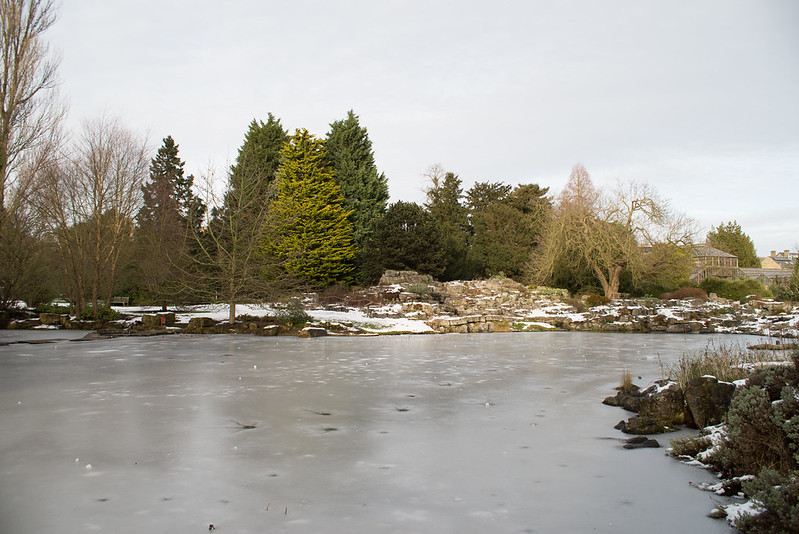
Cambridge Botanical Gardens-26-Jan-Orig.jpg by widebloke, on Flickr
After:

Cambridge Botanical Gardens-26-Jan-29.jpg by widebloke, on Flickr
Really what I want to know is, did I go too far, not far enough? anything else i should look out for? I am also thinking about doing as many POTY2013 as I can to try and learn as much as possible. What do you think?
So after a few years hanging round the film end of the forum I finally upgraded to a Nikon D600 over Christmas. Which means I have now entered the world of white balance, RAW and digital workflows. Previously my PP work was mostly scan, crop, dust removal and maybe contrast or colour tweaks. So now I have started using Lightroom and I have all these sliders and adjustments and I'm not sure if I'm heading the right way.
So here are a couple of images from a family afternoon walkabout last week.
Before:
Cambridge Botanical Gardens-26-Jan-Orig.jpg by widebloke, on Flickr
After:
Cambridge Botanical Gardens-26-Jan-19.jpg by widebloke, on Flickr
Before:
Cambridge Botanical Gardens-26-Jan-Orig.jpg by widebloke, on Flickr
After:
Cambridge Botanical Gardens-26-Jan-29.jpg by widebloke, on Flickr
Really what I want to know is, did I go too far, not far enough? anything else i should look out for? I am also thinking about doing as many POTY2013 as I can to try and learn as much as possible. What do you think?


