HELP Render problem pixelation

KIPAX

Seriously Likeable
Suspended / Banned
Messages
21,370
Name
KIPAX Lancashire UK
Edit My Images
No
Video OK as original, OK in editing software (Sony Vegas Pro 17) . I have rendered videos before and OK But if you look at this test footage at 33 seconds and arrgh :( I have done a 5 min video that was all put together and looked good until i rendered and this happened a few times.

Videos to do but I am stuck :(

View: https://youtu.be/9UxX3coGC98?si=i_3eqUqGOGbsoO6U
 
It may be that that your render bit rate setting is too low to handle all of the detail and movement in the frame at that point. You could try raising the quality/bit rate or switching to a variable bit rate option.
 
Thank you. Just looking. It's set to 8 bit. There's 32bit floating video levels or 32bit full range that's in ediring

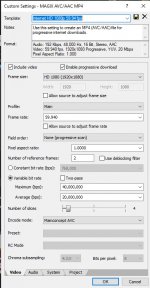
But in rendering it's variable. Two pass. Isn't selected. Min bps 40 mill Ave 20 mil

Amy good? :)
 
I would try increasing your Maximum (bps), ticking the Two-pass box will also give you a better result although with a slower render time. You could also look at your original footage and see what the bit rate it was recorded in as that works OK.
 
Your top end 40,000,000bps converts to only 5 megabytes per second for bitrate.

With it being a fast moving, constantly changing scene the compression will be nowhere near as efficient as a slower scene with static elements. That along with the low bitrate will definitely lead to the macroblocking issues I'm seeing in your video.

Even Netflix's 4K feeds struggle with moving water, flames and other complex elements due to their compression rates of 15-20 megabytes per second.

I'd also check what bitrate the camera is using because if it's too low to begin with, tinkering with it in export won't do a thing.
 
cheers guys much appreiciated.. its a sony ax53 camcorder and the record bitrate is at the highest of the two options at 100 mbps
 
You could just render that section at 100mbps and see if it solves the issue.
 
You could just render that section at 100mbps and see if it solves the issue.


i dont know whow haha ;) sorry.. it says between 20 and 40 million bps does that equate to 20-40 mbps.. I am guessing here
 
@ah5168 @Adam-G Looks like we have cracked it thank you :) I upped the upper limit to 99 million (just randonm higher number) and did the 2 pass. I just rendered the same 5 minute video i did yesterday... yesterday I watched my logo and could see it was ghosting and very rough quite a lot (therefore rest of video was) But after making changes I just watching my logo for 5 mins haha (good way of testing for me) and it was clear and sharp all the way through... I can even pause the video and whole frame still look good

Not sure if my figures are right . might be dumb luck.. but you guys got me on the right track and sorted...THANK YOU .. Am uploading to youtube now so will post later :)
 
@ah5168 @Adam-G Looks like we have cracked it thank you :) I upped the upper limit to 99 million (just randonm higher number) and did the 2 pass. I just rendered the same 5 minute video i did yesterday... yesterday I watched my logo and could see it was ghosting and very rough quite a lot (therefore rest of video was) But after making changes I just watching my logo for 5 mins haha (good way of testing for me) and it was clear and sharp all the way through... I can even pause the video and whole frame still look good

Not sure if my figures are right . might be dumb luck.. but you guys got me on the right track and sorted...THANK YOU .. Am uploading to youtube now so will post later :)
Glad you got it sorted.

If you are shooting this kind of very detailed image, where there is also a lot of movement in the frame and also you are moving the frame at t the same time you can run into trouble if you are shooting a heavily compressed codec.

It's worth testing the codec to find out where the breaking point is. If you find a scene like a gravel drive with lots of leaves and trees above it and pan backwards and forwards across it you may be able to create the pixilation issue in camera. If you do run into the issue using ND filters to lower the shutter speed and and a low frame rate like 25fps may help.
 
@ah5168 @Adam-G Looks like we have cracked it thank you :) I upped the upper limit to 99 million (just randonm higher number) and did the 2 pass. I just rendered the same 5 minute video i did yesterday... yesterday I watched my logo and could see it was ghosting and very rough quite a lot (therefore rest of video was) But after making changes I just watching my logo for 5 mins haha (good way of testing for me) and it was clear and sharp all the way through... I can even pause the video and whole frame still look good

Not sure if my figures are right . might be dumb luck.. but you guys got me on the right track and sorted...THANK YOU .. Am uploading to youtube now so will post later :)
Glad you got it sorted. Video is a whole different ballgame to photography, I'm no expert but I'm learning as I go like you.

I've been an AV nerd for years so I've always understood compression codecs. The way they work at the most base level is on a frame to frame basis, they only log data for each pixel that has changed. In a relatively static shot, in a 24 frame sequence, only 10% of the frame may have changed. In a shot like yours full of flowing water and fast moving subjects, I'd bet only 10% of the frame is the same from one to the next so it's a nightmare for a compression algorithm, meaning that a lot of guesswork has to take place.

One thing I've found that has made my job much easier is using Shutter Angle rather than frame rate if you have access to this function. 180 degree shutter angle results in a filmic, natural subject motion which is what I want to achieve 90% of the time. I can just set 180 degrees and not worry about calculating frame rates to shutter speeds that may never match exactly and then just balance the exposure for the motion I want to achieve. Worth looking up if you have access to it.
 
Back
Top