Beginner Help needed to soften edges

IanC

Suspended / Banned
Messages
1,318
Name
Ian
Edit My Images
Yes
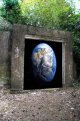
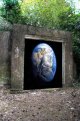
Hi All, I am not the best in Photoshop but I do like being creative, hence this attempt at something different.

I need to soften the bottom edge as it looks too sharp, can anyone teach me how to do this?

Many thanks
 

Attachments

  • DSC_0121-_+_ s.jpg
    DSC_0121-_+_ s.jpg
    185.6 KB · Views: 54
Just run the blur tool over it until you get the desired effect?
This was "darken" and @ 27%


DSC_0121-edit.jpg
 
Maybe the edges of the selection should have used some feather before copying and pasting.
It's an option in every decent photo programme.
 
Your problem with the "sell" on this image is that the globe image you've composited in is first of all distorted out of aspect ration, then it's not clear if you're trying to go for a "planet in a garage lockup" concept, or a "poster of a planet" painted onto the wall. If i was the latter, then you'd need to fake some specular highlights and reveal a little of the wall texture. If it's the former then you want to watch your aspect ratio more closely (Keep the earth earth shaped) and perhaps use some of the foreground frame to occlude the composited image to make the obvious hard-edge less obvious. Hanging ivy, broken masonry, that sort of thing.
 
If you find the ground detail distracting, reduce the contrast on that area, in addition to softening it.
 
Back
Top