Help needed please

u8myufo

Suspended / Banned
Messages
19,354
Name
Rich
Edit My Images
Yes
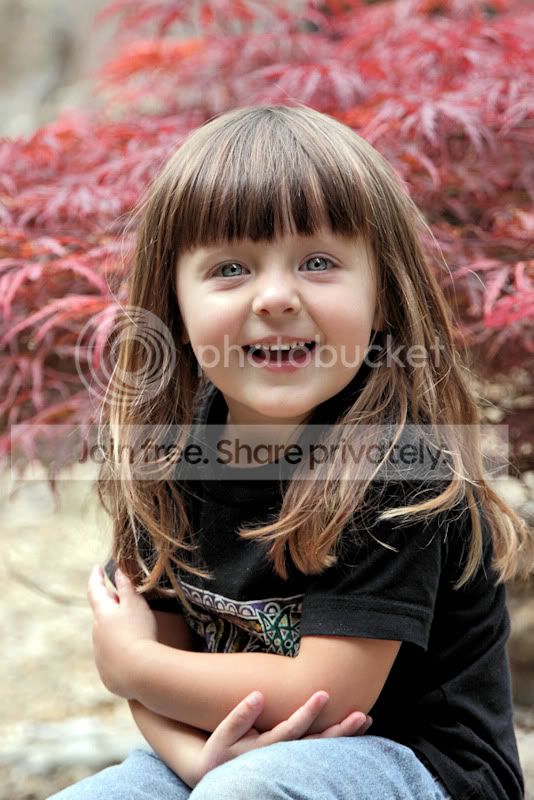
I took this shot of the neighbours daughter the other day and after her Mum seen it, wondered if I could get one printed off for her, she settled on something like a 9x6 when I showed her what actual sizes were like. Now I have not had much dealings with skin tones in my limited editing skills so wondered if perhaps some kind person on here could do it a bit of justice? I know technically the picture is not brilliant but she is pleased. Maybe if you can help then perhaps you could explain a bit about what was done.

Thanks

http://s119.photobucket.com/albums/o125/u8myufo/?action=view&current=mave1.jpg
 
Just had a quick adjust of it, tweaked the levels, up the saturation a bit, touch of d lighting a slight crop and a bit of a sharpen.

mave1-2-1.jpg
 
What a lovely smile, her mum must be so proud :thumbs:

Nice capture too!
 
What a gorgeous little girl :love:.

The shot as you have it isn't half bad, but I do think it needs a little tweaking to bring out the best.

Here's my effort:

u8my.jpg


Using Corel Paint Shop Pro Photo x2 ...

Adjust > Colour > Fade correction by 8
Adjust > Brightness & Contrast > Brightness & Contrast > Brightness 0, Contrast 5
Adjust > Brightness & Contrast > Clarify > 2
Using the lasso selection tool I selected the area around her eyes, then copy and pasted it as a new layer.
Then on this layers I Adjusted the brightness and contrast ...
Brightness 28 Contrast 20
Adjust > Hue & Saturation > Hue, Saturation & Lightness > Saturation 23 the rest left at 0
Then using the eraser tool I delete everything but the iris' and pupils and then move into correct position.
Adjust > Brightness & Contrast > Clarify 18
Flatten layers
Crop so the eyes are on the top third, whilst keeping the crop ratio
Resize to 800 pixels on the longest side (obviously you wont do this for the print)
Final sharpen to taste.

HTH, and again what a gorgeous little girl, and a lovely photograph to boot ;)
 
Looks a good bit of tweaking to me Jo, not that I could have done that.
 
Thanks all for the help, i think I will go with your effort Jo it looks good. Yeh she is a cutie, although mine have all grown up I think she has adopted me as a big friend :lol: her name is Maeve, she is full of beans and never stops:lol: here is one of her in action.

IMG_8065.jpg
 
I prefer the action to the still shot - she almost looks as if she has been inserted into it . Would not take much to clone the people out and do a portrait crop :)
You could well be right there :thumbs: I can clone them out no problem but was wondering at what point of cropping does it become a portrait shot? from the waist up :shrug: or would cropping just below the shoulder work? I got the original RAW so thats no prob
Awww :love: She really is adorable!

Thanks again Jo ;)
 
Ive gone Sepia mad so here is a quick edit from me.

Also, she is a real cutie :thumbs:

MaveSepia.jpg
 
Sorry, heres another quick effort.

IMG_8065.jpg
 
Yikes @ Jo's edit - way too OTT on the eyes for me I'm afraid, spoils it for me.
 
Then show us what can be done MM :D Please? :lol:
OOh blimey... I didn't suggest that I could do any better... just that I didn't think that edit did the young lady justice - especially on the eyes.:)

EDIT: had a quick go over a nice morning cuppa!!

p851251067-5.jpg
 
Back
Top