Help me Fix This Boy's Rash

Messages
213
Edit My Images
Yes
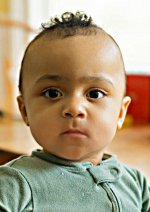
I fail pretty badly in situations with random subjects or challenging light, but it seems like it's nearly impossible to take a bad picture of this kid.

How do I deemphasize the rash and excess skin detail in Photolab9? I also have Elements 24 and Topaz AI, and there there is free Affinity. I tried to get help from AI, but it didn't work out.

A6700244_DxO by Cosmo Bogus, on Flickr
 
Have you tried Nano banana AI, their is a small fee, but its not much about £1 I think, or seedream both are in Photoshop, I'm not sure if their available in elements though.
 
No. Thanks for the suggestion.

I tried the Photolab repair tool, and it put a big deformity on his face. It looks like it is not easy to learn.

Topaz AI doesn't seem to offer anything I want. It appears to be all about denoising, restoring faces, and upscaling.
 
There is something in Affinity called frequency separation - where you can separate texture and colour and then work on those two areas on separate layers.

In this kind of image, it’s really easy to then brush over the redness with the same colour as the rest of the face whilst keeping the texture - it will look more natural that way.
 
Thanks. I will see if I can make it work.

The image is fine as it is, but I think toning down the rash is a good move.
 
Sure. Both if you want. I'd love to see what can be done with it.
 
I will check it out tomorrow. Thanks.
 
Back
Top