Help! I've done something weird on Capture One Pro! Fixed, thanks

ChrisR

I'm a well known grump...
Suspended / Banned
Messages
11,730
Name
Chris
Edit My Images
Yes
I'm using C1Pro 23, build 16.2.7. I've just been checking out a project representing a roll of colour film. After initial edits, I opened up the first image in full screen, intending to go through and rate each image. So far, my normal practice. However, I fumbled a bit while doing this, and got a small window opened at top left of the screen, which included at least some of the Library tab. This wouldn't go away, so at some point I clicked on the 3 dots to the right of this window and selected Remove Tool. Success, it went away!

Not success. Now my Library tab has no folder, project or album information at all. It starts from metadata. So I have no way to navigate round!

I realise I messed up here, But I can't find a way to undo what I have done!

Help.... please...

EDIT, before my grumpy mood gets any worse, I'm going out for a short walk before it gets darker or freezes again, or both... Just to explain why there may not be an instant response.
 
Last edited:
I'm using C1Pro 23, build 16.2.7. I've just been checking out a project representing a roll of colour film. After initial edits, I opened up the first image in full screen, intending to go through and rate each image. So far, my normal practice. However, I fumbled a bit while doing this, and got a small window opened at top left of the screen, which included at least some of the Library tab. This wouldn't go away, so at some point I clicked on the 3 dots to the right of this window and selected Remove Tool. Success, it went away!

Not success. Now my Library tab has no folder, project or album information at all. It starts from metadata. So I have no way to navigate round!

I realise I messed up here, But I can't find a way to undo what I have done!

Help.... please...

EDIT, before my grumpy mood gets any worse, I'm going out for a short walk before it gets darker or freezes again, or both... Just to explain why there may not be an instant response.
Right click on the panel below the library tab, and you will get an option to "add tool"; select the missing tools you want added back to the library tab.

Unless, I have misunderstood your problem.

As an alternative, assuming you haven't customised your workspace, you can go to the Windows menu and choose workspace, and then select one of the default workspaces.
 
Last edited:
If you're on Windows couldn't you roll it back to a point prior to that?
 
Right click on the panel below the library tab, and you will get an option to "add tool"; select the missing tools you want added back to the library tab.

Unless, I have misunderstood your problem.

As an alternative, assuming you haven't customised your workspace, you can go to the Windows menu and choose workspace, and then select one of the default workspaces.
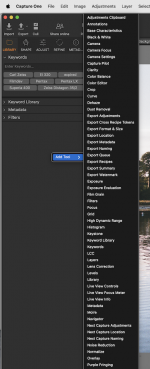
Your advice sort of worked, in that it did offer me a huge array of tools to add:

C1Pro Screenshot 2026-01-06 at 16.30.51.png

I thought Navigator looked liked a good option, but that seemed to be just a small version of my current image. I've got Keywords, Keyword Library, Metadata and Filters, but none of them seem to include the bits I want. An old manual I have suggests I'm missing Catalog Collections, User Collections and Folders, none of which seem to be on offer!

More exploring, looks like Library was what I needed. I ignored that because I was already in the Library tab. Phew, got those missing parts back, in the wrong order but I'm pretty sure I can fix that..

Along the way I explored the Filter menu for the first time in a very long time. I suspect it makes easy some things I've been doing in a complicated way. More investigation to come.

I did look at the Windows menu, but I'm not really sure what a workspace is, and I couldn't see anything to select. (Actually I tried create floating tool, which brought up all the options above, tried Library, found my missing bits, dragged them into the Library tab and voila!)

Thanks for pointing me in the right direction.
 
Don't they something called Time Machine?
They do, but while it's easy to recover an old folder or file, in this case I wouldn't know which one I was looking for. Anyway, got there in the end, thanks.
 
Your advice sort of worked, in that it did offer me a huge array of tools to add:

View attachment 471758

I thought Navigator looked liked a good option, but that seemed to be just a small version of my current image. I've got Keywords, Keyword Library, Metadata and Filters, but none of them seem to include the bits I want. An old manual I have suggests I'm missing Catalog Collections, User Collections and Folders, none of which seem to be on offer!

More exploring, looks like Library was what I needed. I ignored that because I was already in the Library tab. Phew, got those missing parts back, in the wrong order but I'm pretty sure I can fix that..

Along the way I explored the Filter menu for the first time in a very long time. I suspect it makes easy some things I've been doing in a complicated way. More investigation to come.

I did look at the Windows menu, but I'm not really sure what a workspace is, and I couldn't see anything to select. (Actually I tried create floating tool, which brought up all the options above, tried Library, found my missing bits, dragged them into the Library tab and voila!)

Thanks for pointing me in the right direction.
Glad you got it sorted.

You can change the order by simply dragging the tool up and down the tools panel.

And yes, the library tool is just one of the tools that comes under the library tool tab.

Although, you can add a floating tool to the tool tab, C1 continues to think it’s a floating tool, on my version it has a blue chevron to show it’s a floating tool, so I always add tools via the right click on the tool panel. I don't think there is an issue with having a docked floating tool bar, but it upsets my sense of order. I also have some tools permanently floating e.g the layers tool.

The Workspace is everything you are looking at on the screen: the tools the windows, the menus, the tool tabs, and the tools contained in the tool tabs.

C1 comes with several default workspaces, which should be visible in that right click menu, so I'm not sure why you didn't find any. You should have some workspaces for using dual monitors and one designed specifically for culling and rating, which only has tools related to this task.

Every aspect (except the contents of menus) of the C1 interface is customisable. tool bar, tool tabs, contents of tool bar, and windows layout.

You can, for example add a new tool tab, and have multiple instances of the same tool such as the curves tool, but with one tool defaulting to the RGB curve, a second to the luma curve, at third to the red curve, fourth to the green and fifth to the blue. It means you can look at and adjust all five curves at the same time, rather than flicking between tabs.

Once you have things set up a workspace, you can then save it for reuse. There is no limit to the number of workspaces you can create.

I often use the tools in an ad hoc manner, so if I find I am switching between tool tabs a lot, I will just add the necessary tool to my most active tool tab for the day. Or leave it floating.

Every so often I reset my workspace to my personalised default workspace, and it tidies away all my ad hoc changes.

 
Back
Top