Have I bought a faulty spyder?

blinky

Suspended / Banned
Messages
8
Name
Craig Jameson
Edit My Images
Yes
Hi,
I bought a spyder3pro from fleabay that arrived today. I activated the version 3 software and ran through monitor calibration.... my monitor is pretty good to be fair but when measuring with spider it showed the green as really, really low. Running through the auto calibration it then produced a horrible colour profile with green cast as well. I've never used monitor calibration hardware or software before, it looks like this might be a faulty unit I've bought 2nd hand but anybody able to confirm/assist? Im not sure what else I can try.....
 
Hi,
I bought a spyder3pro from fleabay that arrived today. I activated the version 3 software and ran through monitor calibration.... my monitor is pretty good to be fair but when measuring with spider it showed the green as really, really low. Running through the auto calibration it then produced a horrible colour profile with green cast as well. I've never used monitor calibration hardware or software before, it looks like this might be a faulty unit I've bought 2nd hand but anybody able to confirm/assist? Im not sure what else I can try.....
I think this is quite an old calibrator with exposed sensors so it's most likely 'drifted' & will never yield accurate results.
You're better off with an X-rite i1 display pro or the cheaper Studio version which have sealed sensors & less likely to drift.
 
Firstly, what monitor and what OS are you using?

Secondly, a general check of a monitors characteristics have a read here and run through the checks http://www.lagom.nl/lcd-test/

PS in regard to OS have a look here as e.g. Windows 10 is not supported by the last 'official' version of the Spyder 3 software
 
Last edited:
I have a Spyder 3 Pro and it does not work with the Spyder Software on W10. However, no worries, just install DisplayCAL it works at least as well if not better.

Dave
 
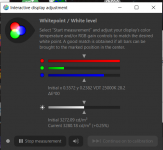
Just tried that software and it seems the same, im using an LG 27UL500-W monitor which is supposed to be not too bad out the box and to my untrained eye the screen looks pretty good. so I can only assume the unit is old/faulty :-( Anyone disagree?
1632420081957.png
 
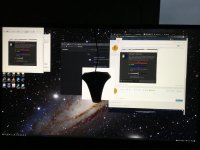
Here is a shot of the screen taken from my ipad
 

Attachments

  • 0BA28A5C-942E-4988-9AA8-64E12DF14680.jpeg
    0BA28A5C-942E-4988-9AA8-64E12DF14680.jpeg
    103.8 KB · Views: 13
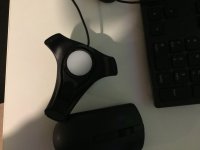
Can I just check, there's not a cover or anything I need to remove? The sensor looks like an opaque circular white disk....
 
Crumbs brightness @ 3272.09 cd/m2 talk about burn your eyes! I have never seen such a high measured figure or even that a screen can go that high??? Perhaps the spyder is indeed faulty!
 
Dam! At least I can return it free of charge! A new calibration tool is about the same price as the monitor!
 
Last edited:
That screen is brighter than the sun. I’d say it’s faulty.

I have a colormunki display in the classifieds which nobody else seems interested in. Just in case that interests you ;)

having used a couple of spyder devices and now x-rite devices I will say that x-rite have always been more consistent in the quality of profiles created.

sorry, just realised you are a new member so won’t have access to the classifieds yet.
 
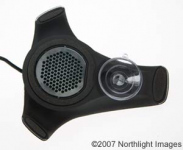
The cover is missing from mine, all I have is a white opaque disk, not like this!
 

Attachments

  • 1632421891453.png
    1632421891453.png
    61.5 KB · Views: 4
Here's mine
 

Attachments

  • image.jpg
    image.jpg
    60.4 KB · Views: 8
Here's mine
It does indeed look like you are missing something, the structure here gives some credence to that:-
Where Keith Cooper at Northlight Images says and showed the illustration

If you’re curious as to what’s behind the sensor aperture, then this cut-away shows the seven coloured filters used.

A reading is taken through each one to decide what colour your screen is showing.

inside.jpg
"
"
 
Back
Top