[Haus Of Gaga] Final Touch Ups & Stuff!

TinySpark

Suspended / Banned
Messages
874
Name
Melissa
Edit My Images
Yes
Okay...
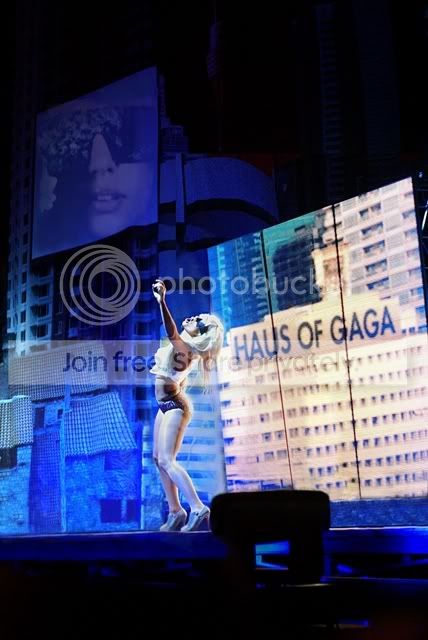
Another Lady Gaga pic. But this one's probably a lot more workable!
Need some guidance on photoshopping it!

Here's the original (top) and the edited one (bottom)
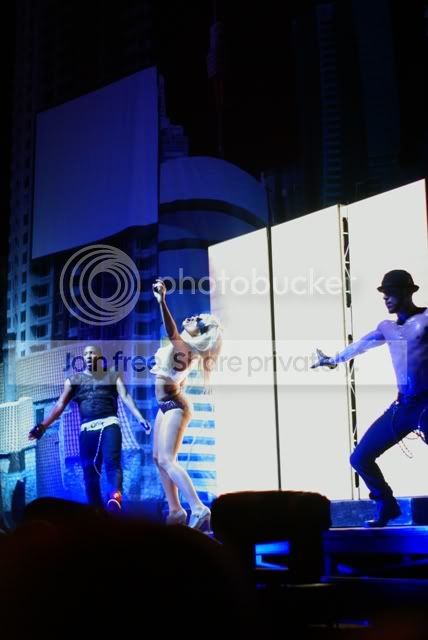
iconoriginal.jpg
iconps.jpg


Took me ages though! I'm a bit of a ps noob! (i about 5 tools like lol)
Basically did some layer masking of other images to make up the 'haus of gaga' board, the stage floor and curtain on the LHS and a lot of cloning work.

I'm still not happy with it though, the main concern being how i don't know how to/cant clone straight! Look how wobbly under the 'haus of gaga' board is! and the mess under her feet. Not good.
Anyone know how to straighten these up or a different technique for fixing these?


Any other pointers will be great, and if you spot any other problem areas let me know! :)

FULL SIZE IMAGE- http://i395.photobucket.com/albums/pp39/TinySpark_GoesBoom/Concerts/ladygagaicon3.jpg
(incase any one wants to demonstrate or whatever!)
 
Cant' really offer any advice other than maybe using a grid whilst cloning, i would not have spotted anything unless you'd pointed it out or i was really looking. Excellent work, the curtain behind the bloke must have taken some getting right.:thumbs:
 
thanks huujuu! i took loads of shots that night, so i was able to piece together the missing parts one by one from other shots, but yeah kept noticing weird bits!
a grid? good idea, though how do you get it to show up on the image?
 
i think you are way too critical of yourself :) that's an amazing job you have done there with the cloning and retouch work
 
wow, thanks ricky1980!
Maybe, sometimes i can be rather nit-picky, but i guess I'm thinking this way because of the some the work i've seen on here, they're too bloody good! aha
 
liquify can straighten edges for areas under gaga feet.

also noticed anomalies on skyscraper screen :)

only noticed this cos you went thru the details
 
id say thats a great job, if its for web use i wouldnt bother touching it up anymore personally. Hard to say for print, maybe it is a bit smudgey under her feat but that can be tidied up with a bit more work.
 
thanks huujuu! i took loads of shots that night, so i was able to piece together the missing parts one by one from other shots, but yeah kept noticing weird bits!
a grid? good idea, though how do you get it to show up on the image?

On cs3 its 'view' (drop down menu) then 'show' and 'grid'. This will give you a tight grid of lines.

You can also alter how the grid looks, how many lines and how it divides up the picture in 'edit' and 'preferences'. Theres a link here that gives one idea of how to set it up for thirds, but you can have it with as many lines as you like.http://www.talkphotography.co.uk/forums/showthread.php?t=90484&highlight=rule+thirds+grid

Well worth the fiddle, good luck.
 
oooh liquify is cool, this is the first time i've used it but yeah it seems pretty handy!

yeah that screen... i see what you mean ricky. I'm just lost about how to fix that one though! I'll see what i can do before i get too frustrated and beat up the monitor. then later regret it... lol

xeno, you're probably right, it's only going on flickr and bebo really so i guess there's no need to be so fussy. :)
 
If you have 2 virtually identical images, one that has the main image you want on and the other with the additional details on you could try this

Open both images. Copy the main image to the secondary one so that it sits on a layer on top of the secondary one. Now use auto align images . This will hopefully line everything up.

Now select the top image layer and create a layer mask. With this mask selected.(Select the Mask not the layer) choose the Brush tool. Now ensure that the foreground colour is set to white, carefully paint over the main image in the area you want the secondary image to appear, Hey presto it paints through. ops made a mistake, no problem select Black as the foreground colour and paint over your mistake and it disappears.
 
I used that technique for parts of the image, worked well! oh thanks for that description too, i didn't know how to fix mistakes actually, thats handy! :)
 
Back
Top