

Hasselblad issues.....

Threeracers

Suspended / Banned
Messages
573
Name
Mark
Edit My Images
No
Having developed a few rolls recently I seem to have a wonky image problem! I am not sure but it may be just one film back but I need to test that further (I developed quite a batch and they went through three backs). I just wondered if anyone had experienced that same before I sent a film back off for a service?

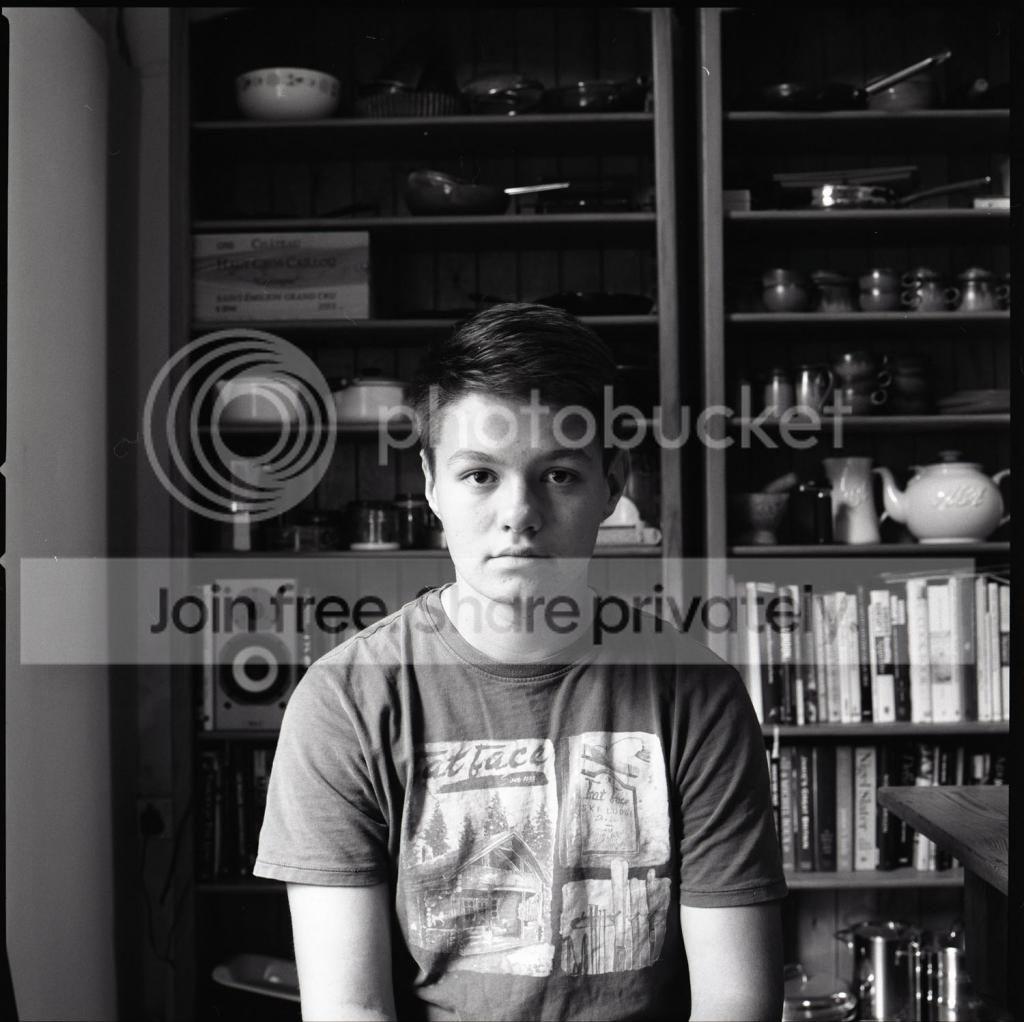
These are three shots of my kids and they are all off. I have a grid focussing screen, these were tripod shots and all were lined up on the shelf before focusing on the rugrat. They are all off by the same amount and thats a common theme through a few rolls but not all. That fact suggests a back issue but I have one really new one - my favourite - and two older so I am not completely sure.

Anyone been brave enough to service a back themselves are will a million cogs shoot across the room the moment I open one up?




Well I can't understand how you can get a wonky image because of the back unless it was fitted at an angle when attached to the main body, so would be interested in other members replies.
 
I am not sure it is a back Brian. Looking at my entries in the colour challenge they are both wonky and they were taken with different backs. Both were lined up with the shelf. Again tripod shots so tricky to screw up! Both seem to be off to the same side and a similar angle too.

Mark
 
The things I can think of that might cause it are: aperture blade sticking a little, shutter blade sticking (assuming it's an iris shutter) or a lens hood?.


EDIT - wait, I'm confused now, is the issue missed focus or the large black bits on the bottom left?
 
Last edited:
Wonky viewfinder?
 
I'm not sure what the problem is. Is it the black marks bottom left in the frames, or the fact that you have a "sloping horizon"? I read it initially as the latter, but I can't help wondering about the former.
 
I am not sure it is a back Brian. Looking at my entries in the colour challenge they are both wonky and they were taken with different backs. Both were lined up with the shelf. Again tripod shots so tricky to screw up! Both seem to be off to the same side and a similar angle too.

Mark

Well I don't own a Blad but an idea that someone might elaborate on:- Could you hold a piece of glass (with the back off) to see how the image looks......something like how to check the focus on a LF camera (well I suppose it could be used for even a 35mm camera) ?
 
Last edited:
Have you got one of those bubble levels that fit on the side accessory shoe, one of these.

If you have then I would point the camera at a known true horizontal object, you could use your shelf unit provided the shelves are actually perfectly horizontal. Make sure that the camera is perfectly horizontal using the bubble level, then see if everything is horizontal through the viewfinder. If it isn't then it's likely to be a focussing screen or mirror alignment problem. I can't imagine there would be a problem with the focussing screen as there is so little tolerance for anything to be out of alignment. Perhaps the mirror isn't seating itself correctly.

If everything is fine through the viewfinder then it seems to me that the problem must be with the camera back.
 
Find a brick wall and set camera up on a tripod with a spirit level. Then check to see if the viewfinder is showing wonky or straight. Then take an image. Then if viewfinder wonky, straighten according to the viewfinder and take another. If it looks straight in the viewfinder and comes out straight then your shelves are wonky. They look wonky to me to be honest!
 
I do have a bubble on the tripod top but I suspect that is just going to show that my old house is wonky! I am not worried about "true" horizontal, I want what I see in the viewfinder being what I get on the negative. I am lining up the grid lines on the focusing screen up with something that I want horizontal in the final image and that's where it's going wrong.

I think you might have something regarding the mirror seating David and that's worth investigating. If that wasn't seated correctly what I see in the viewfinder wouldn't match up. And the body has recently been opened for a spring to be replaced!

Thanks all

Mark
 
To me it seem the film is not flat within the film back.

Yeah, looking at the reference lines in these photos (e.g., walls, bookshelves, etc.), it seems an issue of film flatness at either time of exposure or scanning to me, although I've been wrong plenty of times before.

The black bits in the bottom left corner completely confound me at present.
 
In the bottom left corner there is something leaning up against the kitchen wall! It's nothing to do with the problem - it's in the room! Sorry, took me a moment to realise what people were referring to there.......

If it's a film flatness issue it would be exposure rather than scanning as the rebate is square on the negative. If it was a scanning screw up I assume the rebate would be squiffy too.

I will do a few more test shots on this
 
Looks like this chap had a similar problem here. It's a shame that he didn't return to confirm the diagnosis but it seems that it pointed to a problem with the mirror.
 
You don't say what lens you're using

Can't see it being the back

I'd guess at some misallignment between your view on the focussing screen and what actually projects on to the film plane.

So this ...

Wonky viewfinder?
 
Looks like this chap had a similar problem here. It's a shame that he didn't return to confirm the diagnosis but it seems that it pointed to a problem with the mirror.
ha...that could do it...ninja
 
Just as an update as I got to the bottom of this and it may help others; the focussing screen wasn't sitting square in the top of the camera! There was a little play and one of the two catches that hold it in place as the viewfinder is slid into position wasn't quite holding it tightly.

Mark
 
Just as an update as I got to the bottom of this and it may help others; the focussing screen wasn't sitting square in the top of the camera! There was a little play and one of the two catches that hold it in place as the viewfinder is slid into position wasn't quite holding it tightly.

Mark
Thanks for reporting back, it's something to look out for if a similar problem occurs.
 
Back
Top